

Tap to Pay on iPhone is one of Apple’s more practical business features because it addresses a narrow but common problem: accepting in-person card payments without carrying a separate reader. For a small business, that can matter. Not every seller begins with a storefront, a full point-of-sale system, or enough transaction volume to justify a larger checkout setup.
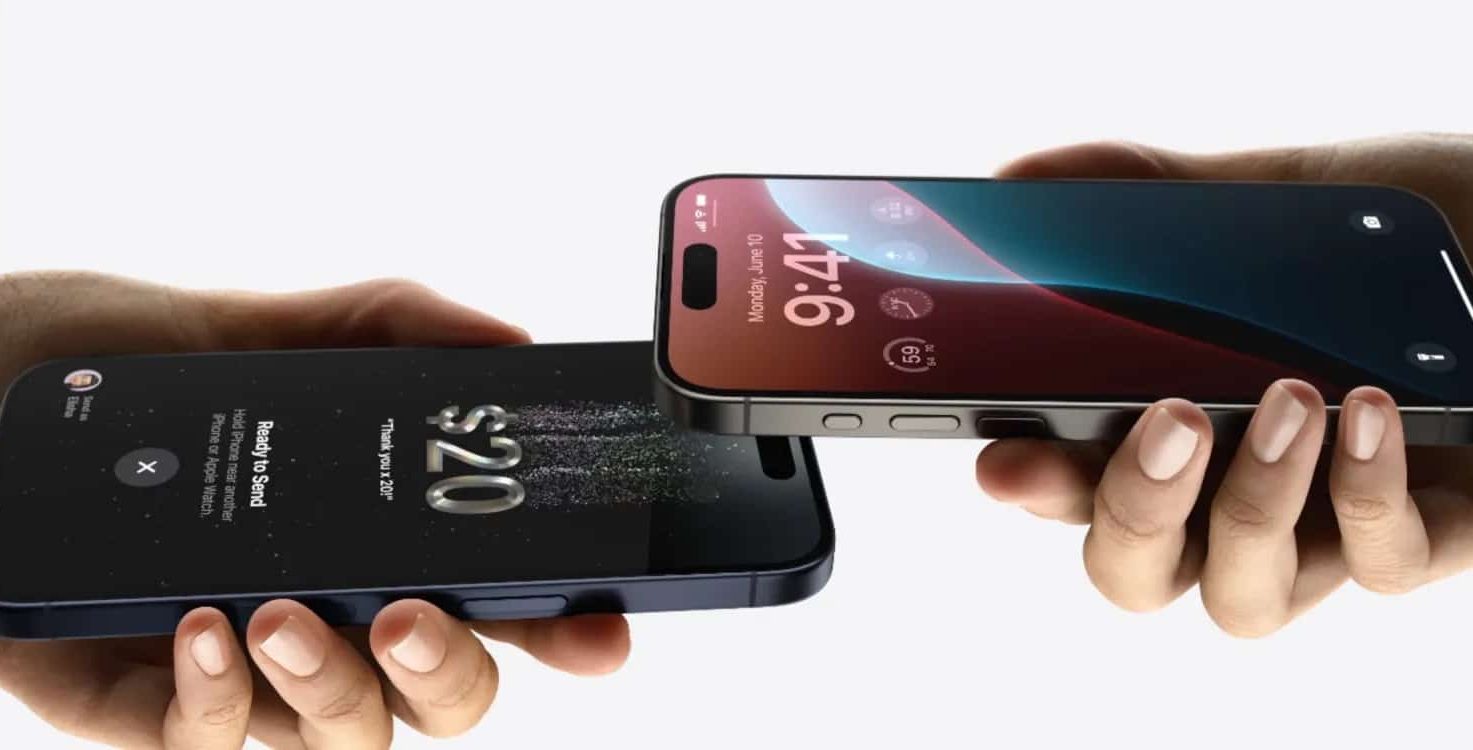
The feature lets a merchant accept contactless cards, Apple Pay, and other supported digital wallets directly on iPhone through a participating payment app. The customer taps a card or device near the merchant’s iPhone, and the payment platform processes the transaction. Apple provides the contactless acceptance layer, while companies such as Square, Stripe, Shopify POS, Adyen, SumUp, and other regional providers handle onboarding, merchant accounts, fees, payouts, refunds, receipts, reporting, and disputes.
That distinction is necessary. Tap to Pay is not a standalone business system, and it does not make Apple the processor for every transaction. It is a hardware-reducing feature inside a larger payment workflow. A business still has to choose a provider, compare fees, meet account requirements, handle taxes, issue receipts, manage refunds, and keep basic records.
Even with those limits, the feature can be useful during the earliest stage of a business. A market seller, independent service provider, tutor, repair technician, photographer, stylist, delivery operator, nonprofit, or creator may need to take payment in person before investing in a permanent retail setup. If the business already has a compatible iPhone, the additional hardware requirement can be minimal.
The appeal is not that iPhone becomes a complete checkout counter. It is that the first checkout can happen with fewer pieces.

Tap to Pay: A Smaller Step Into Card Payments
Card acceptance has traditionally added cost and complexity to small operations. A business may need a terminal, card reader, dock, receipt printer, cash drawer, barcode scanner, tablet stand, or network setup, depending on how it sells. That equipment can make sense once sales are steady, but it can be excessive for temporary events, appointments, weekend markets, or low-volume services.
Tap to Pay on iPhone reduces one part of that setup. The payment app still matters, but the separate contactless reader can be removed in supported situations. That makes the feature most useful when mobility is more valuable than a fixed checkout station.
A vendor can take payments at a booth without carrying a reader. A service provider can accept payment at the customer’s location. A store can use an extra iPhone during busy moments when the main register is tied up. A nonprofit can collect donations without setting up a full terminal table. A business testing demand at a pop-up can avoid buying hardware it may not need later.
This does not mean every merchant should replace its existing terminal. Dedicated hardware can still be better for high-volume retail, restaurants, cafés, and stores that need fast staff workflows, printed receipts, cash drawers, barcode scanning, inventory integrations, or countertop reliability. A physical terminal also feels more familiar in some environments and may support extra features that a phone-only flow does not.
The best use case is more modest. Tap to Pay on iPhone works as a starting point, a mobile checkout option, or a backup. It is particularly valuable when the alternative would be cash only, manual transfers, delayed invoices, or a payment link sent after the customer has already left.
That can affect real sales. A customer who has no cash may still have a contactless card or phone. A client who can pay immediately may be less likely to delay. A small seller who looks prepared at checkout can reduce hesitation. None of that guarantees more revenue, but it removes one avoidable obstacle.
iPad Plays a Different Role
Tap to Pay is an iPhone feature. Apple says Tap to Pay on iPhone works with iPhone XS or later using the latest version of iOS and a supported payment app. iPad is not the tap-to-accept device in Apple’s current Tap to Pay branding, but it can still be part of a small-business setup.
The difference is role. iPhone is better suited for the physical payment moment because it can accept the contactless tap. iPad is better suited for the larger checkout workflow. A bigger screen can make product catalogs, menus, service lists, appointment schedules, order notes, inventory, invoices, staff controls, and sales reports easier to manage.
For some businesses, iPad remains the main point-of-sale screen, while iPhone handles occasional contactless acceptance. For others, iPhone alone is enough. A solo seller with a small product list may not need an iPad. A shop with multiple products, modifiers, staff, or inventory likely benefits from the larger display.
This is where Apple devices can be useful without turning the article into a sales pitch. Many small businesses already use iPhone for customer messages, photos, email, banking, delivery tracking, social posts, and scheduling. iPad may already be used for forms, orders, portfolios, invoices, or product displays. Tap to Pay on iPhone adds payment acceptance to a device that may already be part of the operation.
The trade-off is that a business built entirely around consumer devices can become messy if it grows without structure. Personal and business accounts can mix. Receipts can be scattered. Staff may share devices informally. Payment apps may not be configured with proper permissions. A temporary setup can become permanent without enough safeguards.
That is why a small business should treat iPhone-based checkout as an entry point, not the whole foundation. If sales become regular, the next questions are more operational: whether a dedicated device is needed, whether staff accounts should be separated, whether inventory is accurate, whether taxes are configured correctly, and whether the payment provider’s reporting is enough for accounting.
Business Identity Matters Before Payment
Fast checkout helps only after a customer is ready to pay. Before that, the business has to be found, recognized, and trusted. Apple’s business tools can help with part of that visibility, especially through Apple Business Connect, which lets companies manage how their information appears across Apple services such as Maps.
A verified business listing can include details such as name, category, address, hours, phone number, website, logo, photos, and other customer-facing information. For a small business, that basic accuracy matters. A wrong opening time, outdated phone number, missing website, or unclear location can cost more than a slow checkout.
Apple has also expanded business identity tools across services, including features that help verified businesses present consistent branding in customer interactions. That kind of presence is not a substitute for marketing, but it can make a small operation look less improvised.
This is especially relevant for businesses that do not operate like traditional stores. Appointment-based services, mobile businesses, pop-ups, home studios, weekend vendors, and local creators may not have a large storefront or expensive website. A clean business listing and consistent payment experience can make the operation easier to understand.
Still, Apple Business tools should not be overstated. They do not replace a good website, customer service, local reputation, social presence, accounting, licensing, insurance, or clear pricing. They provide a layer of visibility and management inside Apple’s ecosystem. That layer is useful, but it is not the entire business.
The same is true of Apple Maps. Being listed correctly helps customers find a business, but it does not create demand by itself. A payment setup can make checkout smoother, but it does not fix weak product-market fit, poor communication, or inconsistent service. The practical value is in removing friction from basic operations, not in solving the deeper work of running a business.
Payment Providers Decide Much of the Experience
Because Tap to Pay on iPhone depends on supported payment apps, the provider choice can matter more than the Apple feature itself. Two businesses using Tap to Pay may have very different experiences depending on the app behind it.
A simple mobile service may need only quick payments, digital receipts, and reliable payouts. A retailer may need product catalogs, inventory, barcodes, taxes, discounts, returns, gift cards, and staff access. A restaurant may need menus, tips, table management, kitchen workflows, and order routing. An online seller may want in-person checkout connected to an existing ecommerce store.
That is where platforms such as Square, Shopify POS, Stripe-based apps, Adyen-supported systems, SumUp, and other regional providers differ. Fees vary. Hardware options vary. Payout timing varies. Refund and dispute processes vary. Some platforms work better for solo sellers. Others are built for larger or more complex merchants.
A business should compare the full provider relationship, not only Tap to Pay support. The relevant questions include transaction fees, monthly costs, contract terms, refund handling, chargeback support, tax settings, receipt customization, inventory tools, online store integration, customer data handling, staff controls, and availability in the business’s country or region.
This is also why Tap to Pay on iPhone is not automatically the cheapest path. It can reduce hardware costs, but processing fees still apply. A free or low-cost setup at the device level may still carry ongoing transaction costs through the payment provider. For occasional sellers, that may be acceptable. For higher-volume merchants, small differences in fees can add up.
The benefit is flexibility. A business can start smaller, then move toward a more complete POS setup if volume grows. Tap to Pay on iPhone can remain part of that setup as a mobile or backup option rather than disappearing once the business becomes more established.
Security Helps, but It Is Not Automatic Trust
Payment security is one of the reasons Apple emphasizes Tap to Pay on iPhone. Apple’s security documentation says the feature uses iPhone security and privacy protections, with payment card data protected through encryption and the Secure Element when temporarily stored on the device. Apple also says it does not know what is being purchased or who is buying it.
Those details matter because payment acceptance involves customer trust. A customer tapping a card on another person’s phone may want reassurance that the process is legitimate. The familiar contactless flow can help, especially when the payment app shows a clear amount and confirmation.
But security is not only about the tap. A business also needs to protect the device, merchant account, staff logins, email, payout settings, and customer records. A weak passcode, shared account, unprotected email inbox, or poorly managed staff access can create risk even if the payment technology itself is secure.
A growing business may need a dedicated iPhone for payments rather than using a personal device. It may also need clear rules about who can access the payment app, how refunds are handled, how receipts are issued, and how devices are updated. If multiple people take payments, staff permissions become part of the security model.
This is where Apple’s broader business management tools can become relevant, though not every small operation needs them immediately. Device management, managed accounts, and business app deployment are more useful once a company has multiple employees or devices. A solo business may begin with simpler controls, then formalize the setup later.
The main point is that Tap to Pay can make payment acceptance look simple, but the business still needs discipline behind it. A polished checkout flow should be matched by careful account management.
Where It Works Best
Tap to Pay on iPhone is strongest in mobile, occasional, or flexible checkout environments. A local vendor selling at events can avoid a separate card reader. A repair professional can collect payment after a service call. A photographer can accept a balance after a shoot. A tutor can take payment after a session. A small retailer can use iPhone for line-busting during busy hours. A nonprofit can take donations at a table without a full terminal setup.
It is less ideal when checkout needs are complex. A busy food business may need receipt printers, kitchen routing, tips, modifiers, and staff workflows. A store with hundreds of products may need barcode scanning and inventory discipline. A business that handles cash still needs cash management. A company with several employees needs permissions and oversight.
In those cases, Tap to Pay on iPhone may still be useful, but not as the center of operations. It can be a companion to a fuller POS system. It can cover events, deliveries, curbside sales, overflow lines, or backup scenarios. That is a more realistic role than presenting it as a replacement for all payment hardware.
The same balanced view applies to iPad. It can be a low-cost operational screen, but it may require paid apps, stands, printers, scanners, and accessories depending on the business. Apple Business Connect can improve customer-facing information, but it does not replace marketing. Apple Maps can help discovery, but only if the business has demand and accurate details. The tools are useful because they reduce starting friction, not because they guarantee success.
A Practical Starting Point, Not a Complete System
The larger value of Tap to Pay on iPhone is that it lowers the minimum setup needed to take an in-person payment. That is meaningful for small businesses, but it should be understood in context. Payment acceptance is only one part of operations.
A credible small-business setup still needs accurate pricing, a reliable payment provider, clear receipts, a refund policy, basic tax awareness, customer communication, secure accounts, and a way to track sales. Apple’s tools can support some of those pieces, while third-party platforms handle others.
For early-stage businesses, the most sensible approach is gradual. Start with the smallest setup that can handle real transactions professionally. Use Tap to Pay on iPhone if supported by the chosen provider. Add iPad if a larger sales screen or catalog helps. Claim and maintain business information through Apple Business Connect if customer discovery matters. Move to more complete POS hardware only when the business model justifies it.
That approach avoids two extremes. It does not dismiss Apple’s feature as just another convenience, because reducing hardware can matter when a business is small. It also avoids treating it as a complete solution, because payments, operations, accounting, and customer trust involve more than one tap.
Tap to Pay on iPhone is useful precisely because it is limited. It handles a specific job: accepting contactless payment with less hardware. For many small businesses, that is enough to make the first in-person sale easier. The rest of the business still has to be built around it.


