

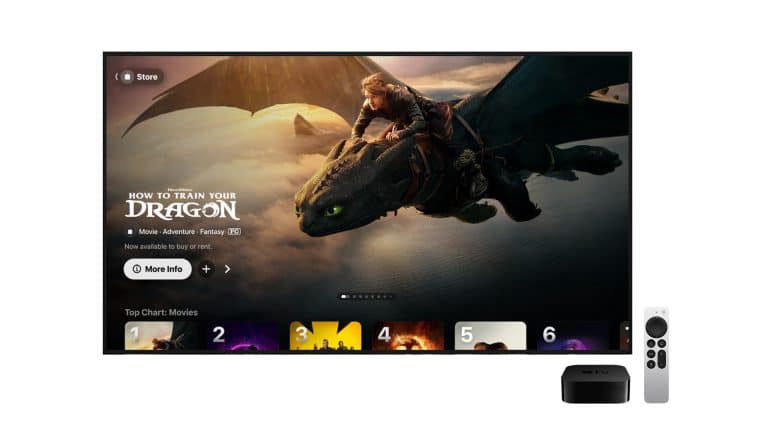
The Apple TV app is now crowded with subscription stories. Apple’s own streaming service, live Formula 1, MLS Season Pass, Friday Night Baseball, premium channels, connected streaming apps, and sports hubs all sit inside the same entertainment surface. Yet one of Apple’s older video businesses is still there, still active, and still useful: buying and renting movies and TV shows.
That storefront can feel almost old-fashioned in a market dominated by subscriptions. Netflix, Disney+, Prime Video, Max, Hulu, Peacock, Paramount+, and Apple TV have trained viewers to think in monthly plans, rotating catalogs, and original series. But the rent-or-buy model inside the Apple TV app solves a different problem. It gives access to specific titles without requiring another recurring bill.
Apple’s own Apple TV app page still highlights “thousands of movies to buy or rent,” while the App Store listing says the app includes over 100,000 movies and shows, including a large selection of 4K HDR titles. Apple’s support pages continue to explain how buying, renting, redownloading, and watching purchased content works across iPhone, iPad, Mac, smart TVs, streaming devices, gaming consoles, and the web.
That matters because streaming catalogs remain unstable. A movie can leave one service, appear on another, return months later, or become unavailable through subscriptions altogether. A new release may not be included in any service at the moment someone wants to watch it. A favorite film may be scattered across platforms depending on licensing windows. Rentals and purchases give Apple TV a transactional business beside its subscription business.
The result is a more flexible entertainment model. Apple can sell subscriptions, sell channels, sell live sports access, rent movies, and sell permanent library access through the same app. That mix is confusing from a branding perspective, especially because Apple TV now refers to multiple things, but it also gives the app a role that a single streaming service cannot fill.
Rentals Still Make Sense for One-Time Viewing
Renting a movie through Apple TV is still the cleanest option when the goal is simple: watch one title without signing up for another service. A rental avoids the trap of starting a monthly subscription for one film, forgetting to cancel, then paying again the next month.
Apple’s rental window remains straightforward. After renting a movie, the user has 30 days to start watching. Once playback begins, the rental is available for 48 hours. During that window, the movie can be played as many times as needed until the rental expires. When the time is up, it disappears from the library.
That model works best for new releases, family movie nights, travel, holiday viewing, and films that are interesting but not worth owning. It also makes sense when a movie is split across streaming availability. Instead of checking five apps, subscribing to a service, or waiting for a licensing window to change, a rental can be the fastest path.
Apple TV rentals are also useful because they are not tied to Apple TV 4K hardware. They work through the Apple TV app across Apple devices and supported third-party platforms. Someone can rent from an iPhone, watch on a smart TV, continue on an iPad, or finish on a Mac depending on device availability and account setup.
To rent a movie on iPhone or iPad:
Apple TV app > Search > Select the movie > Rent > Confirm with your Apple Account
To rent a movie on Mac:
Apple TV app > Search > Select the movie > Rent > Confirm with your Apple Account
To find a rented movie:
Apple TV app > Library > Rentals
The main limitation is timing. A rental is not meant to become a casual long-term watchlist item. The 30-day start window is generous, but the 48-hour viewing window after playback starts requires some planning. Renting late at night and finishing days later may not work. Renting for a group watch before everyone is ready can also waste the window.

Buying Is for Titles That Keep Leaving Streaming
Buying a movie or TV season through Apple TV is a different calculation. It costs more than renting, but it creates a library item tied to the Apple Account. Apple’s support pages say purchased items can be redownloaded, and Apple also says purchased content can be permanently downloaded to iPhone, iPad, Mac, or Windows PC so it can be accessed offline and not removed from the device by Apple.
That last distinction is worth understanding. Digital purchasing is not the same as owning a disc. Rights, store availability, regions, account status, and provider agreements can still affect digital libraries in ways physical media does not. But Apple’s purchase model remains useful for people who want repeat access to specific films or TV seasons without relying on subscription catalogs.
The best candidates for buying are familiar: movies watched every year, films that disappear from streaming often, children’s favorites, workout or concert videos, TV seasons not included in a current subscription, and titles worth keeping for travel. A purchase can also make sense when a sale price drops close to a rental price, which happens often enough to make checking worthwhile.
Apple’s storefront has another advantage: quality. The Apple TV app emphasizes 4K HDR availability, and Apple has long been competitive in digital movie presentation. A purchased title may include high-resolution formats when available, though quality depends on the title, device, display, region, connection, and studio support.
To buy a movie on iPhone or iPad:
Apple TV app > Search > Select the movie > Buy > Confirm with your Apple Account
To buy a TV season on iPhone or iPad:
Apple TV app > Search > Select the show > Buy Season or Buy Episodes > Confirm with your Apple Account
To find purchased movies or shows:
Apple TV app > Library > Movies or TV Shows
The decision to buy should still be selective. Buying everything quickly becomes more expensive than a subscription. The model works best when used for titles that have repeat value or unstable availability. It is less useful for casual viewing, background watching, or shows that are already included in a subscription the viewer keeps anyway.
The Store Survived Because Subscriptions Do Not Cover Everything
The biggest reason Apple TV rentals and purchases still matter is that subscription services are incomplete by design. Each service has its own rights, originals, licensing deals, regions, windows, and expiration dates. No single subscription contains everything.
That is especially noticeable with movies. A film may be available on one service in the U.S., another service in Canada, and nowhere as part of a subscription in other markets. A studio may pull a catalog title to reserve it for its own service. A new movie may arrive first as a premium rental or purchase before joining a subscription later. An older film may move between services several times in a year.
Apple TV’s transactional store fills those gaps. It does not require Apple to own the movie or include it in Apple TV. Apple can simply sell or rent the title through the app when the studio makes it available. That makes the Store a broader catalog layer beside Apple’s subscription programming.
It also gives the Apple TV app a role closer to a digital video marketplace. A user may open the app to watch an Apple Original, subscribe to a channel, find a sports event, rent a new movie, or play something already purchased. Those are different businesses, but Apple wraps them into one interface.
That model can be messy, but it reflects how entertainment now works. The old cable bundle was expensive but centralized. Early streaming was cheaper but fragmented. The current market is fragmented and increasingly expensive. Apple’s answer is not to replace all of it with one bundle. It is to make its app a place where several access models can coexist.
That also explains why buying and renting have not disappeared. A subscription service wants ongoing commitment. A rental wants one transaction. A purchase wants library value. Each serves a different viewing mood.
Apple’s Digital Library Has Real Advantages
The strongest reason to use Apple TV for purchases is library continuity across devices. Purchased movies and shows are tied to the Apple Account and appear in the Library tab. They can be watched on iPhone, iPad, Mac, Apple TV 4K, supported smart TVs, streaming devices, gaming consoles, Windows PCs, and the web where the Apple TV app or Apple TV website is available.
Apple also supports redownloading purchased movies and shows. On iPhone and iPad, purchased items can be found in the Library tab and downloaded for offline viewing. On Mac and PC, the Apple TV app can also download purchases, depending on device, title, and availability.
To redownload a purchased movie on iPhone or iPad:
Apple TV app > Library > Movie > Download button
To redownload a purchased movie on Mac:
Apple TV app > Library > Movies > Pointer over the movie > Download button
To download a show or movie for offline viewing:
Apple TV app > Select the item > Download
Offline access is one of the clearest benefits over streaming subscriptions. A downloaded purchase can be useful during flights, weak hotel Wi-Fi, road trips, remote work, or data-limited situations. Streaming subscriptions often allow downloads too, but availability varies by service, plan, region, and title. A purchased library keeps the download tied to the transaction rather than a current subscription.
Family Sharing can also add value. Eligible purchases can be available to Family Sharing members, depending on account setup and content rules. That can make buying a frequently watched movie more sensible than repeatedly renting it or keeping a subscription only for one title.
There is also less app clutter. Instead of buying some movies through one platform, others through another, and TV seasons elsewhere, keeping purchases inside Apple TV can create one cleaner library. That does require commitment to Apple’s store, but for people already using iPhone, iPad, Mac, or Apple TV 4K, the convenience can be significant.
The Ownership Question Is Still Complicated
Digital purchases come with a warning that should not be ignored. Buying a movie in a digital storefront does not feel exactly like buying a Blu-ray. The file may be downloaded, but the broader library depends on accounts, rights, stores, software, and device support.
Apple’s support language helps here. It says purchased content can be permanently downloaded to iPhone, iPad, Mac, or Windows PC, and that once downloaded, it can be accessed offline and Apple can’t remove it from the device. That makes downloading valuable for titles that matter. A library item that is only streamed from the cloud can feel convenient, but an offline copy offers more security.
Still, consumers have learned to be careful with digital storefronts. Other companies have reduced or closed movie and TV stores, changed device support, ended partnerships, or shifted where purchases can be accessed. Microsoft ended new movie and TV sales through its Store on Windows and Xbox in 2025 while keeping previously purchased content accessible through its apps. Movies Anywhere also changed platform support when Google Play and YouTube stopped participating for new syncing in 2025.
Apple’s store is larger, older, and more deeply connected to its device ecosystem than many abandoned storefronts, but the lesson remains: digital libraries are convenient, not identical to physical ownership. The safest approach is selective buying, downloading favorite purchases, and using cross-platform programs where available.
Movies Anywhere can help in the U.S. for eligible films from participating studios and retailers. When supported, it can sync eligible purchases across connected digital retailers, including Apple TV. It does not cover every movie, every studio, every country, or every type of content. TV shows are not part of the same promise in the way many buyers might expect. Eligibility needs to be checked title by title.
That makes Apple TV purchases best for convenience and repeat viewing, not as a perfect archive. Physical media still has a place for collectors who want maximum control, disc extras, consistent access, or the highest bitrates. Digital buying is easier. Physical buying is more independent. The choice depends on whether convenience or control matters more for a specific title.

The Business Apple Keeps Beside Apple TV Subscriptions
Apple’s entertainment strategy now has several layers. Apple TV sells subscriptions to Apple’s own shows, movies, sports, and originals. Apple TV channels sell premium partner subscriptions inside the app. The Apple TV app connects other streaming services and cable providers. The Store still sells and rents movies and shows.
That structure gives Apple several ways to make money from viewing without relying only on one service. A person who never subscribes to Apple TV may still rent a movie. A person who watches Apple Originals may still buy a TV season that is not streaming. A sports subscriber may still use the app library. A channel subscriber may still rent a new release. Apple benefits from being the transaction layer even when the content is not Apple’s.
This is a quieter business than live sports rights or prestige dramas, but it remains strategically useful. The Store keeps the Apple TV app relevant when a title is not available through subscriptions. It gives Apple a reason to maintain a large catalog. It also helps the app feel less like a single-service destination and more like an entertainment hub.
The challenge is clarity. Many people still confuse Apple TV hardware, the Apple TV app, Apple TV as a subscription service, Apple TV channels, and the Store. Rentals and purchases can get buried under sports banners, originals, channel promotions, and connected-app recommendations. Apple’s branding has not made the distinction easy.
Even so, the business makes sense because viewer behavior is not uniform. Some people want everything bundled. Some want the cheapest monthly plan. Some rotate subscriptions. Some buy favorite movies. Some rent only new releases. Apple TV can support several of those patterns at once.
When Renting or Buying Is the Smarter Move
Renting makes sense when the content will be watched once, when a subscription would be started only for one title, or when a new release is not included in a service yet. Buying makes sense when the title will be watched repeatedly, when it frequently leaves streaming catalogs, when the sale price is low, or when offline access has real value.
Subscriptions make sense when the viewer wants a large library, ongoing series, live sports, or several titles from the same service. Channels make sense when the viewer wants a premium add-on inside Apple’s app without another separate login. Purchases and rentals make sense when the target is one specific title.
The best strategy is not choosing one model forever. It is using each model for the right situation. Rent the movie that only needs one viewing. Buy the favorite that returns every year. Subscribe to the service that is actively being used. Cancel the one sitting idle. Download purchased favorites that should remain available offline.
Apple TV’s Store survives because that kind of selective viewing has become more logical, not less. As streaming prices rise and catalogs keep shifting, paying once for the exact title can feel more sensible than carrying another monthly charge. The old iTunes-style transaction has not disappeared. It has been absorbed into Apple TV as one more layer of a larger entertainment business.
The quiet advantage is that Apple does not need every viewer to subscribe all the time. Sometimes the customer only wants one movie tonight. Apple still has a button for that.