

Apple updates have become one of the least glamorous but most important parts of the company’s ecosystem. Every iPhone, iPad, Mac, Apple Watch, Apple TV, and Vision Pro depends on a steady flow of patches that fix vulnerabilities, close privacy gaps, improve stability, and keep the platform aligned with threats that never stop evolving.
That constant patching can feel exhausting. A user installs iOS 26.5, then sees a supplemental update. A Mac gets a security patch. Older iPhones receive iOS 15.8.8 or iOS 16.7.16. Safari, WebKit, watchOS, tvOS, and visionOS all receive their own fixes. Some updates bring visible features, but many arrive with only technical notes and a long list of components most users never think about: Kernel, WebKit, ImageIO, Shortcuts, LaunchServices, IOKit, mDNSResponder, Quick Look, Model I/O, and other system layers.
That is the burden of modern software. The devices are more powerful, more personal, and more connected than ever. They hold messages, photos, passwords, Wallet cards, health data, location history, school accounts, work files, payment credentials, home keys, identity documents, and years of personal information. The same features that make Apple devices more useful also make them harder to protect.
Apple’s update culture is built on a simple idea: security is not finished when a device ships. It is a relationship between Apple, researchers, developers, users, and the devices themselves. Apple builds the system, researchers find flaws, attackers search for weaknesses, Apple patches them, and users install the fixes. Then the cycle begins again.


The Update Cycle Never Really Ends
Apple updates arrive so often because the attack surface is enormous. A modern iPhone is not only a phone. It is a browser, camera, payment terminal, game console, authenticator, car key, health companion, satellite communicator, smart-home controller, messaging device, and app platform. Each role adds code. Each piece of code can contain mistakes. Each mistake can become a vulnerability.
That is why a single iOS security release can list dozens of fixes across unrelated parts of the system. A malicious image can affect an image-processing framework. A crafted webpage can target WebKit. A local app can attempt to access sensitive data. A shortcut can trigger a permission issue. A kernel flaw can expose memory. A networking bug can create tracking risk. These are not abstract engineering details. They are the hidden layers that decide whether user data stays protected.
The same problem exists across macOS, iPadOS, watchOS, tvOS, and visionOS. Apple’s platforms share technologies, but they also have device-specific behaviors. Safari runs across devices. WebKit powers web content. iCloud syncs data. AirDrop, Handoff, Continuity, FaceTime, Messages, and HomeKit connect hardware together. A vulnerability in one shared component can require fixes across several operating systems.
This is why Apple often releases many updates on the same day. It is not only adding features. It is synchronizing protection across a connected ecosystem. The burden for users is that the update schedule can feel constant. The benefit is that Apple can patch many devices quickly and directly.
Older Devices Make the Burden Larger
Apple updates are especially important because many older devices remain in use for years. An old iPhone may become a child’s phone, a backup device, a music player, a home camera viewer, a car device, or a two-factor authentication backup. An older iPad may stay in a kitchen, classroom, small business, or family room. A Mac may remain in service long after its original owner upgraded.
Those devices still store data. They may still receive messages, emails, photos, app notifications, passwords, and documents. That is why Apple sometimes updates very old operating systems alongside current releases. When iOS 15.8.8, iOS 16.7.16, or iPadOS 17.7.11 appears next to modern iOS and iPadOS versions, it usually means Apple is closing a security or privacy issue important enough to reach devices that cannot run the newest software.
This long-tail support strengthens trust, but it also makes maintenance more complex. Apple must support current platforms, recent platforms, and older branches. Users must understand that an old device is not automatically safe just because it still turns on. If an update is available, it should be installed.
The burden also falls on families. A tech-savvy user may update their own iPhone quickly, but an older parent, sibling, child, or employee may ignore updates for months. That creates weak points inside a household or organization. Security is only as strong as the devices still connected to accounts, messages, photos, and shared services.
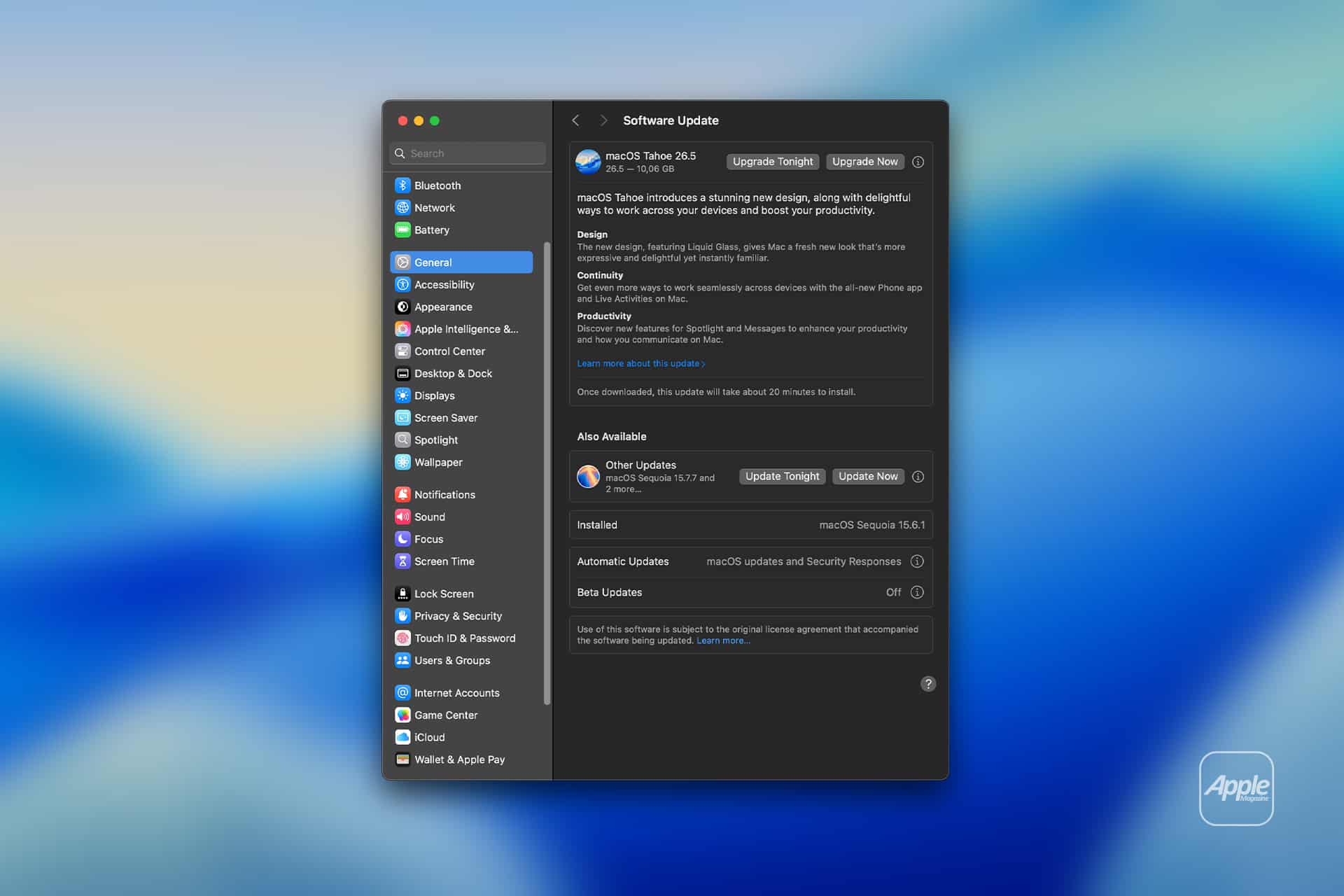
To check for updates:
Settings > General > Software Update
On Mac:
System Settings > General > Software Update
For many users, automatic updates are the best protection because they reduce the need to think about every patch manually.
To enable automatic updates:
Settings > General > Software Update > Automatic Updates
Update Fatigue Is Real
Apple updates can also create fatigue. Users may delay installing them because they worry about battery life, storage space, app compatibility, bugs, or the time it takes to restart. Some people have been trained by past experiences to wait a few days before updating, especially on devices used for work, travel, school, banking, or health-related tasks.
That hesitation is understandable. Updates sometimes introduce bugs. A new iOS version can change battery behavior during indexing. A Mac update can interrupt workflows. A watchOS update can take time. An app may need its own compatibility patch. A user with limited storage may need to delete files before installing.
The problem is that waiting too long leaves known vulnerabilities open. Once Apple publishes a security note, the existence of a flaw becomes public. Attackers can study the patch, look for older devices that have not updated, and try to exploit the gap. In security, a delayed update can become an invitation.
The best practical approach is not panic. It is routine. Install major feature updates when ready, but treat security updates more urgently. Keep backups current. Leave enough free storage. Avoid installing beta software on primary devices unless testing is the goal. Check mission-critical apps before upgrading to a major new OS, but do not ignore security-only releases.
For iPhone and iPad, iCloud backup or a Mac backup can reduce anxiety before installing. For Mac, Time Machine remains the safest habit. A good backup turns an update from a risk into a manageable maintenance step.
To back up iPhone:
Settings > Apple Account > iCloud > iCloud Backup > Back Up Now
To back up Mac:
System Settings > General > Time Machine
Security Is Now Part of the Product
Apple updates have become part of the product experience, not an after-sale detail. A device that receives patches for years is worth more than a device abandoned quickly. Long software support improves resale value, extends useful life, protects families, and supports Apple’s environmental goals by keeping hardware usable longer.
That is one reason Apple can sell premium devices with confidence. Buyers are not only paying for the hardware in the box. They are paying for the years of software maintenance that follow. The update culture is part of the value proposition.
It also supports Apple’s privacy brand. Privacy claims depend on secure software. Face ID, Wallet, iMessage encryption, App Tracking Transparency, passkeys, Find My, health data protection, and Digital ID all rely on the underlying operating system staying protected. If the system is not patched, privacy features lose strength.
The same applies to Apple Intelligence. AI features will make software maintenance even more important. A personal assistant that can read context, summarize messages, act across apps, and use cloud or third-party models creates new trust boundaries. Apple will need to patch not only traditional bugs, but also AI-related permission issues, data-handling risks, model-routing problems, and developer-framework vulnerabilities.
The more personal the device becomes, the more important the update pipeline becomes.
The User’s Role Is Smaller, but Still Necessary
Apple updates are designed to be easy, but they still require user cooperation. Apple can create the patch, sign it, distribute it, and explain the security content. The user still has to install it, keep the device charged, maintain enough storage, and avoid turning off update settings.
That shared responsibility is the uncomfortable part of modern devices. Security is not something Apple can finish alone. A device left unpatched for months is not protected by Apple’s latest work. A Mac without backups makes every update more stressful. An old iPad connected to an Apple Account can still become a privacy risk if ignored.
The easiest habit is to treat updates like maintenance, not interruption. Phones, cars, homes, and computers all need upkeep. Software is no different. The difference is that software maintenance now protects the most personal parts of daily life.
Users do not need to read every CVE or understand every framework Apple patches. They do need to keep devices current, especially when Apple releases security updates for actively exploited or privacy-sensitive issues.
A Necessary Burden
Apple’s update culture can feel relentless because the threat landscape is relentless. The company is patching not only for new features, but for a world where attackers, spyware vendors, criminal groups, researchers, and state-backed teams all study modern devices for weaknesses.
That makes constant patching a burden, but also a sign of a living platform. A device that never receives updates is not simpler. It is abandoned. Apple’s steady patch cycle shows that the company is still maintaining the trust users place in its hardware.
The cost is inconvenience. The benefit is protection. In a world where iPhone and Mac hold identity, money, health, work, family memories, location, messages, and access to the home, that tradeoff is no longer optional.
Apple updates are not the exciting side of the ecosystem. They are the reason the exciting side can be trusted. Every new feature depends on the quiet discipline of patching the old vulnerabilities underneath it.