Google has opened a new front in the desktop AI race with the Gemini Mac App, a native release that brings its assistant directly to macOS instead of keeping the experience inside a browser tab. For Mac users, that shift is practical more than symbolic. The closer an AI tool sits to the desktop, the more likely it is to become part of real work, whether that means checking a document, summarizing a chart, reviewing a draft, or pulling in a local file without breaking concentration. Google says the app is free, available globally in supported Gemini regions, and designed for macOS 15 and later.
The launch also shows how quickly the competition has moved beyond chat in a browser. A year ago, an AI assistant on a desktop still felt optional for many people. Now the major question is whether it can stay close to the user, respond in context, and remove enough friction to justify a permanent place in the workflow. Google is clearly aiming for that outcome on the Mac, where speed, polish, and integration tend to matter more than flashy claims. Its own announcement describes the app as a native desktop experience built to live where people already work.
This matters for Mac users because desktop habits are often harder to change than mobile ones. People settle into shortcuts, window arrangements, and routines that save time across the day. If an assistant can fit into those habits naturally, it has a chance to stick. If it feels slow, clumsy, or detached from the rest of the system, it becomes one more icon that gets opened only occasionally. Google’s first pitch for the Gemini Mac App centers on that exact tension, offering immediate keyboard access, window sharing, and local file support as reasons to keep it close at hand.

Gemini Mac App Moves Closer to Daily Work
The most obvious difference is access. Google says users can call up the app with > Option + Space, which gives Gemini a much faster entry point than opening a browser, loading a tab, and typing a prompt from scratch. That sounds like a small change, but on a desktop it can be the difference between an assistant that feels built into the routine and one that remains a separate destination. Google is explicitly framing the shortcut as a way to get help without losing focus or switching away from the task already in progress.
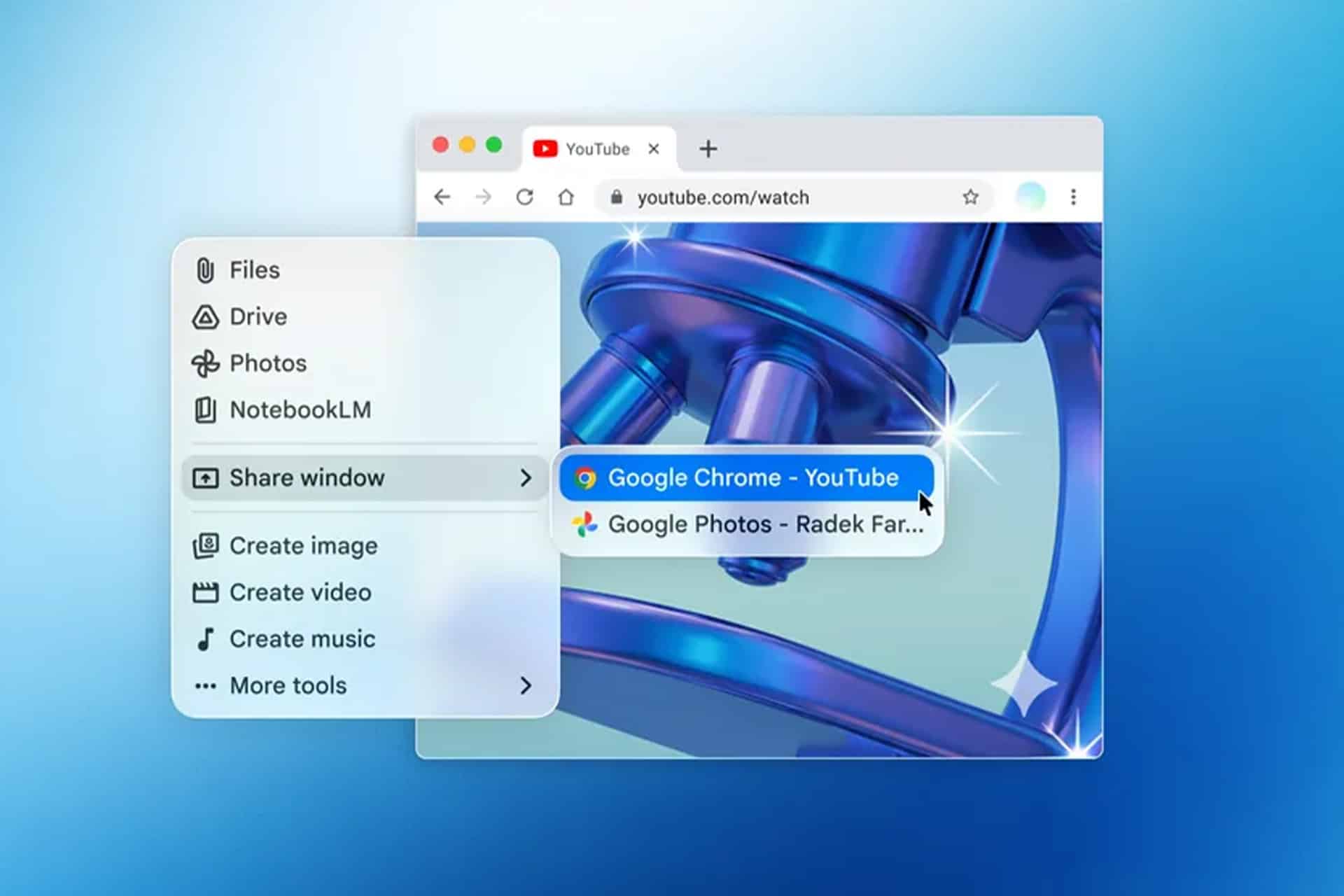
The screen-sharing feature pushes that idea further. Google says users can share what is on their screen with Gemini and ask questions about exactly what they are viewing, including local files. In practice, that can mean pulling out the key takeaways from a complex chart, checking the contents of a document, or getting help with a spreadsheet while it is still open on the desktop. This moves Gemini away from the old model of general-purpose chatbot and closer to a contextual assistant that reacts to work already underway.
File uploads are part of the same story. Gemini on the web already handles documents and images, but the native Mac version makes that exchange feel more direct and better suited to desktop use. The app can work with files, photos, and documents while also syncing conversations to the user’s Google Account, which means people can move between devices without losing continuity. That continuity is increasingly important as AI products shift from one-off question tools to ongoing workspaces where drafts, research, and creative experiments build over time.
There are a few limits that shape who can use it right away. Google’s support documentation says the Gemini Mac App requires macOS Sequoia 15.0 or later, at least 8 GB of RAM, about 200 MB of available disk space, a stable internet connection, and either a personal Google Account or an eligible work or school account. Google’s Mac landing page also says the app runs on Apple silicon, which narrows compatibility further even among Macs that can run Sequoia.
Creative Features Broaden the Gemini Pitch
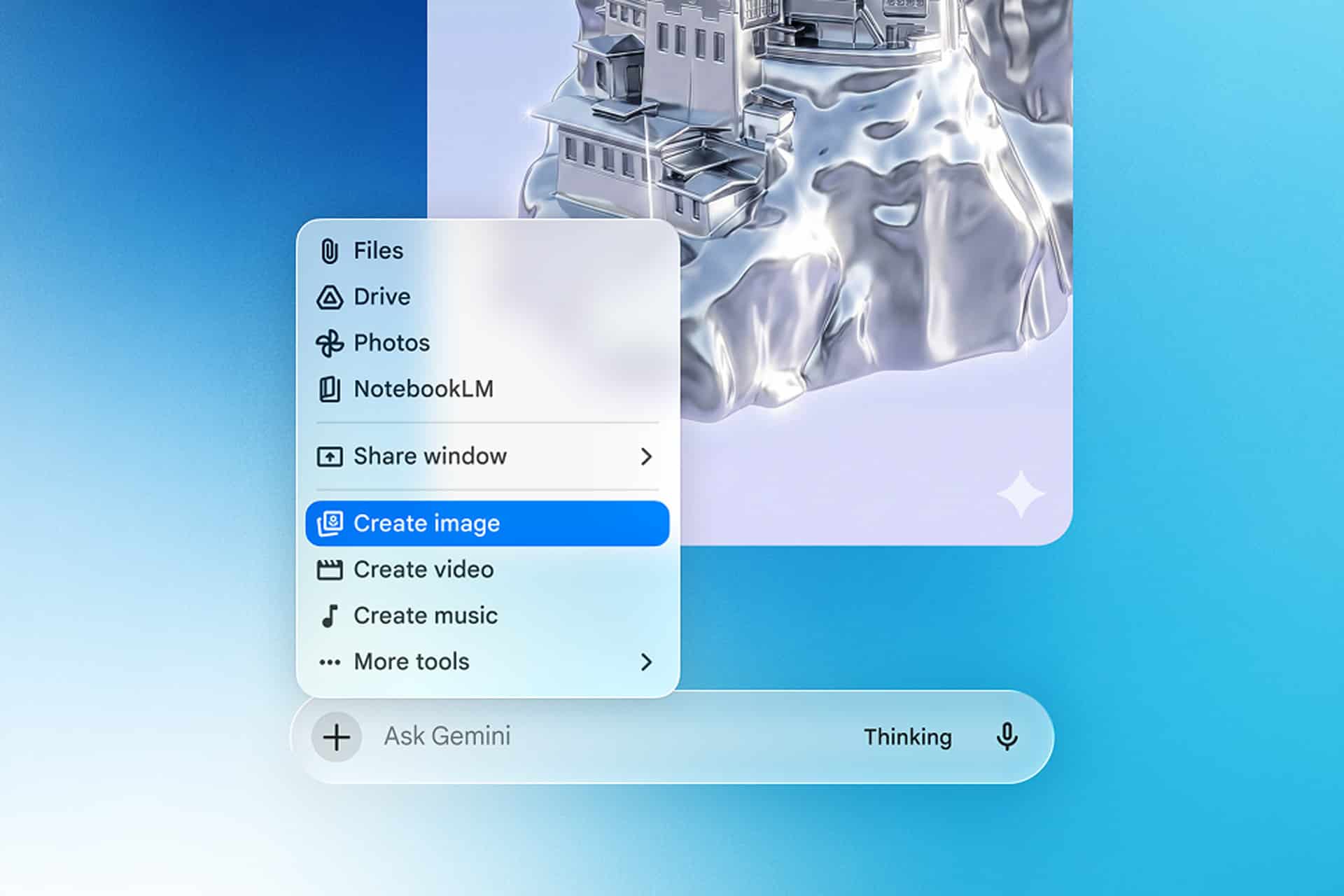
Google is not presenting the Mac app as a narrow writing or research utility. The company’s launch coverage says the app can also help generate images and videos, a sign that Gemini on desktop is being pitched as a broader creative environment rather than a single-purpose assistant. That matters because Mac users often move between office work and creative work in the same day, and software that can bridge those tasks tends to feel more useful than software that only handles one slice of the workflow.
The broader Gemini platform has also been evolving quickly around the Mac release. Google’s release notes show continued expansion across models, file handling, Canvas, and higher-tier AI subscriptions, which makes the desktop app feel less like a standalone experiment and more like another endpoint in a larger Gemini system. For users, that creates a more stable impression: the Mac app is not arriving in isolation, but as part of a product Google is actively extending across consumer and professional use cases.
That wider context is especially important because the desktop AI category is getting crowded. OpenAI, Anthropic, Microsoft, and Perplexity have all been pushing harder to turn their assistants into everyday computing tools rather than occasional chat interfaces. Google’s answer on the Mac is to reduce friction, keep the product free at entry level, and connect it to the account system millions of users already rely on. It is a familiar strategy, but on the desktop the details matter more than the headline. The app has to feel quick, present, and useful enough to earn repeated use.
A Timely Release Ahead of WWDC
The timing adds another layer. Apple has already confirmed that WWDC26 runs from June 8 through June 12, which means Google is planting Gemini on the Mac just weeks before Apple outlines its next major software direction. Even without making any promises about deeper Apple-level integration, the move puts Google’s assistant directly in front of Mac users at a moment when AI on Apple platforms remains one of the most closely watched stories in tech.
That does not mean the Gemini Mac App replaces whatever Apple may show next. It does mean Google now has a more visible seat at the table on one of Apple’s most important platforms. The company no longer has to wait for users to visit Gemini in a browser or reach for a phone. It now has a native desktop app, a shortcut that keeps it one keystroke away, and a feature set built around the kind of contextual help that desktop AI increasingly demands.
For Mac users, the release is less about branding than habit. The winners in this category will likely be the assistants that show up fastest, understand the most context, and prove useful often enough to become second nature. Google’s new Mac release does not settle that race, but it does make Gemini harder to ignore on the desktop than it was before.