

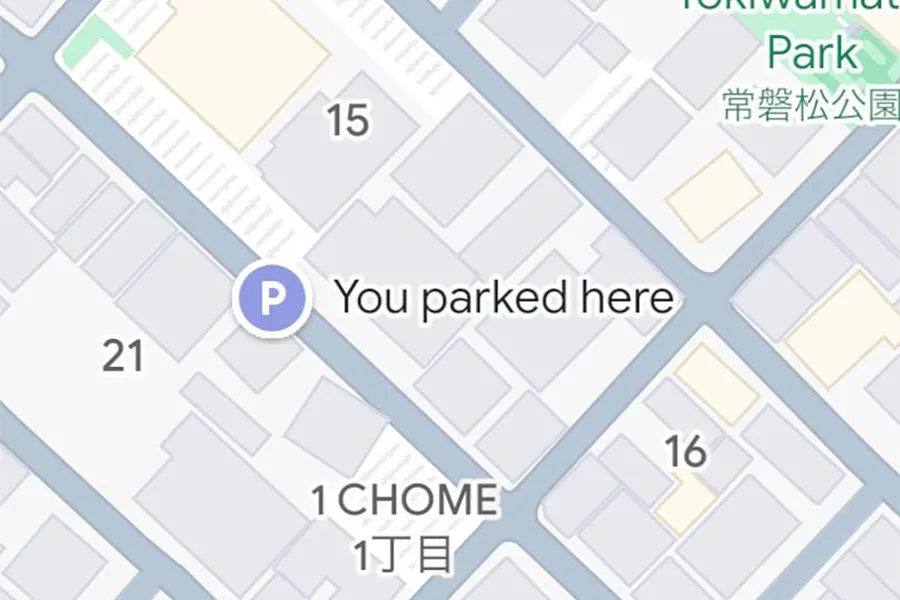
The update sees GPS coordinates recorded when the app detects you’ve parked, keeping the pin visible on the map until you begin driving again or for up to 48 hours. A custom icon may mark the spot, and once you drive off, the location is cleared — streamlining the process of remembering where you left your car.
The feature works only when Google Maps is used for navigation and paired with your car — via USB, Bluetooth or CarPlay. That connection triggers Maps to monitor movement: once the travel ends and you disconnect or stop, the app infers you’ve parked and records your location.
Automatic Parking Detection Available on iPhone
Drivers who rely on Google Maps for navigation will find the new automatic parking feature especially useful — no need to remember to tap a button or manually mark a location. The map will display a pin labeled “You parked here” along with any custom icon previously set for the vehicle. The pinned location persists for 48 hours unless you remove it or start driving again, helping users avoid the frustration of forgetting where they left their car.
While the app previously offered manual parking-save functionality (via tapping the blue dot in Android or iOS), this update automates the step entirely — at least for iOS users. The manual option remains available for Android users, but the automatic detection has not yet been confirmed for Android rollout.
What to Know Before You Rely on It
For the automatic detection to work reliably, a few conditions need to be met. The app must have been used for navigation during the trip. Your iPhone must have been connected to the vehicle via USB, Bluetooth, or CarPlay so the app can detect when the driving session ends. If the connection isn’t established (for example, if you use a rental car, or don’t enable CarPlay/Bluetooth), the feature may not trigger automatically — you might need to mark the parking manually.
Also, while the feature rolls out widely, availability may vary depending on region or device. There’s no official word yet on a wider Android or Wear OS launch, meaning some drivers will still need to rely on older methods or manual saving.
Why This Update Matters for Frequent Drivers and Urban Users
Parking — especially in large, crowded cities or complex parking garages — can be stressful. Forgetting where you parked your car is a common annoyance. By automating the memory step, Google Maps reduces friction in the final moments of a drive. The convenience of letting your phone remember parking removes a minor but frequent friction point, which can make everyday travel smoother.
For occasional drivers, rental users, or those using shared vehicles, the feature can add value by minimizing reliance on manual memory tricks (taking a photo, writing down floor numbers, etc.). The automatic save + custom icon also helps in scenarios where you park far from your final destination or in unfamiliar locations.
How the New Feature Compares with Previous Parking Tools in Google Maps
Google Maps has offered parking-save options for years. On Android and iOS, users could manually tap the location dot and mark their parking spot — a useful but manual step. In vehicles using Android Auto or CarPlay, a “Save Parking” toggle sometimes appeared when arriving at a destination.
The latest update changes that model by letting the app detect the end of a drive and handle the saving automatically. It combines multiple signals — travel end, vehicle connection, and map data — to infer parking. On iOS, at least, this makes the experience more seamless than before and aligns with expectations around smart automation.
What’s Still Manual: Android and Older Devices
For Android users and environments where CarPlay / Bluetooth / USB linking isn’t available, parking saving remains manual. Users will need to tap the location dot and choose “Save parking” to mark their spot. This option continues to exist, so all users retain the ability to record parking — just without the automatic convenience.
That means some who switch between phones, share cars, or use third-party navigation systems may need to rely on manual marking until broader automatic detection becomes available.
This change reflects a subtle but meaningful shift: navigation apps like Google Maps increasingly aim to reduce friction in everyday travel tasks, smoothing out small pain points like remembering where you parked — and for many users, that small convenience could add up over time.


