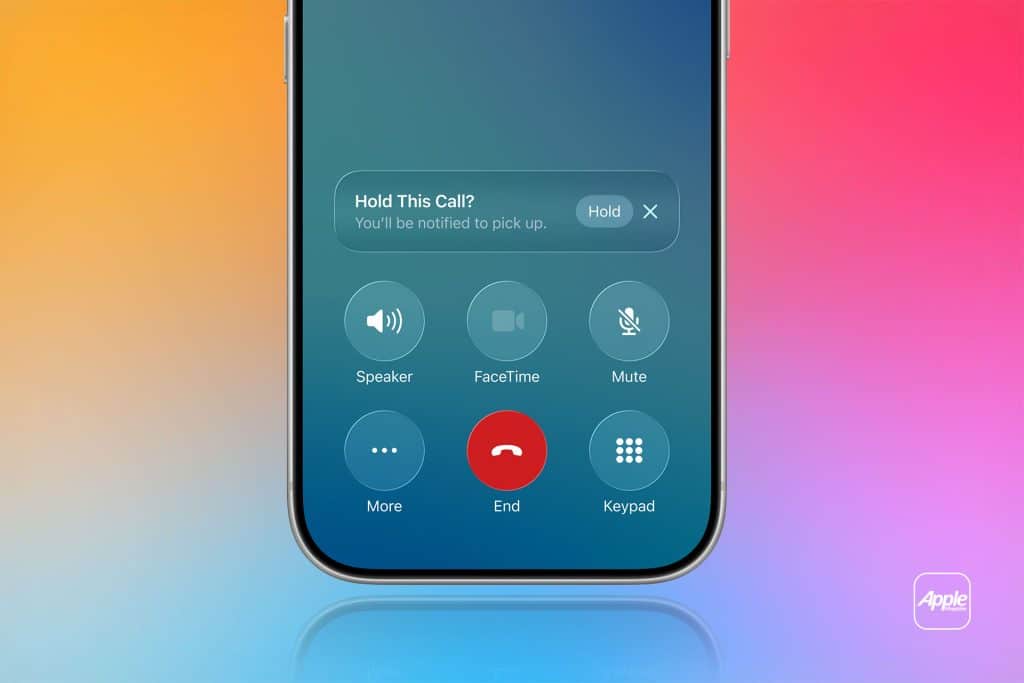
Hold Assist Detection is Apple’s quiet answer to one of the most exhausting parts of modern communication: waiting on hold. Long automated menus, looping music, and repeated “your call is important” messages drain time and attention. For years, people have been forced to sit with their phone pressed to their ear, afraid to miss the moment when a human finally answers.
With iOS 26, Apple changes that experience. Hold Assist Detection listens for you. It recognizes when a call is still on hold and when a real person joins the line. You can put the phone down, switch apps, or continue your day. The system waits in the background and notifies you when the conversation actually begins.
This feature is not about speed. It is about respect for time. It assumes your attention is valuable and should not be wasted on silence, music, or automated loops.
Why Being on Hold Became a Daily Problem
Customer support calls have become longer, not shorter. Banks, airlines, delivery services, healthcare providers, and utilities now route nearly every call through automated systems. Even when the issue is simple, reaching a person often takes twenty minutes or more.
During that time, you are trapped. You cannot focus. You cannot move freely. The phone becomes a leash. Many people avoid calling altogether because of this friction.
Hold Assist Detection was built to solve that exact tension. It removes the emotional weight of waiting and turns it into a background process instead of a personal burden.


How Hold Assist Detection Works
When you place a call and the system detects hold music or automated loops, iOS marks the call as “on hold.” You can lock the phone, open other apps, or set it down. The call remains active, but you are no longer tied to it.
The moment a human voice appears, your iPhone sends a clear notification. You return to the call only when it matters. There is no guessing, no hovering, no anxiety about missing the answer.
This transforms long customer service calls into passive tasks instead of active interruptions.
How to Enable Hold Assist Detection
Open Settings > Tap Phone > Select Call Automation or Call Intelligence > Turn on Hold Assist Detection
Once enabled, the feature activates automatically whenever a call is placed on hold by an automated system.
When to Use Hold Assist Detection
- Calling a bank or credit card provider
- Contacting airlines or travel agencies
- Reaching internet or phone carriers
- Dealing with government or utility services
- Any situation where you expect long wait times
Instead of blocking your day, the call becomes something that runs quietly in the background.
A New Relationship With Voice Calls
Hold Assist Detection builds on the same philosophy as spam filtering and call silencing. Voice calls should adapt to your life, not interrupt it. When technology waits for you, instead of demanding your attention, communication becomes lighter and more humane.
You no longer feel trapped by a ringing phone or endless music. The system handles the waiting. You handle the conversation.
This is not about replacing people. It is about removing friction. And in doing so, Apple turns one of the most frustrating parts of calling into something almost invisible.