


Most guides on iPhone proxy configuration stop at “open Wi-Fi settings and enter your IP.” That’s the easy part. What actually matters – and what determines whether your proxy connection holds up under real workloads – is understanding which proxy type to use, how iOS handles proxy authentication, where the configuration silently fails, and what separates a stable proxy provider from one that drops your connection mid-session. This guide covers all of it.
What iOS Actually Does With Your Proxy Settings
Before touching Settings, it helps to know what you’re working with. iOS routes proxy configuration per network interface – meaning the proxy you configure on one Wi-Fi network does not apply to another, and it never applies to cellular traffic. This is a hard platform constraint, not a misconfiguration.
When you set a manual proxy on iOS, the system intercepts outbound HTTP and HTTPS requests and routes them through the designated proxy server. For HTTP proxies, this is transparent. For HTTPS, iOS establishes a CONNECT tunnel to the proxy, then performs the TLS handshake with the destination server inside that tunnel. The proxy never sees the decrypted payload – only the hostname and port.
SOCKS5 is handled differently. iOS supports SOCKS proxies natively since iOS 10, but SOCKS configuration is per-app in most cases unless you’re using a configuration profile (MDM or manual .mobileconfig file). For system-wide SOCKS5 routing on a device without a profile, you’ll need a third-party app that acts as a local proxy bridge.
This distinction matters. If you’re configuring a proxy for browser-based tasks – data collection, ad verification, market research sessions – manual HTTP/HTTPS proxy setup in Wi-Fi settings is sufficient. If you need deeper protocol-level control, you’re looking at PAC files or configuration profiles.
Manual Proxy Setup On iPhone: Step by Step
Open Settings → Wi-Fi, tap the info icon (ⓘ) next to your active network, scroll to HTTP Proxy, and tap Configure Proxy. You’ll see three options: Off, Manual, and Auto.
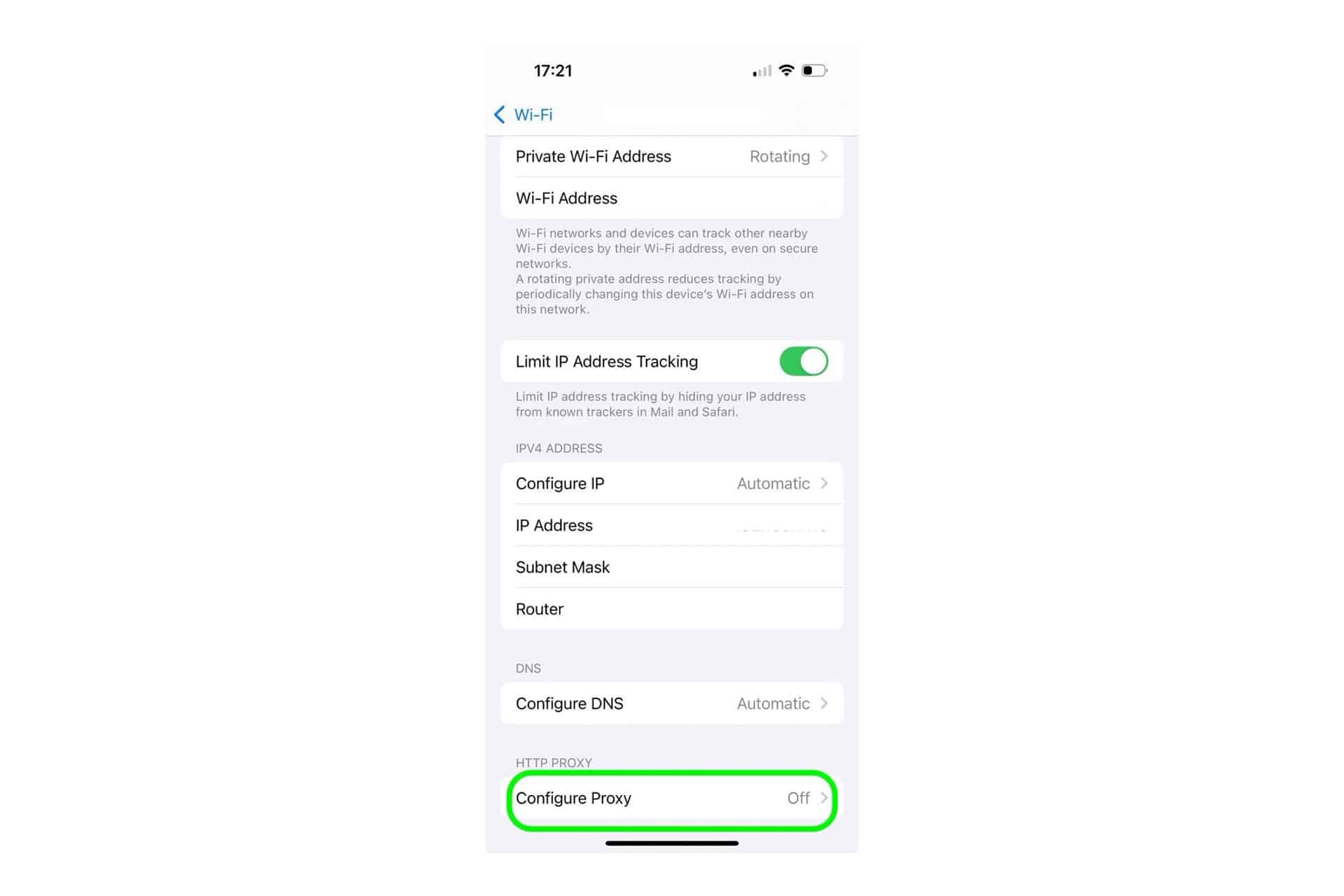

Manual requires you to enter the server address (IP or hostname), port number, and authentication credentials if your proxy requires them. The Authentication toggle reveals username and password fields. iOS stores these credentials in the keychain, so you won’t need to re-enter them unless the network changes.
Auto uses a PAC (Proxy Auto-Config) file – a JavaScript file hosted at a URL that tells iOS which proxy to use for which destinations. This is useful when you need different routing rules for different domains, for example sending scraping requests through one proxy while keeping internal traffic direct.
A basic PAC file looks like this:
function FindProxyForURL(url, host) {
if (shExpMatch(host, “*.target-domain.com”)) {
return “PROXY 185.220.101.45:8080”;
}
return “DIRECT”;
}
Host it on any accessible URL (your own server, S3 bucket, or GitHub raw file), paste that URL into the PAC URL field on iOS, and the device fetches it each time it evaluates a connection. One practical note: iOS caches PAC files aggressively. If you update the file, you may need to toggle the Wi-Fi off and on, or forget and rejoin the network, to force a re-fetch.
Step-by-step instructions: https://proxys.io/en/blog/proxy-settings/setting-up-a-proxy-on-an-iphone-or-ipad.

Proxy Protocol Comparison for iPhone Use Cases
Not all proxy protocols perform the same way on iOS. The table below reflects observed behavior across real workloads, not theoretical specs.
|
Protocol |
iOS Native Support |
Authentication |
Speed Overhead |
Best Use Case |
|
HTTP |
Yes (System-wide on Wi-Fi) |
Username/Password |
~2–5ms added latency |
Web scraping, ad verification |
|
HTTPS (CONNECT tunnel) |
Yes (System-wide on Wi-Fi) |
Username/Password |
~3–8ms added latency |
Secure sessions, API calls |
|
SOCKS5 |
Per-app or via profile |
Username/Password |
~1–3ms added latency |
General TCP, mixed traffic |
|
PAC-routed HTTP |
Yes (System-wide on Wi-Fi) |
Per-proxy in PAC |
Variable |
Multi-destination routing |
The latency figures above assume a proxy server in the same region as the client. Cross-continental routing adds 80–200ms depending on the provider’s infrastructure. For tasks requiring low latency – such as real-time monitoring or high-frequency API calls – choosing a proxy geographically close to your target endpoint matters more than protocol selection.
Where Proxy Configuration Fails on iOS (and Why)
The most common failure point is authentication on captive portal networks. If you’re on a hotel or office Wi-Fi that requires a browser-based login before granting internet access, iOS will sometimes fail to route proxy authentication properly until the captive portal session is established. The fix is to disconnect the proxy temporarily, complete the captive portal flow, then re-enable proxy settings.
The second common issue is proxy authentication with HTTPS. iOS handles proxy auth challenges for HTTP correctly, but some proxy servers send a 407 Proxy Authentication Required response inside a CONNECT tunnel, which iOS cannot process. The workaround is IP-based authentication (whitelisting your iPhone’s IP at the proxy provider) rather than username/password – this eliminates the auth challenge entirely.
Third: DNS leaks. When an HTTP proxy is configured on iOS, DNS resolution for most requests goes through the proxy. However, some app-level requests – particularly from certain system services and background refresh tasks – bypass the proxy entirely and resolve via the default DNS. If your use case requires consistent IP attribution, this is a meaningful limitation. A VPN-based solution handles this more completely, but that’s a separate infrastructure choice.
Choosing a Proxy Provider: What the Specs Don’t Tell You
The advertised proxy type (datacenter, residential, mobile) gives you a starting point, but the operational details determine whether your configuration holds under production conditions.
IP reputation is the most underappreciated factor. A datacenter IP that has been used by thousands of previous clients may carry flagged history that causes requests to be rejected or served degraded responses. Residential IPs sourced from real consumer ISPs have clean reputations by default but cost more per IP. For tasks requiring high trust-level attribution – analytics sessions, verification workflows, competitive intelligence collection – residential IPs justify the premium.
Subnet diversity matters at scale. If you’re running multiple concurrent sessions, using IPs from the same /24 subnet creates correlation risk. Quality providers offer IPs spread across multiple subnets and ASNs.
Connection stability is where many providers fall short. A proxy that disconnects every 10–15 minutes is unusable for long scraping sessions or sustained automation. Look for providers that publish uptime guarantees and offer session-persistent connections.
The table below compares proxys.io against two other commonly used providers across dimensions that matter for iPhone-routed traffic and professional workloads:
|
Feature |
proxys.io |
Provider B (generic datacenter) |
Provider C (residential network) |
|
Individual IPv4 price |
From $1.40/mo |
From $1.20/mo |
From $4.00/mo |
|
Protocols supported |
HTTP, HTTPS, SOCKS5 |
HTTP, HTTPS |
HTTP, HTTPS, SOCKS5 |
|
IP exclusivity |
1 user per IP |
Shared (up to 10) |
1 user per IP |
|
Residential IPs |
Yes (Russia, Poland) |
No |
Yes (multiple countries) |
|
Mobile IPs |
Yes |
No |
No |
|
Geo coverage |
25+ countries |
10 countries |
50+ countries |
|
PAC file support |
Compatible |
Compatible |
Compatible |
proxys.io offers individual IPv4 addresses from $1.40/month with HTTP, HTTPS, and SOCKS5 support across 25+ countries, including residential IPs for Russia and Poland. The shared IPv4 tier (up to 3 users per IP) starts at $0.67/month – a reasonable option for lower-intensity workloads where IP exclusivity isn’t critical. Dynamic proxies are available from $0.27/month and suit use cases where the IP can rotate between sessions.

PAC Files for Advanced Routing on iPhone
For professional use cases – particularly SEO monitoring, ad verification across markets, or analytics collection – PAC files give you routing granularity that manual proxy configuration cannot. A PAC file can route traffic to different proxy endpoints based on destination hostname, TLD, IP range, or time of day.
A more complete PAC example for multi-region monitoring:
function FindProxyForURL(url, host) {
// Route US-based targets through US proxy
if (shExpMatch(host, “*.amazon.com”) || shExpMatch(host, “*.google.com”)) {
return “PROXY 104.21.45.112:3128”;
}
// Route EU targets through EU proxy
if (dnsDomainIs(host, “.de”) || dnsDomainIs(host, “.fr”)) {
return “PROXY 185.220.101.45:8080”;
}
return “DIRECT”;
}
One practical limitation: PAC files on iOS are fetched once per network session. If the PAC server is unavailable at connection time, iOS falls back to DIRECT (no proxy), which may not be the desired behavior. Hosting the PAC file on a high-availability server – not a local machine or personal laptop – is essential for production reliability.

When Your Proxy Configuration Works but Performance Doesn’t
Correct configuration doesn’t guarantee acceptable performance. If you’ve set up the proxy correctly on iPhone and connections succeed but requests are slow, the diagnosis typically falls into three categories.
The first is geographic distance. A proxy in Germany adds ~20ms of latency for a user in Western Europe and ~120ms for a user in Southeast Asia. If your target sites are US-hosted but your proxy is European, you’re adding round-trip time on both legs of the journey. Choose proxy locations close to your target endpoints, not close to your physical device location.
The second is proxy server load. Shared proxies – particularly lower-cost datacenter IPs – are often oversold. Peak hours in the proxy provider’s primary markets mean slower response times. Individual (dedicated) IPs eliminate this variable.
The third is protocol mismatch. Some target servers handle HTTP CONNECT tunnels poorly, generating longer handshake times than direct connections. Testing both HTTP and SOCKS5 routing for the same destination can reveal 30–50% latency differences in some cases.
If after addressing these factors performance remains inconsistent, it’s worth evaluating whether your current proxy provider’s infrastructure is the bottleneck. proxys.io’s individual IPv4 proxies offer dedicated bandwidth per IP, which removes shared-load variability from the equation. Their dynamic proxy tier is particularly suited for rotating IP sessions without re-configuring iOS settings manually.
Configuration Profiles for Enterprise and Automation Workflows
For teams managing proxy configurations across multiple iOS devices, manual per-device setup doesn’t scale. Apple’s .mobileconfig profiles allow centralized proxy deployment via MDM (Mobile Device Management) or direct profile installation.
A profile-based proxy config applies system-wide, works across all network interfaces including specific Wi-Fi networks, and can enforce SOCKS5 routing that manual configuration cannot achieve for all apps. For data collection teams or analytics operations managing multiple field devices, this approach saves significant configuration overhead and ensures consistent routing across the fleet.
The profile can be generated using Apple Configurator 2 (macOS) or built manually as an XML document and signed with a certificate for trusted installation. Unsigned profiles display a warning on installation but function identically.
Conclusion
Configuring a proxy on iPhone is a three-part problem: protocol selection, iOS-specific behavior, and provider infrastructure quality. Manual HTTP proxy setup covers the majority of professional use cases and takes under two minutes. PAC files add routing intelligence for multi-destination workflows. Configuration profiles handle fleet-scale deployment.
The consistent failure point across all three setups is proxy IP quality – specifically IP reputation, subnet diversity, and connection stability. These factors aren’t visible at configuration time but determine whether your sessions succeed at scale. Starting with individual (dedicated) IPs from a provider like proxys.io, where each IP is assigned to one user and supports HTTP, HTTPS, and SOCKS5, gives you the cleanest baseline for diagnosing performance issues. Once you’ve confirmed your use case works reliably on dedicated IPs, you can evaluate whether shared or dynamic proxies meet your cost-performance threshold for specific workloads.
