


iCloud is often described as Apple’s cloud storage service, but that definition is too small for what it has become. iCloud is the invisible layer that makes Apple devices feel personal, synchronized, protected, and hard to leave.
It is behind the photos that appear on every device, the passwords that fill automatically, the messages that follow from iPhone to Mac, the files that move between iPad and desktop, the Find My network that locates a missing device, the backups that restore a new iPhone, and the account identity that holds the Apple experience together. It is also becoming more relevant as Apple Intelligence and Siri AI move deeper into apps, personal context, and cross-device behavior.
That makes iCloud one of Apple’s most powerful loyalty tools. It does not need to be loud. It works because users notice the friction only when it is missing. A new iPhone feels familiar because iCloud brings the user’s digital life back. A Mac feels connected because the same documents, passwords, notes, photos, and messages are already there. Apple Watch, AirPods, Apple TV, Vision Pro, and Home devices all gain value because they attach to the same account, data, services, and trusted device network.
iCloud Turns Devices Into One System
Apple’s hardware lineup is broad, but iCloud is one of the main reasons those devices behave as one experience instead of separate products.
An iPhone can capture a photo, and the image can appear on Mac and iPad. A Safari tab can move between devices. A password saved on Mac can fill on iPhone. Notes, Reminders, Calendar, Contacts, Messages, Files, Photos, Health data, and app data can follow the user without manual transfer. A new device can be restored with familiar settings and content. A lost device can still be tied to the owner through Activation Lock.
That continuity has a powerful effect on user behavior. The more Apple devices someone owns, the more valuable each device becomes. iCloud is what allows that value to compound. Without it, iPhone, Mac, iPad, Apple Watch, and Apple TV would still be strong products. With it, they feel like parts of the same personal system.
This is also why Apple’s device loyalty is not only about hardware quality. People stay because leaving means rebuilding a digital life elsewhere. Photos, passwords, subscriptions, family sharing, shared albums, iCloud Drive files, Find My items, Apple Wallet passes, device backups, and app data all create gravity.
The loyalty is not built through lock-in alone. It is built through convenience that becomes routine.


Apple Intelligence Needs iCloud Context
Apple Intelligence makes iCloud more important because AI is only useful when it has the right context. A general chatbot can answer broad questions, but a personal assistant needs access to the user’s world: files, messages, reminders, calendar events, photos, locations, app data, and device state.
Apple’s AI strategy depends on bringing intelligence into familiar apps rather than forcing everything into a standalone assistant. That means Apple Intelligence needs secure access to personal information across the system. iCloud helps make that possible because it already organizes and syncs much of the user’s digital life across devices.
A smarter Siri could help find a file on Mac, understand a message from iPhone, create a reminder from an email, identify a photo, suggest a route, or connect details across apps. Those tasks depend on context. iCloud is where much of that context lives, syncs, and stays attached to the Apple Account.
This does not mean iCloud simply hands everything to AI. Apple’s privacy model is built around on-device processing, user permission, and Private Cloud Compute for requests that need more power. But iCloud remains the connective foundation. It makes the user’s information available across devices in a way Apple can organize, protect, and use selectively for intelligent features.
Siri AI Becomes Stronger Across Devices
Siri AI is the part of Apple’s strategy that could make iCloud feel even more central. The old Siri was often limited to single-device commands: set a timer, call someone, play a song, open an app, control a light. Siri AI is meant to become more personal, contextual, and capable across apps.
That shift requires continuity. A user may start a task on iPhone, continue on Mac, check a detail on Apple Watch, listen through AirPods, and finish on iPad. Siri AI needs to understand not only the command, but where the user is, which device is best for the task, and what information is relevant.
iCloud is the bridge. It keeps Apple’s devices and services aligned under the same identity. It connects the user’s trusted devices, account settings, messages, photos, documents, and app data. It also supports the idea that Siri should not feel trapped inside one device.
This is where Apple has an advantage over AI platforms that are trying to build a personal assistant from the cloud down. Apple can build from the device network up. Siri AI can live across devices that already know the user’s routines, content, permissions, and preferred apps.
That makes iCloud less visible, but more strategic. It is not the assistant. It is the memory layer that helps the assistant stay useful.

Privacy Makes iCloud More Than Sync
iCloud’s role is also tied to Apple’s privacy pitch. Apple wants users to trust that their data can move across devices without becoming exposed to advertisers, data brokers, or unnecessary third-party access.
Features such as iCloud Keychain, passkeys, Advanced Data Protection, Hide My Email, Private Relay, Mail privacy protections, Find My, device backups, and encrypted data syncing all reinforce that position. Apple’s message is that cloud convenience does not have to mean giving up privacy.
Advanced Data Protection is especially relevant because it expands end-to-end encryption to more iCloud data categories. That makes iCloud more appealing to users who want stronger control over backups, photos, notes, and synced information. It also shows Apple trying to make its cloud layer compatible with the privacy expectations it uses to differentiate iPhone and Mac.
This matters for Apple Intelligence. A personal AI layer will only work if users believe their data is being handled carefully. iCloud’s privacy features help create that trust, even when users do not think about them directly.
Apple’s challenge is explaining this clearly. Users want the convenience of personal AI, but they do not want their private lives treated as training material or advertising data. Apple’s iCloud and Private Cloud Compute messaging gives the company a way to argue that intelligence and privacy can coexist.
iCloud Plus Makes the Loyalty Layer Paid
iCloud is also one of Apple’s most effective services products. Many users start with free iCloud storage, then upgrade because photos, backups, messages, and files outgrow the base limit. Once they pay for iCloud+, they often stay because it supports the entire Apple experience.
iCloud+ is not only extra storage. It adds features such as Private Relay, Hide My Email, custom email domains, HomeKit Secure Video support, and family sharing for storage plans. That makes the subscription feel less like a storage upgrade and more like a privacy and services bundle.
For Apple, this is valuable because iCloud+ connects hardware loyalty with services revenue. A user buys an iPhone, stores photos in iCloud, backs up the device, syncs passwords, shares storage with family, uses Private Relay, adds Home cameras, and becomes more tied to the Apple Account. The subscription supports the device experience, and the device experience supports the subscription.
This is different from a standalone cloud storage provider. iCloud is not competing only on gigabytes. It competes by being built into the operating system, the setup process, the camera roll, device recovery, app data, passwords, family sharing, and Apple’s privacy story.
Find My Shows the Power of the Network
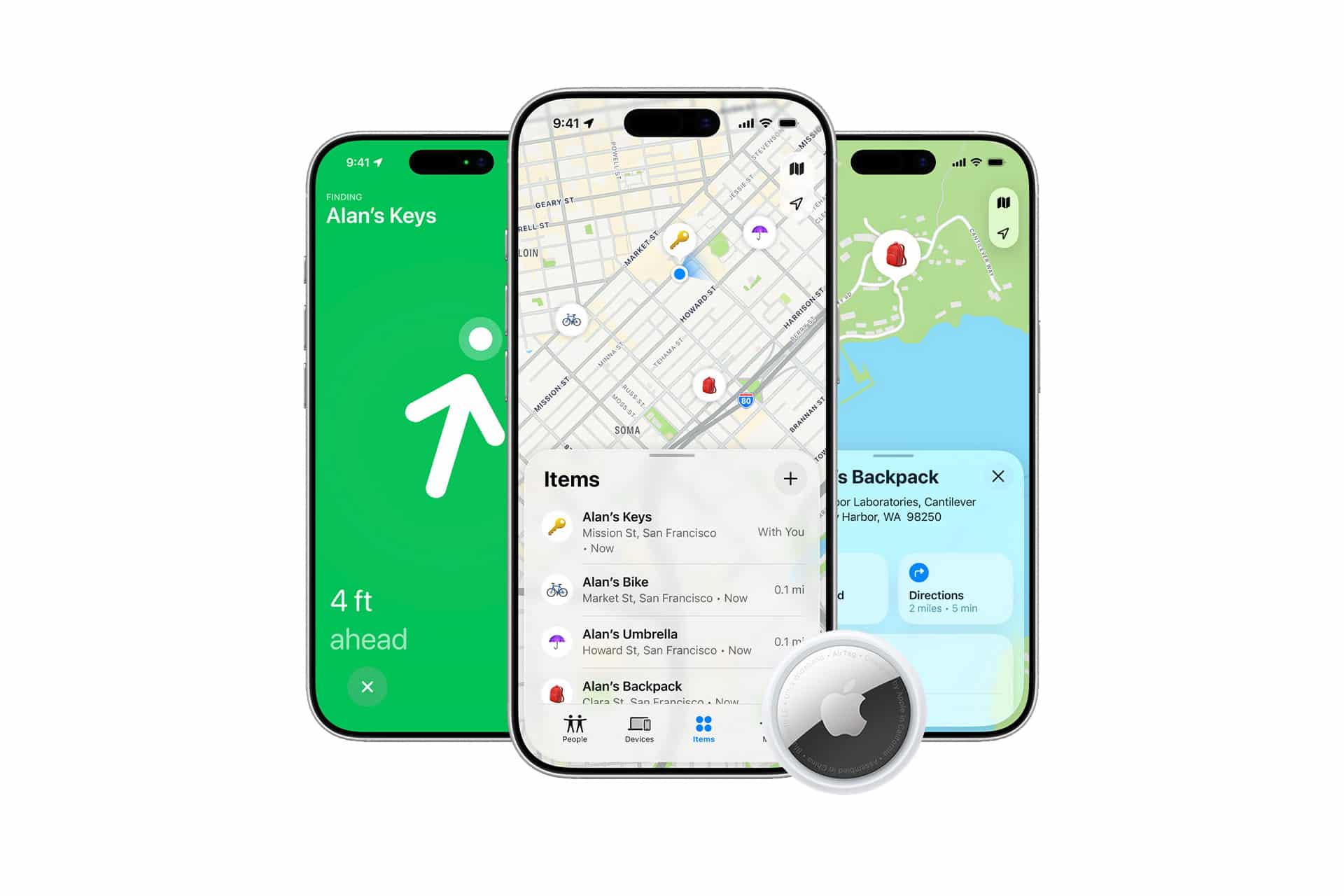
Find My is one of the clearest examples of iCloud’s invisible value. It helps locate iPhone, iPad, Mac, Apple Watch, AirPods, AirTag, and supported items through Apple’s network of devices. It also supports Lost Mode and Activation Lock, which can make stolen devices harder to reuse.
This is not just a location feature. It is a trust feature. Users feel safer knowing that a missing device is still tied to their account. Parents can coordinate with children. Travelers can track luggage with AirTag. People can find AirPods left behind. Mac owners can lock a missing laptop.
Find My is powerful because it uses the scale of Apple’s installed base. Each device contributes to a wider encrypted network, and each user benefits from that network. That is the kind of feature competitors have difficulty matching without similar hardware density and account integration.
It also shows how iCloud turns device ownership into a service layer. The user is not only buying hardware. They are joining a network that makes the hardware more recoverable, secure, and connected.
Photos and Messages Keep People Attached
Two of the strongest iCloud anchors are Photos and Messages. They are deeply personal, difficult to move, and central to daily life.
iCloud Photos keeps years of memories available across devices. It lets users take a picture on iPhone and see it later on Mac, iPad, Apple TV, or Vision Pro. Shared Albums and iCloud Shared Photo Library add another layer by connecting people through shared memories.
Messages in iCloud keeps conversations synced across Apple devices. A chat can continue on Mac, iPad, Apple Watch, or iPhone without feeling fragmented. Attachments, links, photos, and conversation history become part of the Apple environment.
These categories create emotional loyalty. A faster chip or better display may convince someone to buy a device. Photos and Messages help convince them to stay. They are not abstract services. They are people, memories, routines, and relationships.
Apple Intelligence will likely make those categories even more valuable. Smarter search, better summaries, photo understanding, message context, and Siri actions can all become more useful when personal content is organized through iCloud.
The Mac Depends on iCloud More Than Ever
The Mac used to feel more independent from Apple’s cloud strategy. Today, iCloud is central to the Mac experience.
Desktop and Documents syncing, iCloud Drive, Photos, Passwords, Safari tabs, Messages, FaceTime, Notes, Reminders, Calendar, Mail settings, app data, and device handoff all make the Mac feel connected to the rest of Apple’s lineup. A new Mac can become usable quickly because iCloud brings much of the user’s environment back.
As macOS 27 Golden Gate moves deeper into Apple silicon, Siri AI, App Intents, Shortcuts, and cross-device intelligence, iCloud becomes more than a convenience. It becomes the continuity layer that lets Mac participate in Apple’s unified experience.
That is especially relevant for productivity. A user may begin research on iPhone, write on Mac, review on iPad, save files in iCloud Drive, and ask Siri AI to connect information across apps. The Mac remains the work center, but iCloud makes the work portable.
This is Apple’s advantage against cloud-only productivity platforms. The cloud is not separate from the device. It is built into the local experience.

Loyalty as a Feature
Apple’s loyalty is often described as ecosystem lock-in, and iCloud is a major part of that. But the word lock-in can miss the emotional and practical reality. Users often stay because leaving is inconvenient, but the inconvenience exists because the system has become useful.
A person leaving Apple may need to move photos, export passwords, replace iMessage workflows, change family storage, transfer files, rebuild device backups, find new smart home tools, recreate sharing setups, replace Find My items, and adjust subscriptions. That is a lot of friction.
Apple benefits from that friction, but it also has to keep earning it. If iCloud becomes unreliable, confusing, too expensive, or too limited, the loyalty layer weakens. If it keeps improving quietly, users continue treating Apple devices as parts of one dependable system.
That is why iCloud may be more valuable than it looks on a product slide. It is not glamorous, but it is sticky. It holds the user’s digital life in place while Apple sells new devices and services around it.
The Hidden Layer of Apple’s AI Future
Apple’s AI future will not depend only on model performance. It will depend on whether Apple can connect intelligence to the information, devices, and services people already use. iCloud is central to that work.
A smarter Siri needs personal context. Apple Intelligence needs secure access to content. Continuity needs synchronized state. Find My needs trusted devices. Passwords need encrypted syncing. Photos and Messages need consistency. App data needs to follow the user. Device setup needs to feel effortless.
iCloud is the layer underneath all of that. Users may not open iCloud every day, but they use what it does constantly.
As Apple moves from device-first computing toward a more unified AI-driven experience, iCloud becomes the quiet infrastructure behind the shift. It is where loyalty, privacy, personal data, device recovery, subscriptions, and intelligence meet. The next Apple experience may look like Siri AI, Apple Intelligence, Vision Pro, iPhone Fold, or smarter Home devices on the surface. Underneath, iCloud is what helps make the entire system feel like it belongs to one person.