

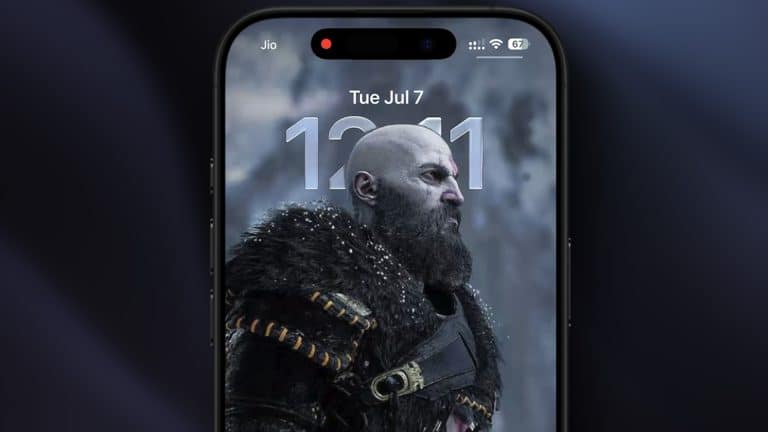
iOS 27 wallpaper effect changes are starting to show up in developer beta 3, giving iPhone users a more layered transition when opening Notification Center. The new animation works with depth-enabled wallpapers and creates the impression that the foreground subject is floating separately from the rest of the screen.
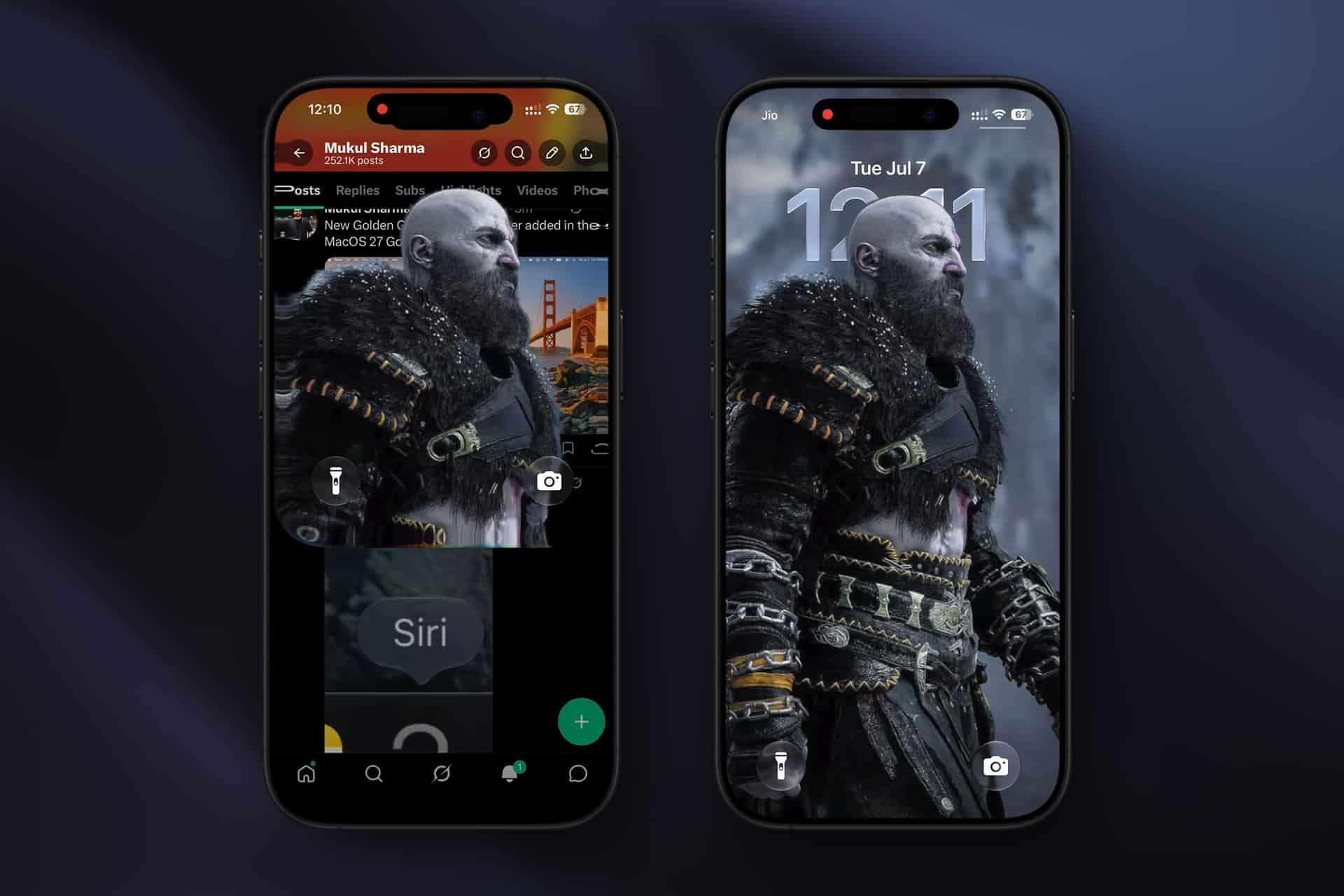
The feature was first spotted by testers after Apple released iOS 27 developer beta 3. When the user swipes down for Notification Center, the system appears to isolate the foreground subject from a compatible wallpaper, briefly placing it above the active app or Home Screen before the rest of the interface settles into a blurred background.
It is a small visual change, but it fits the design direction Apple is testing across iOS 27. The update continues to refine Liquid Glass, Apple’s translucent interface style, while adding more motion, depth and subject separation to parts of the iPhone experience that users see every day.
iOS 27 Wallpaper Effect Depends on Depth
iOS 27 wallpaper effect support appears tied to wallpapers that can use subject separation. In early testing, the animation works best with photos that have a distinct foreground subject, such as a person, pet or object with enough contrast from the background. If the wallpaper does not support the depth option, the new transition may not appear.
That makes the feature more selective than a normal animation. The iPhone needs to understand the photo well enough to separate the subject from the background. Apple has already used similar image segmentation across Lock Screen customization, Photos, stickers and visual lookup tools. Beta 3 now applies that same idea to a system gesture.
The effect is most visible when moving from an app or Home Screen into Notification Center. Instead of the interface sliding down as one flat layer, the subject appears first, almost like a cutout placed in front of the blur. Then the rest of Notification Center fills in behind it.
The result is more polished when the wallpaper has a clean subject and enough background space. Busy images, low-contrast scenes or photos where the subject blends into the background may look less convincing or may not trigger the option at all.

A Small Feature With a Big Design Role
The new animation is not a major functional upgrade. It does not change notifications, widgets, alerts or Lock Screen controls. Its role is visual. Apple is using beta 3 to make the iPhone interface feel more dimensional without forcing users into a complicated setup.
That matters because iOS 27 is already carrying heavier software changes around Siri AI, Apple Intelligence, accessibility, AirPods controls, Reminders, Photos and system polish. A wallpaper transition gives the release a lighter, more instantly visible detail that testers can notice in daily use.
It also shows how Apple is connecting photography, interface design and on-device intelligence. A static image becomes part of the system’s motion language. The wallpaper is no longer just a background. It can be analyzed, separated and animated as part of the interface.
The approach fits Apple’s recent design pattern. Instead of adding more buttons or settings, the company often turns existing content into a more dynamic part of the system. Photos become stickers. Lock Screen subjects sit over the clock. Memories become short edits. Now a wallpaper subject can become part of the Notification Center transition.
Beta 3 Also Brings Smaller System Tweaks
The wallpaper change is only one part of iOS 27 developer beta 3. Testers have also reported updates to AirPods Adaptive audio controls, including a more granular slider for balancing transparency and noise reduction. The Photos app is said to add a toggle for showing star ratings on thumbnails, while Reminders receives small visual adjustments tied to the Liquid Glass design language.
Some AI and accessibility features are also being watched closely in this beta cycle. Apple’s iOS 27 preview describes a more capable Siri AI, improved language-based requests and new Apple Intelligence features, though not every capability is available to every tester or region at the same time. Since iOS 27 remains beta software, behavior can shift before the public release.
That is especially true for visual details. Apple often adjusts animations, blur levels, contrast, transparency, timing and gesture behavior across summer beta releases. A transition that looks one way in beta 3 may be refined, softened or limited before the final version ships.
Users should also avoid treating every beta discovery as guaranteed for the fall release. Apple can remove or delay features if they create performance issues, accessibility concerns or visual inconsistencies across supported devices.
Why Apple Is Testing More Depth on iPhone
The iPhone has been moving toward a more layered interface for years. Lock Screen depth effects, Live Activities, Dynamic Island, StandBy, widgets and Liquid Glass all point to an interface that tries to feel less like a stack of static screens. The latest wallpaper animation continues that direction in a quiet way.
Depth also helps Apple differentiate iOS without changing the basic layout. The Home Screen, Lock Screen and Notification Center remain familiar, but motion and subject separation make them feel more alive. That is useful for an annual update where many changes happen under the surface.
There is also a practical branding angle. Apple sells iPhone as a camera-first device as much as a communication device. When personal photos become more integrated into the interface, the phone feels more customized without asking the user to design anything. A portrait, pet photo or travel image can become part of the system’s daily motion.
The feature may also benefit newer hardware. Devices with more powerful neural engines and better image processing can handle subject separation more smoothly. Apple has not announced final device-specific limits for every beta 3 behavior, so testers should watch whether the animation works consistently across supported iPhones.
What to Watch Before Public Release
The iOS 27 wallpaper effect is available only in beta software for now, and Apple has not presented it as a finished public feature. Developers and testers should expect changes as the company moves toward broader public testing and the final fall release.
The most useful details to watch are compatibility, performance and accessibility. Apple will need the animation to feel smooth across supported devices, avoid distracting motion for users sensitive to animation and preserve legibility when notifications appear over complex wallpapers. The feature also needs to respect Reduce Motion and other accessibility settings.
If it survives the beta cycle, the new transition could become one of the small iOS 27 changes users notice immediately after updating. It does not need a long explanation. Pick a wallpaper with a strong subject, use the depth option when available and open Notification Center. The visual payoff is instant, which is rare for a beta detail built from image analysis, motion design and system-level polish.