

Email used to be simple. You received a message, you opened it, you replied or archived it. What most people never saw was what happened silently in the background the moment an email loaded. Tiny invisible tracking pixels embedded inside newsletters, marketing campaigns, and even transactional messages would quietly notify senders that you opened the message. Not just that — they could estimate your location, device type, time of reading, and sometimes correlate behavior across platforms.
For years, this type of tracking operated largely unnoticed. It wasn’t malware. It wasn’t illegal. It was simply standard marketing infrastructure. But it created an imbalance: email senders could observe recipients without explicit permission.
iOS Mail privacy protections changed that dynamic.
When Apple introduced Mail Privacy Protection, it wasn’t about redesigning the Mail app. It was about altering how email content loads under the hood. Instead of allowing remote content to automatically fetch data directly from sender-controlled servers, iOS now routes those requests in a way that masks identity and blocks open tracking from revealing personal data.
This shift did not change how emails look. It changed what emails can learn about you.

How iOS Mail Privacy Protection Actually Works
The primary goal of iOS Mail privacy features is to prevent senders from knowing when an email is opened and from identifying the recipient’s IP address. These two data points are foundational for most email tracking systems.
When Protect Mail Activity is enabled, iOS preloads remote content through multiple proxy servers. This process prevents the sender from seeing the real IP address of the device. Instead of your device contacting the tracking server directly, Apple intermediates the connection. The sender cannot reliably determine location, network provider, or reading time.
This disrupts tracking pixels — the invisible 1×1 images commonly embedded inside emails. Traditionally, when the image loads, the server logs the request and marks the message as opened. With Mail privacy enabled, that signal becomes unreliable.
To activate these protections:
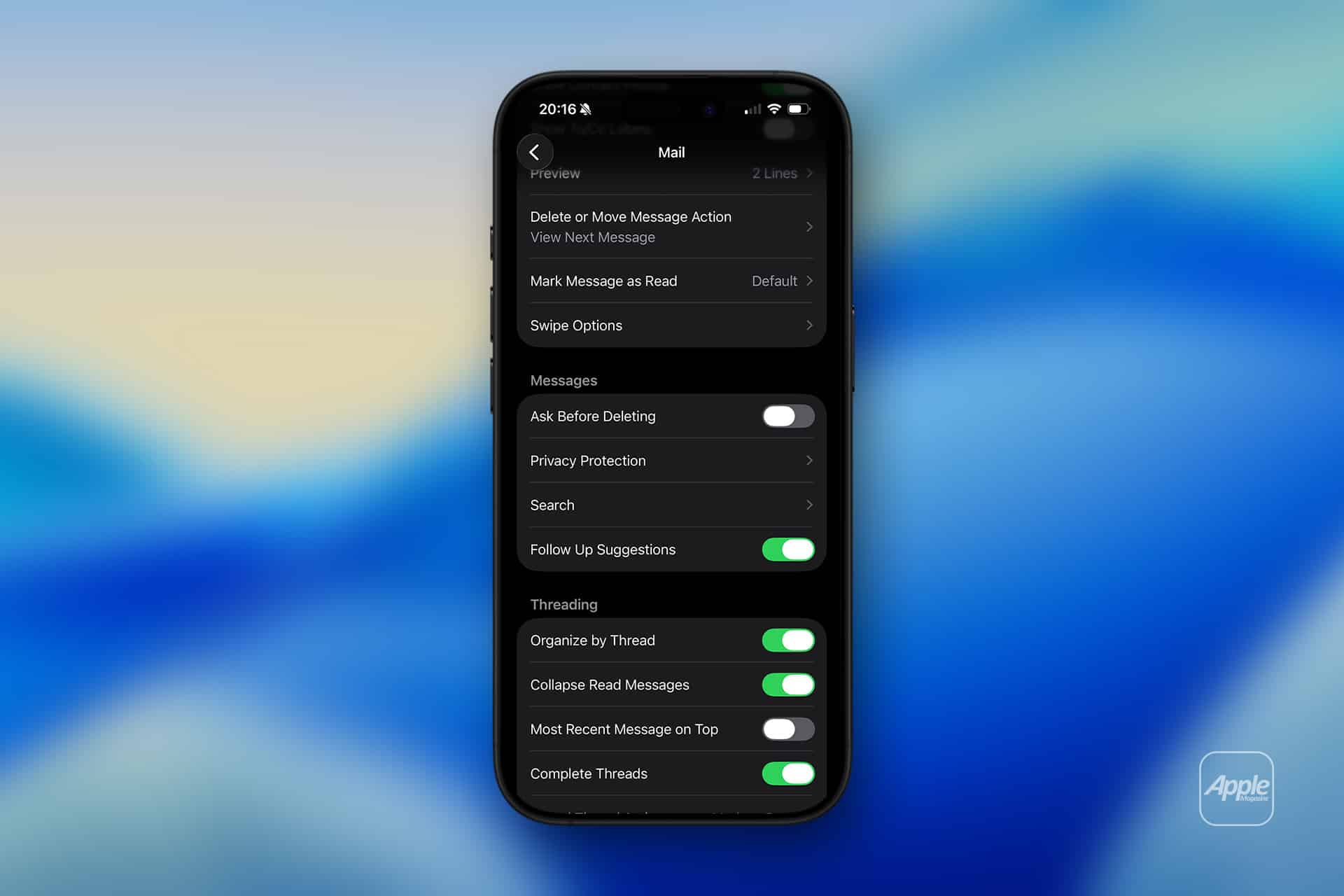
Settings > Mail > Privacy Protection > Turn On Protect Mail Activity
This single toggle activates both IP masking and remote content preloading. If you prefer granular control, you can instead manually enable:
Settings > Mail > Privacy Protection > Hide IP Address
Settings > Mail > Privacy Protection > Block All Remote Content
Hide IP Address prevents senders from identifying your network location. Block All Remote Content stops automatic loading of external images entirely. When blocked, the Mail app will prompt you to load images manually.
The key difference between these options is flexibility. Protect Mail Activity allows images to appear normally while still shielding identity. Blocking remote content prevents external images from loading unless you choose to allow them.
The design ensures that privacy is preserved without breaking everyday usability.
Why Tracking Pixels Matter More Than You Think
Many users assume tracking pixels are harmless. In isolation, an email open confirmation might not seem significant. However, aggregated tracking data builds behavior profiles.
Marketers can determine what time you read messages. They can measure how frequently you engage. They can track your activity across devices if identifiers match. Over time, this data feeds into larger advertising systems and behavioral targeting engines.
Even transactional emails, such as shipping confirmations or event registrations, may include remote elements capable of reporting back when opened.
By masking IP addresses and breaking open-tracking reliability, iOS Mail privacy protections reduce the value of passive surveillance. Senders can no longer confidently determine whether a message was opened by a specific person at a specific location.
This matters not just for marketing newsletters but for professional correspondence. Journalists, executives, legal professionals, and everyday users benefit from limiting metadata exposure.
Protecting your IP address is especially relevant. An IP can reveal approximate geographic location and network identity. In certain environments, that information alone can expose patterns about your routines or work location.
Mail privacy disrupts that passive data leakage.
How It Impacts Marketing Metrics
When Apple rolled out Mail privacy protections, marketing analytics shifted immediately. Open rates became less reliable. Campaign measurement strategies had to adapt. Companies that relied heavily on open tracking were forced to rethink engagement measurement.
This did not break email marketing. It recalibrated it.
Click-through tracking remains possible when users interact with links, but passive open detection lost precision. For recipients, this change rebalances the equation. You can read a message without automatically signaling that behavior to the sender.
The broader implication is that privacy protections alter digital measurement norms. Email is no longer a fully transparent tracking surface.
Privacy Activity and Transparency
iOS includes a simple summary that shows how many tracking attempts were blocked.
Settings > Mail > Privacy Protection > View Activity
While it does not display granular sender-level logs, it offers visibility into how often remote content attempts were intercepted. Many users are surprised at how frequently trackers appear, even in routine communications.
This reinforces an important reality: tracking is common, not rare.
Compatibility Across Accounts
Mail privacy protections apply across most accounts configured in the Mail app, including iCloud, Gmail, Exchange, and IMAP accounts. The protection operates at the client level, not the server level.
This means you do not need to configure each account individually. Once enabled on the device, protections extend across accounts accessed through the Mail app.
However, third-party email apps may not apply the same protections. If privacy is a priority, using Apple’s Mail app ensures that system-level safeguards function consistently.
Balancing Functionality and Privacy
There are situations where blocking remote content may affect visual formatting. Some newsletters depend on externally hosted images. In those cases, Mail provides an option to load images manually for trusted senders.
This design keeps control in the user’s hands. Instead of blocking everything permanently or allowing everything automatically, you choose case by case.
For most users, enabling Protect Mail Activity offers the best balance. Emails render normally, while tracking signals remain masked.
Enterprise and Professional Context
In corporate environments, privacy can intersect with compliance requirements. IP masking may influence certain analytics systems. Organizations using enterprise email servers should ensure compatibility with internal policies.
However, from a user perspective, privacy protections operate seamlessly. There is no visible performance degradation in normal use.
Email remains fully functional — attachments download, text displays, replies send — but the silent handshake between tracking pixel and sender is interrupted.
A Larger Shift in Digital Privacy
Mail privacy protections are part of a broader trend in Apple’s operating systems: minimizing passive data collection.
Just as App Tracking Transparency changed how apps request cross-app tracking permission, Mail privacy alters how background content communicates externally. The philosophy is consistent: default to user control.
Email, historically, operated with few protections at the protocol level. It was designed decades ago, long before digital advertising infrastructure matured. iOS privacy enhancements effectively retrofit modern safeguards onto legacy communication systems.
Instead of rewriting email protocols, Apple modifies the client behavior. That subtle change is powerful.
Security Versus Privacy
It’s important to distinguish privacy protections from encryption. Mail Privacy Protection does not encrypt messages end-to-end by default. That depends on the email provider and security standards such as S/MIME.
Privacy protections limit metadata leakage, not message content visibility.
This distinction matters. Privacy reduces exposure to tracking. Encryption secures message content in transit. Both address different layers of digital communication.
For most users, Mail privacy protections represent a meaningful upgrade without additional configuration complexity.
Practical Scenarios
Consider receiving a newsletter from a retailer. Without privacy protection, the moment you open the message, a server logs your IP address, timestamp, and device type. That data may feed into personalized campaigns.
With Mail privacy enabled, the server cannot confidently determine those details. The open event loses precision.
Or imagine receiving an email from a third-party vendor in a professional context. Reading the message does not automatically confirm your availability window or geographic location.
These are small but meaningful shifts in control.
Mail privacy does not disrupt your workflow. It adjusts the background mechanics of how messages interact with external systems.
As email continues to function as a primary communication channel for billions of people, limiting invisible data exchange becomes less about convenience and more about digital boundaries.
Mail remains familiar on the surface. Beneath it, the data trail has been significantly reduced.