

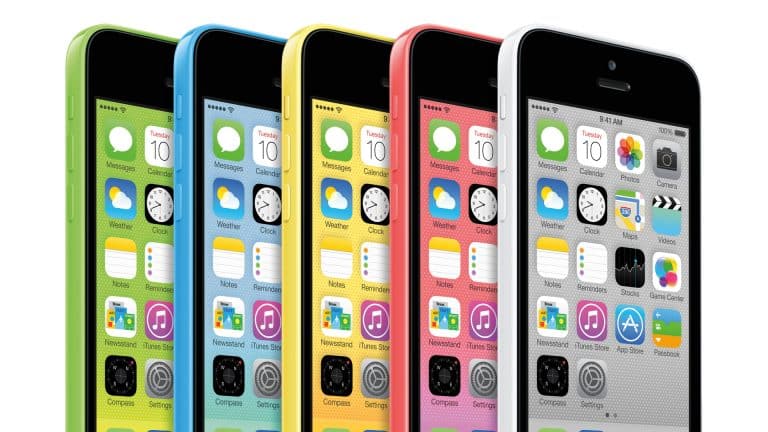
iOS signing changes are closing restore and downgrade paths for several older iPhone and iPad models, affecting users who still keep legacy devices for testing, app compatibility or preservation. The affected versions include older OTA and IPSW builds tied to devices such as iPhone 5, iPhone 5c, the original iPad mini with cellular connectivity and the CDMA iPad 2 Wi-Fi + 3G.
The change does not affect most current iPhone and iPad users. It is aimed at devices that stopped receiving major software updates many years ago. Still, it matters for collectors, developers, repair shops and anyone who maintains older hardware in a working state. Once Apple stops validating a firmware version, Finder, iTunes or Apple Devices for Windows can no longer complete a normal restore to that build.
The newly blocked paths reportedly include IPSW installs of iOS 10.3.3 and iOS 10.3.4 for certain iPhone 5 and iPhone 5c models, OTA installs of iOS 8.4.1 for some legacy iPads, IPSW installs of iOS 9.3.5 and iOS 9.3.6 for cellular iPad mini and iPad 2 variants, and OTA installs of iOS 6.1.3 for the CDMA iPad 2. Apple has not issued a public explanation for the timing.
iOS Signing Controls What Can Be Restored
iOS signing is the server-side verification step Apple uses when a device is restored or updated. When a user attempts to install firmware, Apple’s servers validate that the version is still authorized for that specific hardware. If the version is no longer signed, the restore fails before the software can be installed.
That system is common across modern Apple devices. It helps prevent users from rolling back to versions with known security issues, and it gives Apple more control over the active software base. On current devices, the company often stops validating a previous build soon after releasing a newer update with security fixes.
This case is different because the affected devices are much older. The iPhone 5c launched in 2013, the iPhone 5 in 2012, the original iPad mini in 2012 and the iPad 2 in 2011. These products are no longer part of the normal upgrade cycle, and many of the software versions involved are more than a decade old.
That makes the change less visible to mainstream users but more frustrating for a small group. A device running one of these versions may continue working as it is, but if it needs to be erased, restored or recovered after a failure, the owner may lose access to the exact build that was previously available.


Which Devices Are Affected
The signing changes apply only to specific legacy device and firmware combinations. The affected list includes iPhone 5 GSM and CDMA models, with OTA installs of iOS 8.4.1 and IPSW installs of iOS 10.3.3 and iOS 10.3.4 no longer validated. The iPhone 5c GSM and CDMA models are also affected for IPSW installs of iOS 10.3.3.
The original iPad mini Wi-Fi + Cellular and the iPad mini Wi-Fi + Cellular MM are affected for OTA installs of iOS 8.4.1 and IPSW installs of iOS 9.3.5 and iOS 9.3.6. The CDMA iPad 2 Wi-Fi + 3G is affected for OTA installs of iOS 6.1.3 and iOS 8.4.1, plus IPSW installs of iOS 9.3.5 and iOS 9.3.6.
The distinction between OTA and IPSW matters. OTA refers to an over-the-air update path delivered directly on the device. IPSW refers to firmware files used for restores through a Mac or PC. Apple can stop validating one type of install path without necessarily changing every other path for every model.
Users should also note that older iPads ran iOS before Apple split iPadOS into its own platform with iPadOS 13. That is why these older tablets are still listed under iOS versions rather than iPadOS.
Why This Matters for Legacy Hardware
For most people, nothing changes. These devices are already far outside modern software support, and many current apps, websites and services no longer work well on them. App Store compatibility, browser certificates, security standards and web requirements have moved far beyond the limits of these older systems.
The effect is different for preservation and testing. Some developers keep older devices to check legacy app behavior. Collectors may want to preserve a specific software version because it matches a device’s original era. Repair shops may use older firmware during troubleshooting. Jailbreak researchers and security hobbyists may also rely on restore paths that are now closed through standard Apple tools.
The loss of a restore path can make an old device more fragile. If the system becomes corrupted, enters a boot loop or needs a full erase, the user may not be able to return it to the same version. That changes the risk of experimenting with old hardware, especially when the device is already rare or kept for historical reasons.
There is also a preservation argument. Older iOS releases are part of mobile software history, and Apple’s signing system means those versions cannot always be installed freely even when firmware files still exist online. Once validation is removed, the file alone is not enough for a normal restore.

A Small Change With a Long Tail
Apple’s decision fits its long-standing software control model. The company prefers users to stay on newer, safer versions where possible. It also has little reason to maintain every restore path for hardware that has been out of the mainstream for more than a decade.
Still, legacy signing changes carry a different tone than blocking a downgrade from a current release. When Apple stops validating last month’s iOS build, the goal is usually to keep users on a recent security update. When it closes paths for iOS 6, iOS 8, iOS 9 or iOS 10 on old hardware, the effect is more about preservation, repair and historical access.
The safest move for anyone maintaining affected devices is to avoid unnecessary restores. A working device should be backed up where possible, kept charged and treated carefully if the installed system version matters. Owners should also avoid assuming that downloaded IPSW files will remain installable just because they are still available from mirrors or archives.
The practical takeaway is narrow but real: these iPhones and iPads can keep running as they are, but several official roads back to older software are now closed. For a device sitting in a drawer, that may mean nothing. For a collector’s unit, a test bench or a preserved piece of early iOS history, it changes how risky every restore attempt becomes.