


iPhone camera formats sit inside the Camera settings, yet they shape every image captured. File size, color depth, editing flexibility, and cross-platform compatibility all depend on this choice. For casual users, the default works well. For photographers and video creators, selecting the right format can significantly change how images behave later in editing software or when shared across devices.
Apple organizes camera formats into two main approaches: High Efficiency and Most Compatible. On Pro models, additional Pro formats expand capabilities even further.
Choosing Between High Efficiency and Most Compatible
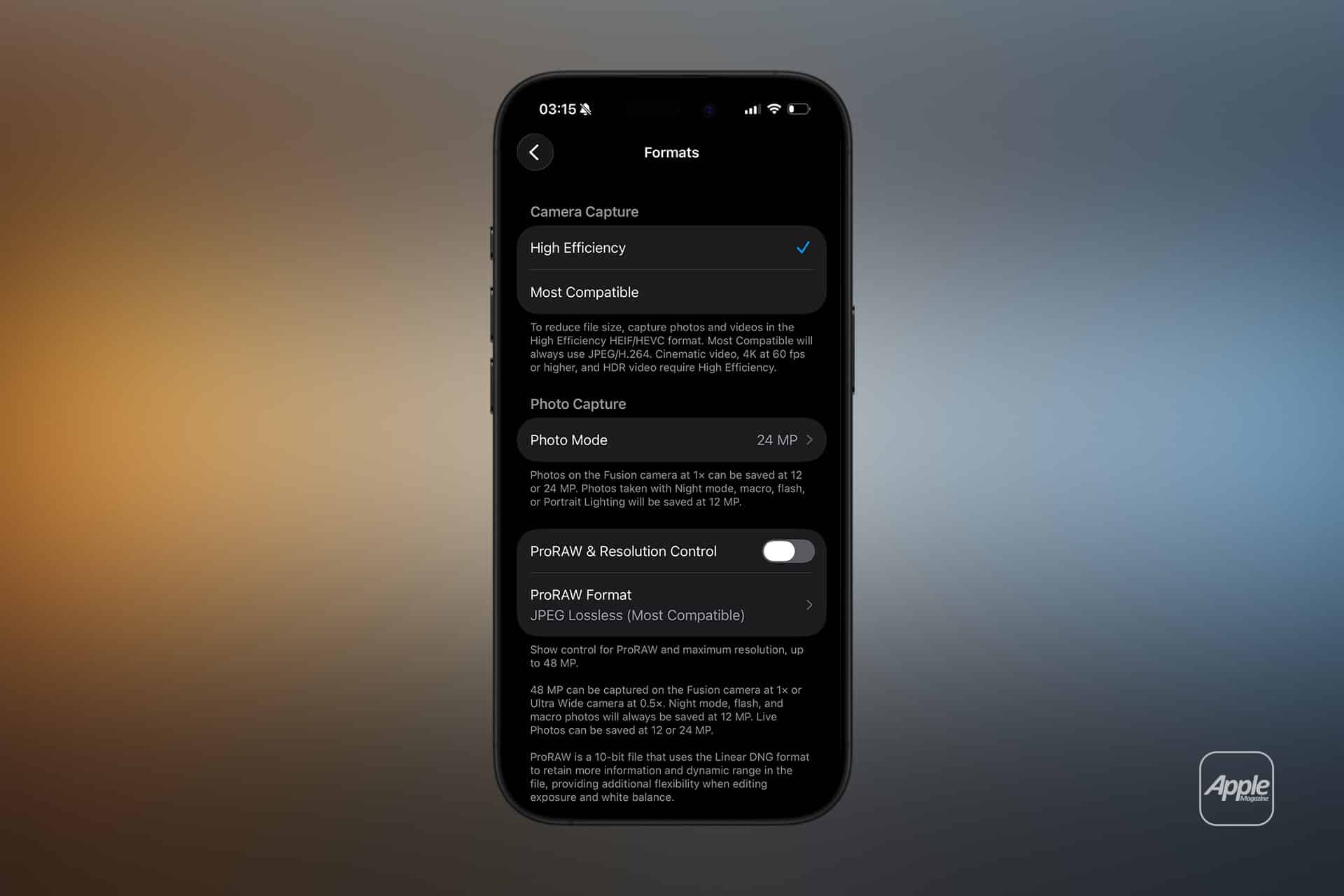
iPhone camera formats can be adjusted through:
Settings > Camera > Formats
High Efficiency uses HEIF (High Efficiency Image Format) for photos and HEVC for videos. Most Compatible uses JPEG for photos and H.264 for videos.
HEIF reduces file size while preserving image quality. It stores more color information in a smaller footprint compared to JPEG. For users who shoot frequently or rely on iCloud storage, this format conserves space without visible quality loss in everyday viewing.
JPEG, on the other hand, prioritizes compatibility. Nearly every platform, operating system, and editing tool supports JPEG without conversion. If photos are regularly transferred to non-Apple devices or uploaded to legacy systems, JPEG ensures fewer surprises.

File Size and Storage Impact
iPhone camera formats directly affect storage consumption. HEIF images can be roughly half the size of equivalent JPEG files while maintaining similar visual detail. For users capturing hundreds of photos per week, this difference accumulates quickly.
Videos recorded in HEVC also benefit from improved compression efficiency. The result is longer recording capacity before storage fills up.
However, when sharing HEIF or HEVC files with older systems, automatic conversion may occur. iOS handles this seamlessly in many cases, converting to JPEG when necessary during export.
ProRAW for Advanced Editing
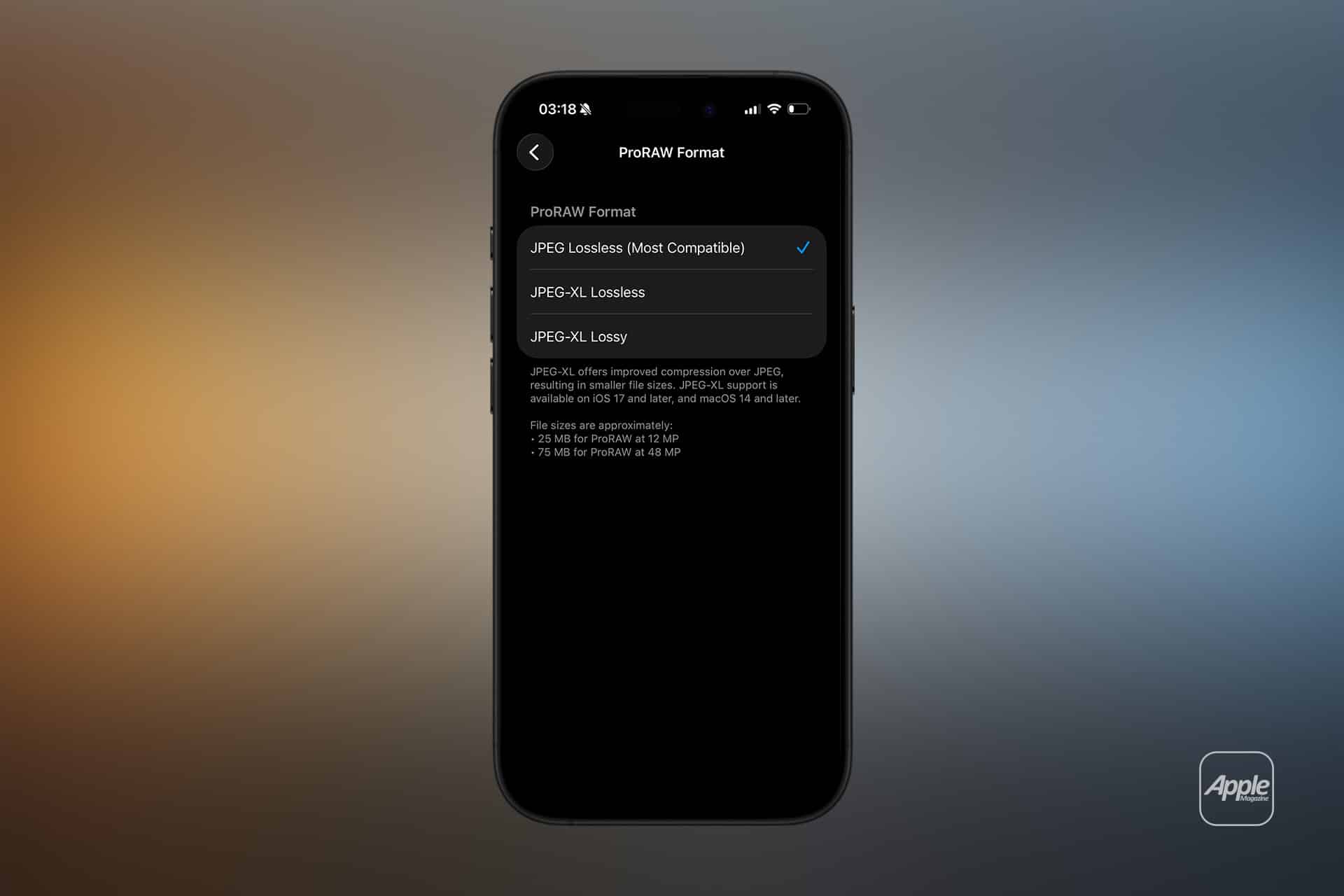
On Pro models, iPhone camera formats expand to include Apple ProRAW.
Settings > Camera > Formats > Apple ProRAW
ProRAW combines RAW image data with Apple’s computational photography processing. Unlike standard HEIF or JPEG images, ProRAW preserves significantly more detail, especially in highlights and shadows.
File sizes increase substantially when using ProRAW. A standard HEIF photo may occupy a few megabytes, while ProRAW files can be several times larger. This format is designed for photographers who edit extensively in apps such as Lightroom or professional desktop software.
ProRAW allows greater exposure adjustment, color grading flexibility, and white balance correction without degrading image quality.
ProRes for Professional Video
iPhone camera formats on higher-end models also include Apple ProRes for video capture.
Settings > Camera > Formats > Apple ProRes
ProRes records video with lower compression compared to HEVC. This preserves more detail for post-production editing. The tradeoff is significant storage usage.
ProRes is typically used in professional production environments where footage will be color graded or integrated into larger editing workflows.
Everyday Photography vs Professional Workflows
For most users, High Efficiency provides the best balance between quality and storage efficiency. HEIF preserves color depth and dynamic range while keeping files manageable.
JPEG remains useful when sharing images directly with systems that do not fully support HEIF. Switching to Most Compatible can simplify cross-platform exchange.
Professional creators often activate ProRAW selectively rather than leaving it permanently enabled. This avoids excessive storage use while preserving flexibility when needed.
Compatibility Settings for Transfers
iPhone camera formats interact with transfer settings as well.
Settings > Photos > Transfer to Mac or PC
Choosing Automatic allows iOS to convert HEIF and HEVC files to compatible formats when exporting. Selecting Keep Originals preserves the original file format during transfer.
This setting matters when importing photos into older editing software or Windows environments without native HEIF support.

Video Compression Choices
Beyond still photography, iPhone camera formats influence video workflow decisions. HEVC maximizes storage efficiency for everyday clips. ProRes is suited for projects requiring advanced editing.
The decision should align with the final destination of the footage — social media uploads, archival storage, or professional editing timelines.
Balancing Quality and Practicality
iPhone camera formats represent a balance between compression efficiency and creative flexibility. HEIF and HEVC are optimized for modern workflows within the Apple ecosystem. JPEG and H.264 prioritize universal compatibility. ProRAW and ProRes expand capabilities for advanced creators willing to manage larger file sizes.
Selecting the appropriate format ensures that storage, editing flexibility, and cross-platform sharing align with the intended use of each image or video captured on iPhone.