

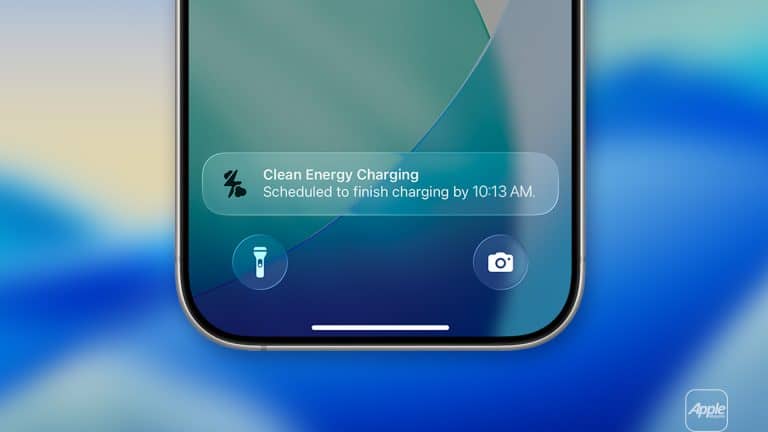
iPhone clean energy settings are designed to make charging a little smarter when the local power grid is using cleaner energy. Clean Energy Charging does not make the iPhone charge faster, and it is not mainly a battery-health feature. Its purpose is environmental: when conditions are right, iPhone can delay part of the charge so more of the charging happens during periods of lower carbon emissions.
The feature is available in the U.S. and is turned on by default when setting up an iPhone. It works by using a forecast of carbon emissions for the local energy grid and by learning a user’s charging routine. When iPhone expects it will remain connected long enough, it may temporarily pause charging and finish later, aiming to complete the charge before the user normally needs the device.
That last part is important. Clean Energy Charging is built around predictable habits. It works best when the iPhone is charged in familiar places, such as home or work, and when the daily schedule is consistent enough for the system to understand when the device needs to be ready. If charging habits change, or if the user is traveling, the feature may not engage.
Apple also ties the feature to privacy. The iPhone uses location settings to know when it is in a familiar place and to access the appropriate local carbon-emissions forecast, but Apple says the location information used for Clean Energy Charging is not sent to Apple. The feature relies on the device understanding context without turning charging into a location-tracking service.
How Clean Energy Charging Works
iPhone clean energy charging works quietly in the background. The user plugs in the iPhone as usual. If the device recognizes a familiar charging routine and sees an opportunity to charge during a cleaner energy window, it can temporarily hold the battery below full charge. A notification on the Lock Screen shows when the iPhone is scheduled to finish charging.
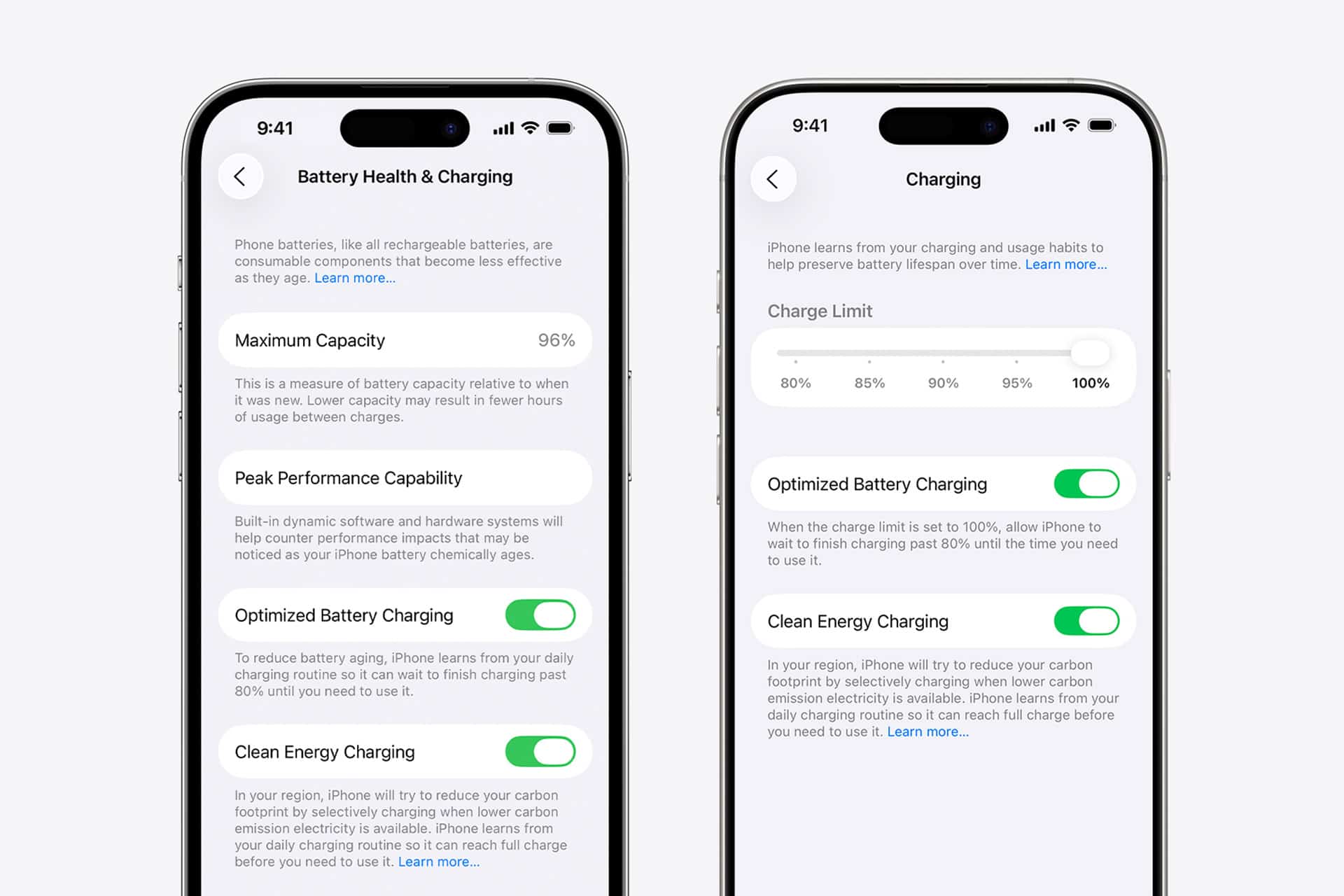
This is similar in spirit to Optimized Battery Charging, but the purpose is different. Optimized Battery Charging is designed to reduce battery aging by limiting the amount of time the battery spends fully charged. Clean Energy Charging is designed to reduce carbon impact by shifting charging to cleaner grid periods when possible. Both features may appear in the same general Battery settings area, but they are not the same tool.
On iPhone 15 models and later, Apple places Clean Energy Charging inside Charging settings. On iPhone 14 and earlier, it appears under Battery Health & Charging. The difference is mostly about how Apple reorganized battery controls for newer models with features such as Charge Limit.
To check Clean Energy Charging on iPhone 15 or later:
Settings > Battery > Charging > Clean Energy Charging
To check Clean Energy Charging on iPhone 14 or earlier:
Settings > Battery > Battery Health & Charging > Clean Energy Charging
If Clean Energy Charging pauses the charge and the iPhone is needed sooner, it can be overridden directly from the Lock Screen. The notification can be touched and held, then the user can choose Charge Now. That makes the feature flexible. It can help reduce carbon impact on normal days without blocking a full charge when plans change.
To charge immediately:
Lock Screen Notification > Touch and Hold > Charge Now

The Feature Depends on Location Settings
iPhone clean energy charging requires certain location settings because the feature needs to know when the device is in a familiar place and which local grid forecast applies. If these settings are off, Clean Energy Charging may not work as expected.
To support Clean Energy Charging:
- Settings > Privacy & Security > Location Services > On
- Settings > Privacy & Security > Location Services > System Services > System Customization > On
- Settings > Privacy & Security > Location Services > System Services > Significant Locations & Routes > On
Those settings help iPhone recognize daily patterns. Clean Energy Charging is not meant to activate everywhere. Apple says it does not engage if charging habits vary or if the user is in a new location. That makes sense because the system cannot confidently delay charging if it does not know when the phone will be unplugged.
This is where some confusion can happen. A user may turn on Clean Energy Charging and never notice it. That does not mean the feature is broken. It may simply not find the right conditions. The iPhone may already be charging during a cleaner period, the schedule may be unpredictable, the device may be away from familiar locations, or location settings may not support the feature.
Clean Energy Charging also should not be judged by battery percentage alone. The user may plug in at night and still wake up to a full charge. The difference is when the device finished the last part of that charge.
Clean Energy Charging Versus Charge Limit
iPhone clean energy settings work alongside newer battery controls, especially on iPhone 15 models and later. Charge Limit lets users choose a charging limit to help reduce long-term battery wear. Optimized Battery Charging learns daily habits to reduce time spent at full charge. Clean Energy Charging shifts charging toward cleaner energy periods when possible.
These features can feel similar because they all affect charging behavior, but each has a different goal. Charge Limit is about long-term battery health. Optimized Battery Charging is about reducing time at 100 percent. Clean Energy Charging is about reducing carbon impact. A user can keep more than one enabled, depending on priorities.
To review charging options on iPhone 15 or later:
Settings > Battery > Charging
For users who want the longest possible battery lifespan, Charge Limit and Optimized Battery Charging are usually more important than Clean Energy Charging. For users who want to reduce the carbon impact of routine charging, Clean Energy Charging is the relevant setting. For users who need the iPhone fully charged at unpredictable times, the feature may feel inconvenient and can be turned off.
This distinction helps avoid a common misunderstanding. Clean Energy Charging is not a magic battery saver. It does not extend daily battery life. It does not make an older battery healthier. It does not improve charging speed. Its benefit is environmental and cumulative, especially when many devices shift small amounts of demand toward cleaner periods.
When to Leave It On
iPhone clean energy charging is easiest to leave on when the daily charging routine is stable. Someone who charges overnight at home and usually wakes at the same time is the ideal case. The iPhone can learn the pattern, delay charging when useful, and still finish before the morning.
It can also work well for people who charge at a desk during regular work hours. If the device often remains plugged in for long periods, the system has more room to choose a cleaner charging window.
The feature is less useful for irregular charging. A student, traveler, shift worker, heavy gamer, creator, delivery driver, or anyone who frequently needs quick top-ups may prefer full control. If the iPhone is often unplugged unexpectedly, Clean Energy Charging may not engage anyway, or the user may need to override it with Charge Now more often.
The best approach is practical. Leave it on if the iPhone still feels ready when needed. Turn it off if it repeatedly interferes with a charging routine. The feature is optional and easy to manage.
To turn it off on iPhone 15 or later:
Settings > Battery > Charging > Clean Energy Charging > Off
To turn it off on iPhone 14 or earlier:
Settings > Battery > Battery Health & Charging > Clean Energy Charging > Off
Small Charging Choices Add Up
iPhone clean energy charging is a quiet feature, not a dramatic one. It does not change the way the device looks. It does not create a new app. It does not demand a new accessory. It simply uses software, grid forecasts, and charging habits to reduce carbon impact when the conditions are right.
That fits Apple’s broader environmental strategy. The company has spent years reducing emissions across materials, manufacturing, shipping, energy use, and recycling. Clean Energy Charging brings part of that effort to daily device behavior. It gives the iPhone a way to participate in cleaner-energy timing without requiring the user to study the local grid.
The impact of one charge session is small. The value comes from scale. Millions of devices making small adjustments can support cleaner-energy use over time, especially as grids add more renewable generation. The feature also makes users more aware that electricity is not equally clean at every hour of the day.
For most people, the setting should be treated as a low-effort environmental option. If it works quietly and the iPhone is ready on time, leave it on. If a full charge is needed sooner, use Charge Now. If the routine is too unpredictable, turn it off. Clean Energy Charging is strongest when it stays invisible, finishing the job without making users think about it.
The best iPhone charging setup is the one that fits daily life. Clean Energy Charging can help reduce carbon impact. Optimized Battery Charging and Charge Limit can help manage long-term battery wear. Fast USB-C charging can help when time is short. Together, they give users more control over how the iPhone charges, how long the battery lasts, and when the device draws power from the grid.