

iPhone keyboard dictation has evolved from a convenience feature into one of Apple’s most meaningful accessibility innovations. Designed initially to simplify text entry, voice typing now serves as a powerful communication tool that enables users of all ages and abilities to interact with technology naturally. From composing messages and emails to drafting notes and documents, dictation transforms spoken words into text instantly, providing an intuitive and efficient alternative to traditional typing.
At its core, iPhone keyboard dictation reflects Apple’s long-standing commitment to accessibility. The feature allows individuals with mobility challenges, tremors, movement disorders, or neurological conditions linked to aging to maintain independence in their digital lives. For many older adults, dictation offers a reliable way to communicate without frustration, ensuring they remain socially active, engaged, and connected with family and friends. What began as a technical capability has become an essential bridge between generations, fostering communication and emotional connection through simple spoken words.
The integration of dictation across Apple devices—including iPhone, iPad, and Mac—extends its value beyond accessibility. With continuous improvements in speech recognition, on-device processing, and artificial intelligence, Apple’s dictation system delivers remarkable accuracy while preserving user privacy. Whether composing a text message on an iPhone or drafting a document on macOS, voice typing enables users to work, communicate, and create effortlessly.

The Evolution of iPhone Keyboard Dictation
Voice typing on the iPhone has progressed significantly since its introduction, evolving alongside Apple’s advances in machine learning and on-device intelligence. Early dictation relied heavily on cloud-based processing, but modern iterations leverage Apple Silicon and Neural Engine technologies to deliver faster, more accurate transcription directly on the device. This shift enhances both performance and privacy, ensuring that sensitive information remains secure while enabling real-time voice input.
As Apple refined its speech recognition capabilities, dictation became increasingly responsive to natural language patterns, punctuation commands, and contextual understanding. Users can now insert punctuation, emojis, and formatting through voice alone, transforming dictation into a comprehensive writing tool rather than a simple transcription feature. The result is a seamless experience that mirrors conversational speech while maintaining clarity and precision in written communication.
For accessibility users, particularly older adults or individuals with motor impairments, these improvements have been transformative. Voice typing eliminates the physical strain associated with prolonged typing, offering a comfortable and efficient method for composing messages, emails, and documents. By reducing barriers to communication, iPhone keyboard dictation empowers users to remain engaged with loved ones and participate fully in digital life.
Apple’s broader ecosystem further amplifies the impact of dictation. Through iCloud synchronization, users can begin composing a message on an iPhone and continue editing it on a Mac or iPad. This continuity ensures that voice input remains consistent across devices, reinforcing Apple’s vision of a unified and accessible digital environment.
How to Enable iPhone Keyboard Dictation
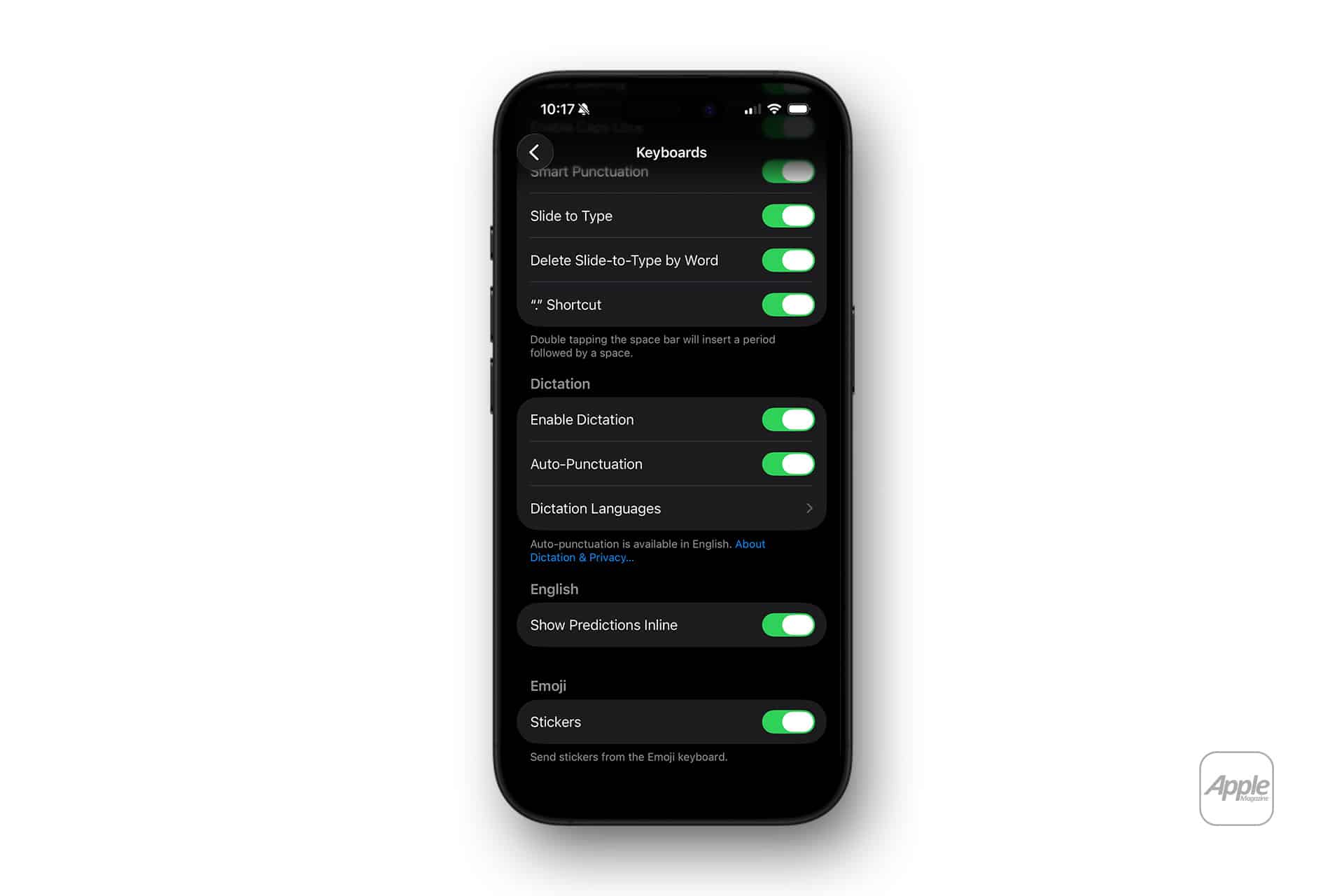
Enabling dictation on the iPhone is straightforward, allowing users to begin voice typing within seconds and tailor the experience to their needs.
Settings > General > Keyboard > Enable Dictation
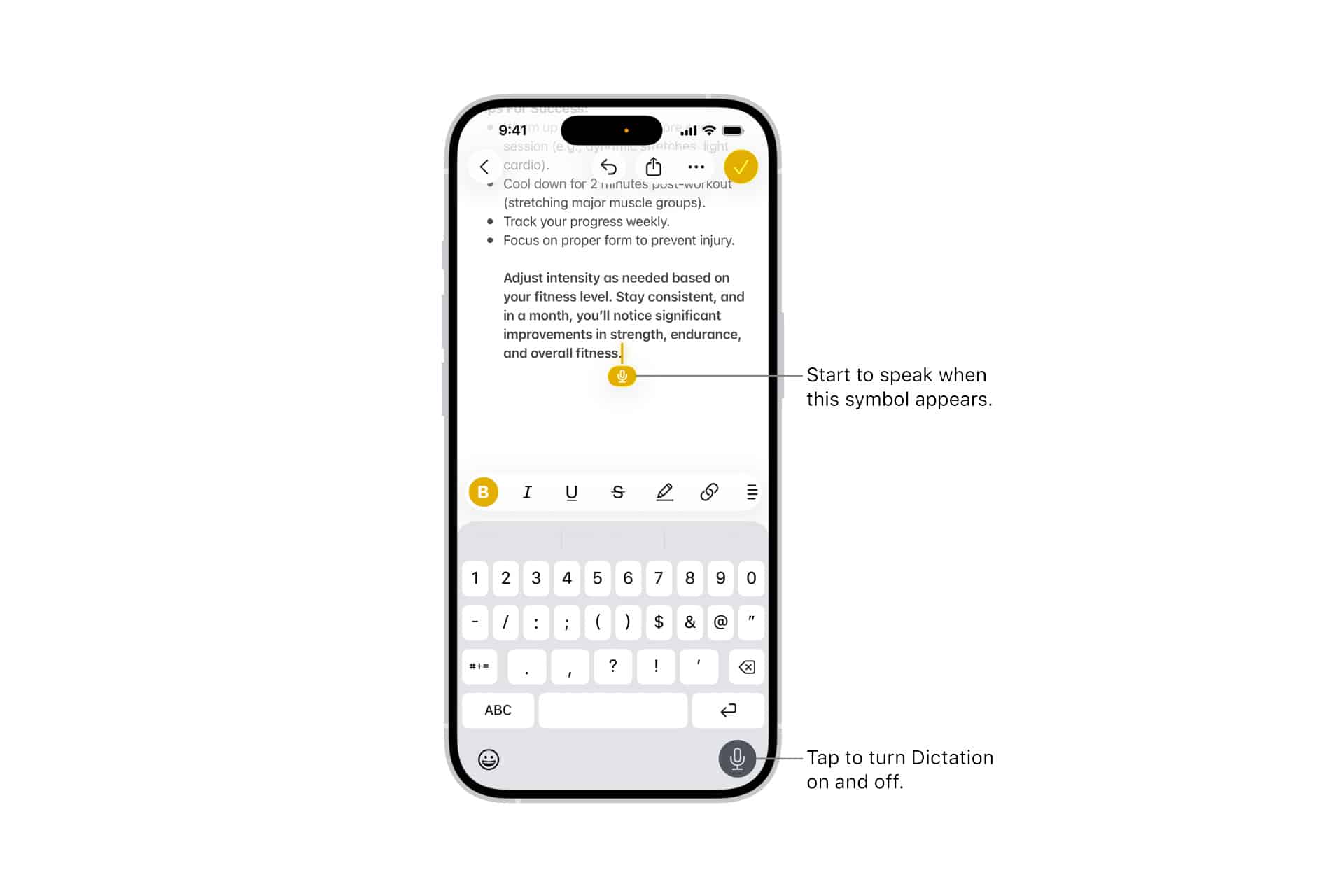
Once activated, a microphone icon appears on the keyboard, enabling users to dictate text in any app that supports typing, including Messages, Mail, Notes, and third-party applications.
Keyboard > Tap Microphone Icon > Begin Speaking
Tapping the microphone initiates voice input. The iPhone transcribes spoken words in real time, allowing users to compose messages, emails, or notes effortlessly. Punctuation can be inserted using voice commands such as “period,” “comma,” or “new line.”
Settings > Accessibility > Spoken Content > Turn On
Accessibility features enhance the dictation experience by supporting spoken feedback and improving usability for individuals with visual or cognitive impairments.
Settings > Siri & Search > Listen for “Siri”
Activating Siri complements dictation by enabling voice-driven tasks, such as sending messages, creating reminders, or composing emails without manual interaction.
Dictation on macOS extends the same capabilities to desktop workflows.
System Settings > Keyboard > Dictation > Turn On
With dictation enabled on macOS, users can compose documents, emails, and messages using voice input, ensuring continuity across Apple devices.
Accessibility, Independence, and Social Connection
iPhone keyboard dictation represents more than technological convenience; it embodies a commitment to inclusive design. For individuals with tremors, arthritis, or neurological conditions, traditional typing can present significant challenges. Voice typing removes these barriers, offering a reliable and comfortable method of communication that preserves independence and dignity.
For older adults, dictation serves as a gateway to digital engagement. The ability to send messages, participate in group conversations, and communicate with family members fosters emotional connection and social inclusion. As technology becomes increasingly central to daily life, tools like dictation play a critical role in ensuring that no one is left behind.
In many households, dictation has become a shared experience. Grandparents compose heartfelt messages to grandchildren, caregivers assist loved ones with communication, and families remain connected across distances. These moments illustrate the profound human impact of accessibility features, transforming devices into instruments of connection rather than mere tools.
Apple’s emphasis on accessibility extends across its ecosystem, with features such as Voice Control, Live Speech, and AssistiveTouch complementing dictation. Together, these innovations create a comprehensive environment designed to empower users of all abilities, reinforcing Apple’s philosophy that technology should be accessible to everyone.
Improving Accuracy and Performance Across Devices
Modern dictation technology benefits from Apple’s continuous investment in machine learning and on-device processing. The Neural Engine enables real-time transcription with impressive precision, recognizing natural speech patterns and adapting to individual voices over time. This personalized approach improves accuracy and responsiveness, ensuring that dictation remains reliable in diverse environments.
Environmental factors, such as background noise and microphone placement, can influence performance. Apple devices incorporate advanced microphone arrays and noise-cancellation technologies to enhance clarity, enabling accurate transcription even in busy surroundings. These innovations ensure that voice typing remains practical and dependable across a wide range of scenarios.
Dictation also supports multilingual input, allowing users to switch seamlessly between languages. This capability reflects Apple’s global reach and commitment to inclusivity, enabling communication across cultures and communities. For multilingual families and professionals, voice typing simplifies cross-language communication and expands opportunities for collaboration.
As artificial intelligence continues to evolve, dictation is becoming increasingly context-aware, capable of recognizing conversational nuances and adapting to individual writing styles. These advancements reinforce dictation’s role as a foundational feature within Apple’s ecosystem, bridging accessibility, productivity, and communication.
Voice Typing as a Bridge Between Technology and Humanity
The significance of iPhone keyboard dictation extends beyond efficiency and convenience. It represents a convergence of technology and humanity, enabling users to express themselves naturally and maintain meaningful connections. In an era defined by digital communication, voice typing ensures that individuals of all ages and abilities can participate fully in the modern world.
For older adults and individuals with mobility challenges, it offers independence and accessibility. For families separated by distance, it provides a simple yet powerful means of staying connected. Each spoken word transformed into text reflects Apple’s commitment to inclusive innovation and human-centered design.
As Apple continues to refine speech recognition and accessibility technologies, iPhone keyboard dictation remains a cornerstone of its ecosystem. By empowering users to communicate effortlessly, the feature reinforces the idea that technology should not only simplify tasks but also strengthen relationships, foster inclusion, and bring people closer together.