

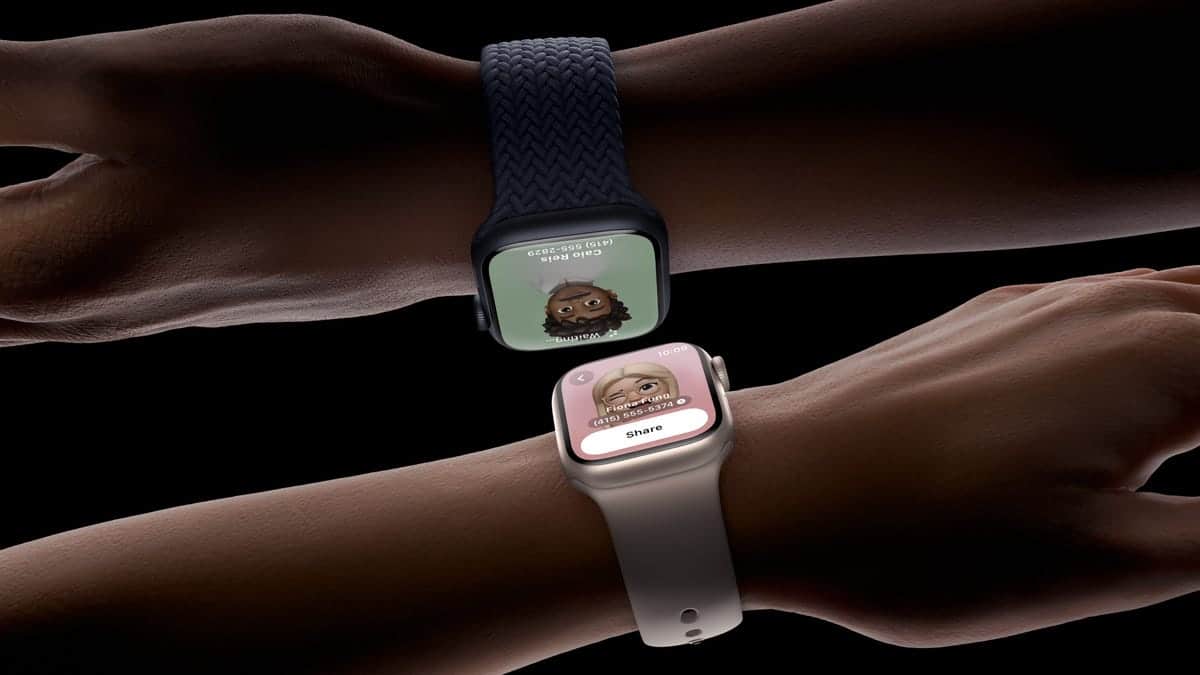
Apple introduced NameDrop as part of iOS 17, bringing a new way to share contact information between iPhones and compatible Apple Watches simply and securely. Rather than manually entering or exchanging contact cards, users can share phone numbers, emails, and Contact Posters by bringing devices near each other and choosing “Share” or “Receive Only.”
How NameDrop Works
NameDrop uses proximity sensors and AirDrop technology to initiate contact sharing. To use it, both devices must be running iOS 17.1 or later (or watchOS 10.1 or later for Apple Watch models supported by the feature) and have AirDrop enabled. When two compatible devices are held close — typically a few centimeters apart at the top of the iPhone or near the Apple Watch — a name exchange interface appears on both screens. Users can then choose to send their contact info, receive the other’s, or do both.
The interface displays your Contact Poster, allowing you to control what details are shared. You can edit your Contact Card before sharing and select which phone number or email you want to send. If you or a friend already have each other in Contacts, NameDrop can update existing entries based on the new information you share.

Setting Up and Using NameDrop
Getting started with NameDrop is easy:
- Ensure AirDrop is enabled: Go to Settings > General > AirDrop, then enable Bringing Devices Together. Both Bluetooth and Wi-Fi should be on for the best experience.
- Hold the devices close: Bring two iPhones (or an iPhone and Apple Watch) nearer at the top to activate NameDrop. A glowing animation indicates the connection is ready.
- Choose share or receive: Tap Share to send your chosen contact details, Receive Only to accept their information, or both if you want a mutual exchange.
NameDrop works instantly and locally; it does not automatically broadcast your contact info and requires deliberate user confirmation on both sides to complete the exchange.
Security and Privacy Considerations
Despite occasional concerns and warnings about digital safety, NameDrop is built with privacy safeguards. Simply bringing your iPhone or Apple Watch next to another device won’t share anything unless:
Your device is unlocked > You confirm the share or receive action > You tap to accept the information.
A stranger cannot extract your contact data without your explicit consent. Even the brief proximity isn’t enough to complete a transfer — both devices must be unlocked and the user must choose to share.
Advantages of NameDrop
NameDrop simplifies networking and quick contact exchange in real life, especially compared with typing numbers manually or opening menus to send a contact via traditional AirDrop. Users consistently highlight how natural the gesture feels once devices are brought together and confirmed.
Limitations and Compatibility
NameDrop requires relatively recent software and compatible hardware, and it’s primarily a proximity-based feature. In some cases, users have reported it doesn’t trigger reliably — especially on older iPhone models or if AirDrop settings aren’t properly configured — but the underlying technology is the same as AirDrop and Contact Posters.
Turning Off NameDrop
If you prefer not to use NameDrop, you can disable it entirely:
Open Settings > Go to General > AirDrop > Toggle Bringing Devices Together off
This also affects other AirDrop proximity sharing, so you might decide to re-enable it later when needed.
NameDrop remains one of the most intuitive ways to share and receive contact information — especially in face-to-face encounters where users want simplicity and full control over what they exchange.


