

iPhone sensor calibration is one of those things you rarely think about — until something feels off. Maybe the screen doesn’t rotate smoothly. Maybe the compass seems slightly inaccurate. Maybe a fitness app tracks steps inconsistently. Behind all of that are tiny motion sensors constantly adjusting themselves.
Inside every iPhone are three key motion-related sensors: the gyroscope, the accelerometer, and the magnetometer, which powers the compass. Together, they help your iPhone understand movement, orientation, direction, and even spatial awareness. And unlike older devices from years ago, modern iPhones recalibrate these sensors automatically.

What iPhone Motion Sensors Actually Do
The accelerometer measures linear movement. It detects when you tilt your phone, shake it, or move it forward. It’s what allows the screen to rotate from portrait to landscape and helps track steps in fitness apps.
The gyroscope measures rotational movement. It detects how your phone twists and turns in space. This is essential for smooth gaming controls, augmented reality experiences, and camera stabilization.
The magnetometer works like a digital compass. It reads magnetic fields to determine which direction your phone is facing. Combined with GPS data, it allows Apple Maps and other navigation apps to show your orientation accurately.
All three sensors constantly share data with iOS. Instead of operating independently, they work together in a system called sensor fusion. That combination is what makes movements feel smooth and precise.
How iPhone Sensor Calibration Happens Automatically
Modern iPhones do not require manual calibration in most cases. iOS recalibrates motion sensors continuously while you use the device.
Every time you walk with your iPhone, rotate it, drive with navigation open, or use motion-heavy apps, the system compares sensor readings against expected patterns. If small inconsistencies appear, iOS adjusts the baseline in the background.
Location services also play a role. When GPS, Wi-Fi positioning, and cellular data align with motion readings, the system refines compass and movement accuracy automatically.
If you’ve ever seen a brief message saying “Calibrating” while using Maps, that’s the compass adjusting using real-world movement data. Usually, simply moving your phone in a natural figure-eight motion helps the system collect new magnetic readings.
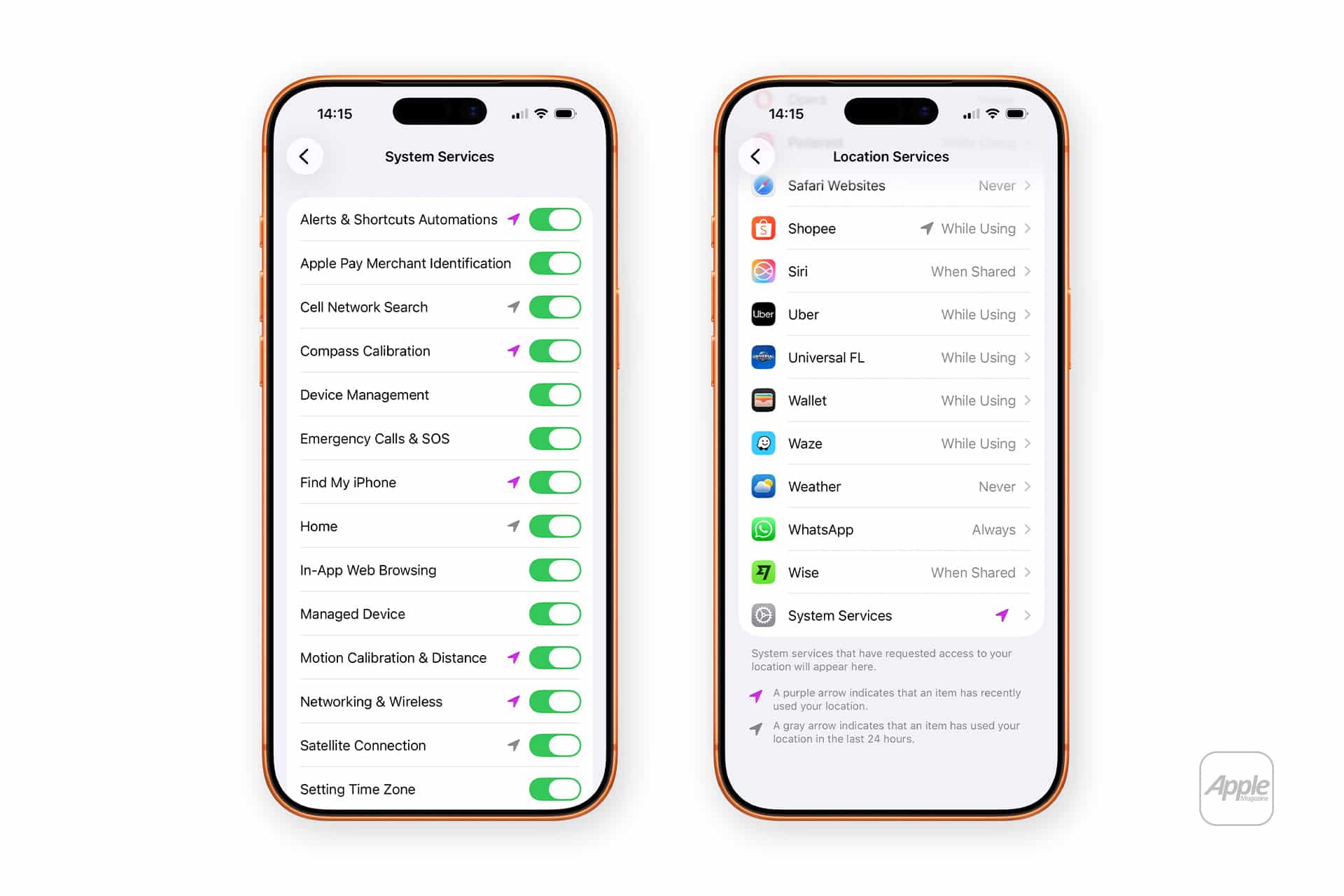
Location accuracy can be improved by making sure the right settings are enabled:
Settings > Privacy & Security > Location Services > System Services > Compass Calibration
When this is on, iOS can use location data to improve magnetic readings.
Why Sensors Sometimes Feel Off
Even though iPhone sensor calibration is automatic, certain situations can affect readings.
Strong magnetic interference from metal objects, car dashboards, speakers, or electronic equipment can temporarily distort compass accuracy. That’s not a permanent problem — it resolves once the interference is gone.
Software updates can also reset sensor baselines. After installing a new iOS version, the system may take a short period to stabilize readings again.
Physical drops or impact damage are different. If the gyroscope or accelerometer hardware is physically affected, recalibration won’t fix it. In those cases, readings remain inconsistent across multiple apps.
If motion tracking feels inaccurate, a simple restart often helps. It clears temporary system states and forces motion services to restart cleanly.
Settings > General > Shut Down
Then power the device back on.
In rare cases where location feels persistently wrong, resetting location settings can help.
Settings > General > Transfer or Reset iPhone > Reset > Reset Location & Privacy
This does not erase your data, but it resets permissions and recalibrates certain background services.

How Sensor Fusion Keeps Everything Aligned
What makes iPhone sensor calibration impressive isn’t a single sensor. It’s how they blend together. The accelerometer measures movement. The gyroscope refines rotation. The magnetometer checks direction. GPS confirms location. iOS merges all of that into a single motion profile.
This constant comparison is why iPhone orientation feels stable when you tilt the device slowly and responsive when you move it quickly. It’s also why augmented reality apps can place objects consistently in physical space.
Unlike older phones that required manual calibration steps, today’s iPhones recalibrate naturally as part of daily use. Walking outside, navigating with Maps, or even just rotating the screen feeds the system fresh data.
Most users never notice it happening. And that’s the point. The sensors adjust quietly, keeping direction accurate and motion smooth without asking for attention — just responding as you move through the day.

