

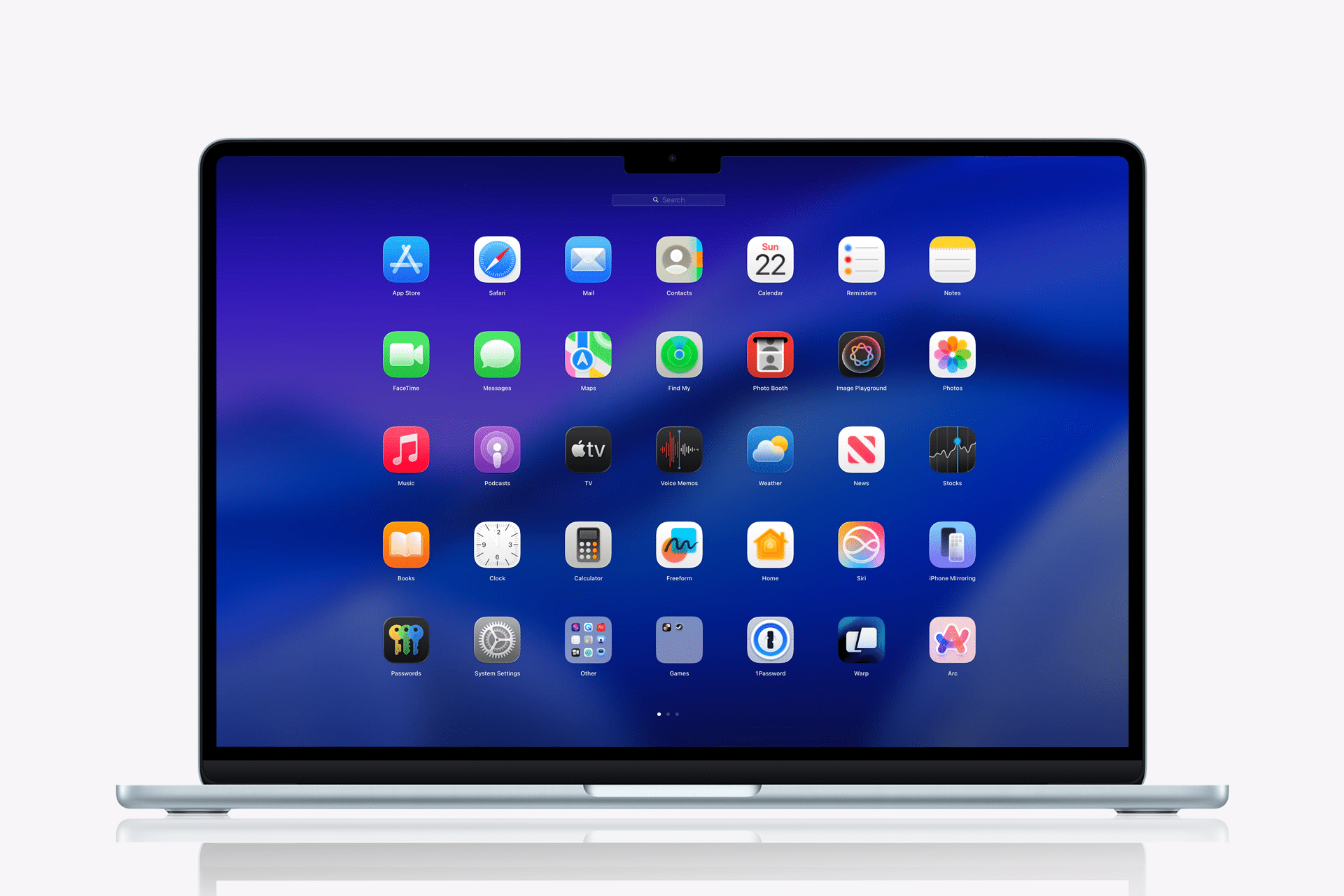
Apple removed Launchpad in macOS 26 Tahoe, and macOS 27 Golden Gate is not bringing it back. For many Mac users, that is one of the more frustrating signs that Apple still sees Launchpad as a feature the Mac has outgrown, even as a vocal group of users keeps asking for its return.
Launchpad was never the most advanced Mac feature, but it served a simple purpose. It gave users a full-screen grid of installed apps, with folders, pages, trackpad gestures, hot-corner access, and a visual layout that felt familiar to anyone who also used iPhone or iPad. For casual users, it was an easy way to find apps without digging through Finder. For organized users, it became a carefully arranged workspace.
macOS 26 replaced that experience with a new Apps view connected more closely to Spotlight and app search. Apple’s logic is easy to understand. Search is faster, alphabetical sorting is cleaner, and Spotlight has become a stronger productivity tool. But the complaints around Launchpad show that speed was not the only reason people used it.
Launchpad Was More Than an App Grid
The frustration over Launchpad’s removal comes from how personal the feature became. Some Mac users did not simply open Launchpad occasionally. They built habits around it.
Users had folders arranged by category. Some used Launchpad with a hot corner. Others used the trackpad pinch gesture to reveal all apps instantly. Some kept the Dock clean and treated Launchpad as their main app browser. For people coming from iPhone or iPad, Launchpad was also one of the few parts of macOS that felt immediately familiar.
That is why the replacement has not satisfied everyone. A searchable Apps interface may be efficient if the user already knows the app’s name. It is less satisfying when the user wants to browse visually, remember an app by icon, organize tools by category, or keep a personal layout.
Several complaints on Apple’s own support forums and Mac communities make the same point: Launchpad’s value was not only opening apps quickly. It was the way it let people organize and scan apps visually. Removing it took away a workflow, not only an icon.

macOS 26 Started the Backlash
The backlash began with macOS 26 Tahoe. After updating, users noticed that Launchpad had disappeared and that Apple’s new Apps interface had taken its place. Some complained that the new view felt narrower, less flexible, and less useful for people with large app libraries.
One of the repeated complaints is that the replacement works better as a search tool than as a launcher. That may be fine for users who live in Spotlight, Raycast, Alfred, or keyboard-driven workflows. It is less ideal for users who prefer visual browsing.
Another complaint is that the new Apps experience can feel crowded by utility apps, iPhone apps, helper apps, or software the user rarely launches manually. Launchpad allowed folders and page layouts that hid some of that clutter. The new approach makes Apple’s organization feel more imposed.
This is where the change feels different from many macOS updates. Apple did not simply redesign Launchpad. It removed the old behavior and replaced it with a new philosophy: search first, visual organization second.
macOS 27 Keeps Apple’s New Direction
macOS 27 Golden Gate does not appear to reverse the decision. Apple is refining the Mac around Apple silicon, AI features, performance, Liquid Glass improvements, stronger Spotlight behavior, and newer system interactions. Launchpad’s return is not part of that story.
That suggests Apple sees the macOS 26 change as intentional, not experimental. The company appears to be moving Mac app launching toward Spotlight, search, Apps view, Siri AI, App Intents, and systemwide intelligence. In that future, the old full-screen grid may look redundant from Apple’s perspective.
The problem is that redundancy depends on the user. For someone who types an app name into Spotlight, Launchpad may seem unnecessary. For someone who likes spatial memory, folders, icons, and gestures, Launchpad did something different.
Apple has made similar bets before. It removes or changes features when it believes a newer behavior is better for the long-term system. Sometimes users adapt. Sometimes third-party utilities fill the gap. Sometimes Apple quietly restores an option after enough complaints. With Launchpad, macOS 27 suggests Apple has not been convinced.
The Replacement Still Feels Less Personal
The new Apps interface has advantages. It can be cleaner, more searchable, and easier to sort. It fits better with Spotlight. It can reduce the messy, iPhone-like spread of app icons across pages. For users who never liked Launchpad, the change may even feel overdue.
But the complaints keep coming because Apple removed choice. Users who preferred Spotlight already had Spotlight. Users who preferred the Dock already had the Dock. Users who preferred Finder already had the Applications folder. Launchpad served a separate group of users, and macOS 26 took that option away.
That is the source of the “Why Apple, why?” reaction. It is not only nostalgia. It is the feeling that a harmless, familiar feature was removed when Apple could have kept it as an optional launcher.
This is especially frustrating because Launchpad did not demand much from the user. It sat quietly until needed. It was easy to ignore if someone did not like it. Removing it solved a problem for Apple’s design direction, but it created one for users who had built muscle memory around it.
Third-Party Replacements Are Filling the Gap
The removal has also created a small market for Launchpad replacements. Apps such as Launchie, LaunchNext, AppGrid, and other launchers have tried to recreate parts of the old experience. Some offer grids, folders, shortcuts, fullscreen modes, or alternate app browsing layouts.
Wired recommended Launchie as a free option for users who missed the old behavior, while noting that Apple’s new Apps button, Finder’s Applications folder in the Dock, and other third-party tools can also fill some of the gap. These alternatives help, but they do not fully replace a built-in system feature.
There is also a trust and maintenance issue. Users who relied on Launchpad because it was part of macOS may not want to install another app just to restore basic app launching. Third-party tools can break, change business models, require permissions, or fall behind macOS updates.
The situation became even more awkward when reports surfaced that Apple blocked App Store updates for AppGrid, a third-party app designed to replace Launchpad, because it resembled a feature Apple had discontinued. That kind of decision only fuels frustration: users lose a built-in feature, then replacement apps face review friction.
Apple Wants Mac Launching to Be Smarter
Apple’s larger direction is easy to see. The Mac is moving toward smarter search, faster app discovery, Siri AI, App Intents, and workflows that start from natural language rather than visual grids. In that model, users should not need to browse pages of apps. They should be able to search, ask, automate, or launch from context.
That makes sense for power users and for Apple’s AI strategy. A smarter Spotlight can surface apps, files, actions, messages, settings, and shortcuts from one place. Siri AI can eventually launch or control apps through more natural requests. App Intents can make app functions available without opening the app at all.
But macOS is not only used by power users. It is used by students, parents, creative workers, office teams, retirees, switchers from iPad, and people who simply prefer visual organization. A search-first interface assumes users know what they want before they begin. Launchpad was useful when they did not.
That is why the removal still feels harsh. Apple is optimizing for a future where the Mac is more intelligent. Some users are asking for a familiar tool that already worked.

Apple Could Still Offer a Compromise
The best answer would not require Apple to abandon its new direction. macOS could keep the newer Apps interface while offering an optional Launchpad-style view for users who want it.
Apple could allow folders, icon pages, fullscreen browsing, trackpad gestures, and hot-corner access as an accessibility or personalization option. It could even rebuild Launchpad using the newer Apps interface underneath. The point is not preserving the old code forever. The point is preserving the workflow.
macOS already offers many ways to do the same task. Users can launch apps from the Dock, Finder, Spotlight, Siri, keyboard shortcuts, widgets, Login Items, Automator, Shortcuts, menu bar utilities, and third-party launchers. Keeping a visual app grid would fit that Mac tradition of flexibility.
Instead, Apple appears to be reducing that flexibility in favor of a cleaner, more controlled app-launching model. That may fit the company’s long-term design goals, but it also makes macOS feel a little less personal for users who valued Launchpad’s layout.
Why the Complaints Will Continue
The Launchpad complaints are likely to continue because macOS 27 does not answer the basic user request. Apple improved other parts of the Mac experience, including performance, Liquid Glass readability, AI features, and Apple silicon optimization. But for people who lost Launchpad in macOS 26, Golden Gate does not fix the missing piece.
This is a small issue compared with compatibility, AI support, and the end of Intel Mac updates. But small interface changes often create the strongest reactions because they affect habits. Launchpad was opened with a gesture, a corner, a Dock icon, or pure muscle memory. When that disappears, the Mac feels different every day.
Apple may believe the new Apps interface is cleaner and more modern. Many users may agree. But the company should not ignore the group that used Launchpad because it was visual, organized, and immediate.
macOS 27 not bringing Launchpad back sends a simple message: Apple has moved on. The complaints show many Mac users have not.