

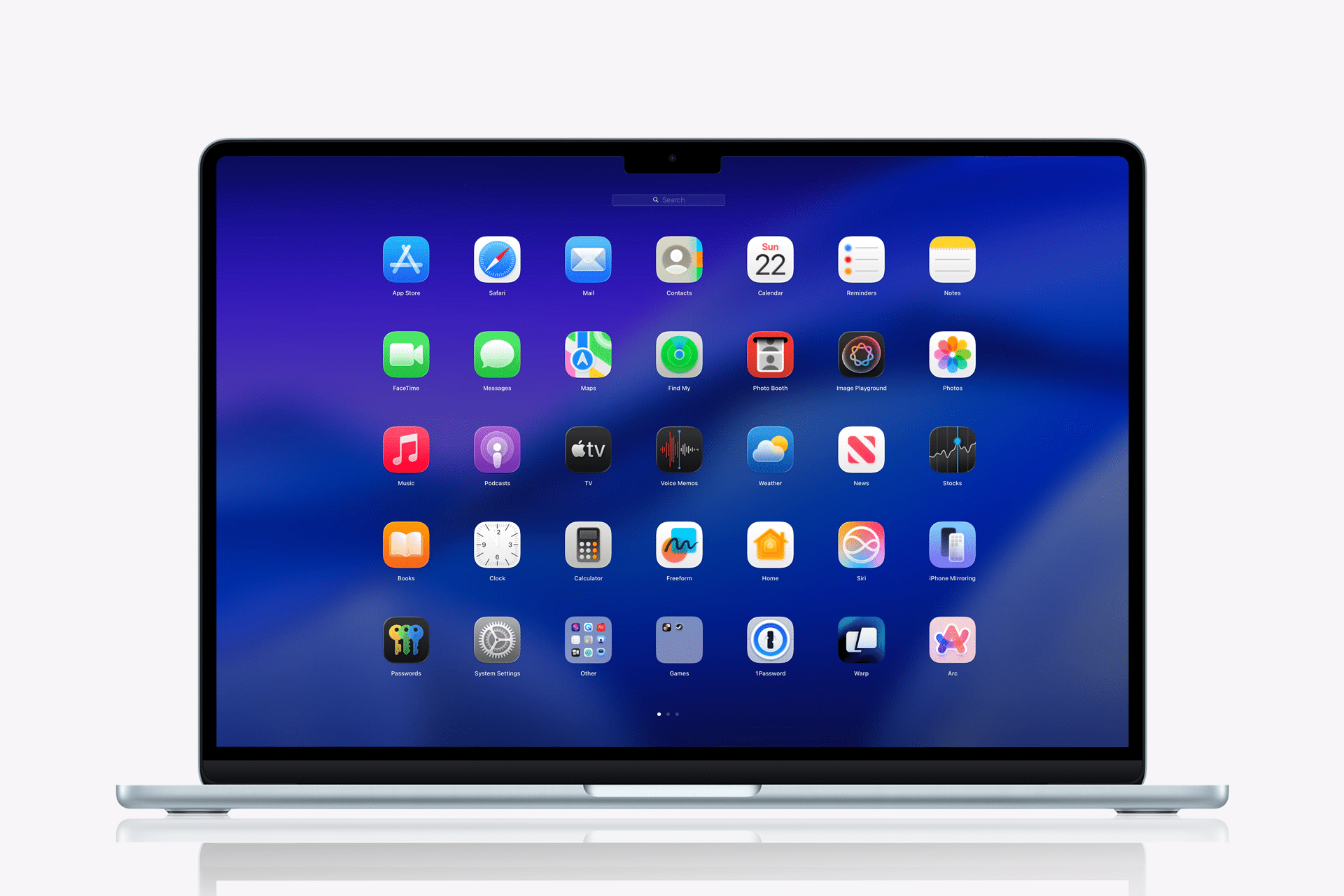
The macOS Launchpad, while not the most prominent feature of the Mac, quietly influenced how users organized and accessed apps. Introduced to bring an iOS-style grid to the Mac, it allowed users to group apps into folders, rearrange icons across multiple pages, and separate daily tools from rarely used utilities. It was simple, visual, and predictable.
Then Apple removed it.
For users who relied on Launchpad as a structured visual app grid, the removal felt abrupt. For some, it was a minor interface adjustment. For others, it was the disappearance of a workflow built over years. What added tension to the situation was not only the removal itself but the reported blocking of third-party replacements that attempted to recreate the same experience.
The result: fewer options for organizing apps visually and uncertainty for developers attempting to fill the gap.
What Launchpad Actually Solved
On the surface, Launchpad looked like a cosmetic bridge between iPhone and Mac. In practice, it solved a real organizational problem.
The Applications folder is functional but static. Spotlight search is powerful but invisible. The Dock is fast but limited in capacity. Launchpad offered a full-screen overview of every installed app, organized spatially.
Users could:
- Move frequently used apps to the first screen
- Create folders for categories like “Design,” “Finance,” or “Utilities”
- Hide bundled apps inside folders
- Separate rarely used software from daily workflows
For creative professionals, developers, and everyday users managing dozens or hundreds of apps, this grid view provided clarity.
Unlike the Dock, which favors speed, Launchpad favored structure. Unlike Spotlight, which favors recall, Launchpad favored visual memory.
It was not flashy. It was practical.


What Replaced Launchpad?
After Launchpad’s removal, Apple leaned more heavily on Spotlight and the Applications folder as primary app access methods.
Spotlight remains one of the fastest ways to launch apps:
Command + Space > Type App Name > Press Return
For users who remember exact app names, this is efficient. But for those who rely on spatial memory or category grouping, it changes the interaction model entirely.
The Applications folder can still be organized in grid view inside Finder. However, Finder lacks the full-screen, folder-based grouping experience Launchpad offered.
The Dock can be expanded, but overloading it reduces visual clarity and defeats its design purpose.
In short, nothing fully replaces Launchpad’s visual organization layer.
Third-Party Launchers and Policy Friction
When Apple removes a feature, the ecosystem often responds. Developers attempt to recreate functionality through third-party apps.
Several launcher-style applications have tried to replicate the grid layout and folder grouping once available in Launchpad. However, reports indicate that Apple has blocked or restricted certain implementations from the Mac App Store.
The friction appears tied to system integration boundaries and private API usage. Apple maintains strict rules about how deeply third-party apps can integrate with system-level functionality.
For developers, this creates uncertainty. Rebuilding Launchpad-like functionality requires accessing app indexing, icon management, and layout control in ways that may not be fully supported under App Store guidelines.
The tension highlights a larger issue: when Apple removes a system feature, it does not automatically guarantee that developers can recreate it independently.
Workflow Disruption
For users who built their productivity around Launchpad, the removal changes habits.
Consider a Mac used for:
- Graphic design
- Video editing
- Audio production
- Office productivity
- Utility management
Grouping Adobe tools into one folder, moving system apps to another, and placing core daily tools front and center created a mental map.
Removing that structure forces adaptation. Some migrate entirely to Spotlight. Others rely on custom folder organization inside Finder. Some attempt third-party launchers outside the App Store.
But none of these options replicate the original behavior precisely.
Why It Matters Beyond Preference
Interface changes always divide users. Some adapt quickly. Others resist.
The frustration around Launchpad is less about nostalgia and more about control. It represented a layer of customization that balanced iOS familiarity with macOS flexibility.
When such features disappear, users perceive a narrowing of interface choice.
Developers face a separate challenge: navigating unclear boundaries about what system behaviors can be replicated without violating policy.
Clarity in App Store guidelines becomes critical when system-level features are removed.
Productivity Versus Minimalism
Apple’s recent macOS design philosophy emphasizes simplicity and reduced redundancy. Features that overlap with Spotlight or Finder may be evaluated for consolidation.
From a design perspective, eliminating duplicate app-launch pathways streamlines the interface.
From a user perspective, diversity of access methods enhances flexibility.
The debate often centers on whether simplicity should replace optional structure.
Workarounds in the Current macOS Environment
While Launchpad itself is gone, users can approximate some functionality.
Creating categorized folders inside Applications:
Finder > Applications > Create Folder > Drag Apps
Using Stacks on the Desktop:
Right-click Desktop > Use Stacks
Leveraging third-party tools outside the Mac App Store if compatible.
However, these are adaptations, not replacements.
The absence of a native full-screen app grid remains noticeable for those who relied on it.

The Developer Angle
Developers building productivity tools face a dilemma. When attempting to replicate removed functionality, they must avoid restricted APIs and maintain compliance with evolving policies.
The uncertainty discourages innovation in certain interface categories.
If system features can be removed while replacements are restricted, developers operate within narrower creative boundaries.
Users ultimately feel the impact through reduced choice.
macOS Evolution and User Expectations
macOS continues evolving toward tighter integration with Apple Silicon, improved performance, and system-level efficiency.
Interface decisions reflect internal priorities around consistency and maintainability.
Yet the reaction to Launchpad’s removal demonstrates that seemingly minor features can anchor deeply ingrained workflows.
Productivity tools do not need to dominate keynote presentations to matter.
Launchpad was not revolutionary. It was reliable.
When reliability disappears without an equivalent option, frustration follows.
The removal itself is not controversial in isolation. Blocking attempts to recreate it amplifies concern. Mac users have historically valued flexibility. Any perception of reduced customization generates friction.
The conversation around macOS Launchpad is less about one grid view and more about the boundaries of user control within Apple’s ecosystem.