

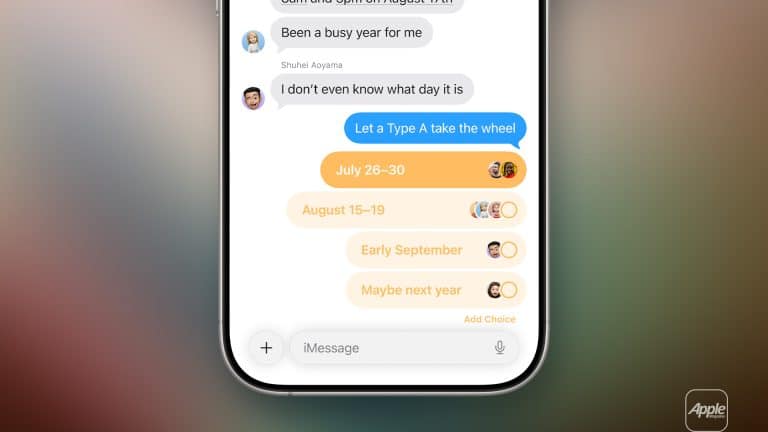
Messages polls are one of those iPhone features that feel small until the first chaotic group chat needs them. A family trying to choose Sunday lunch, friends planning a movie night, cousins voting on a birthday gift, or a travel group picking dates no longer has to survive a wall of “I’m good with anything,” “not that place,” “wait, who said Friday?” and “can someone decide?”
With iOS 26, Apple added polls directly inside Messages, giving iMessage groups a built-in way to vote without leaving the chat. Everyone in the conversation can add options, vote, and watch the results come in. Apple says polls can be used in any iMessage conversation to decide what to eat, which movie to see, where to travel, when to meet, and more. The feature works on iOS 26, iPadOS 26, macOS Tahoe, watchOS 26, visionOS 26, or later. People who cannot view the poll receive a message saying one was sent to the group.
The feature fits especially well between closer friends and a big family, where decisions can be fun but messy. A poll keeps the tone light while giving the group a clear answer. Instead of one person becoming the unofficial planner, everyone can tap their choice and move on.
Apple has also tied polls to Apple Intelligence. When a conversation includes different options, Messages can suggest creating a poll, making it easier to turn a messy discussion into a quick vote. Apple says Apple Intelligence can suggest polls when it detects choices in a conversation, such as food, movies, or travel ideas.


A Group Chat Feature Made for Real Life
Messages polls work because group chats are rarely organized. A family chat may include parents, siblings, cousins, grandparents, and people replying hours late. A close-friends chat may jump between jokes, memes, plans, photos, and last-minute changes. Polls give the conversation one simple place to collect answers.
That is useful for small decisions. Pizza or sushi. Beach or mall. Saturday or Sunday. Early movie or late movie. Gift card or dinner. Road trip or staycation. In a normal chat, those choices can take dozens of messages and still end without a clear winner. A poll turns the same decision into a shared tap.
It is also useful because everyone can see the same result. The group does not have to rely on one person counting replies or remembering who said what. Apple says everyone in the conversation can contribute options and watch as votes come in, which makes the poll feel more like part of the group chat than a separate planning tool.
For big families, this can reduce small conflicts. The person organizing dinner does not have to guess. The cousin planning a birthday does not have to chase people privately. The parent coordinating weekend plans can ask once, let people vote, and choose based on the result.
For close friends, it keeps planning casual. A poll can be playful instead of formal, especially when the options match the group’s personality. “Movie night,” “tacos,” “do nothing and pretend we planned,” or “whoever votes last drives” all fit the mood of a real chat. The feature does not have to feel like a calendar invite.
The best part is that Messages polls stay inside the conversation. The decision, jokes, replies, photos, and final plan are all in one place. That makes it easier to scroll back later and remember what the group actually chose.
Messages Polls Are Easy to Create
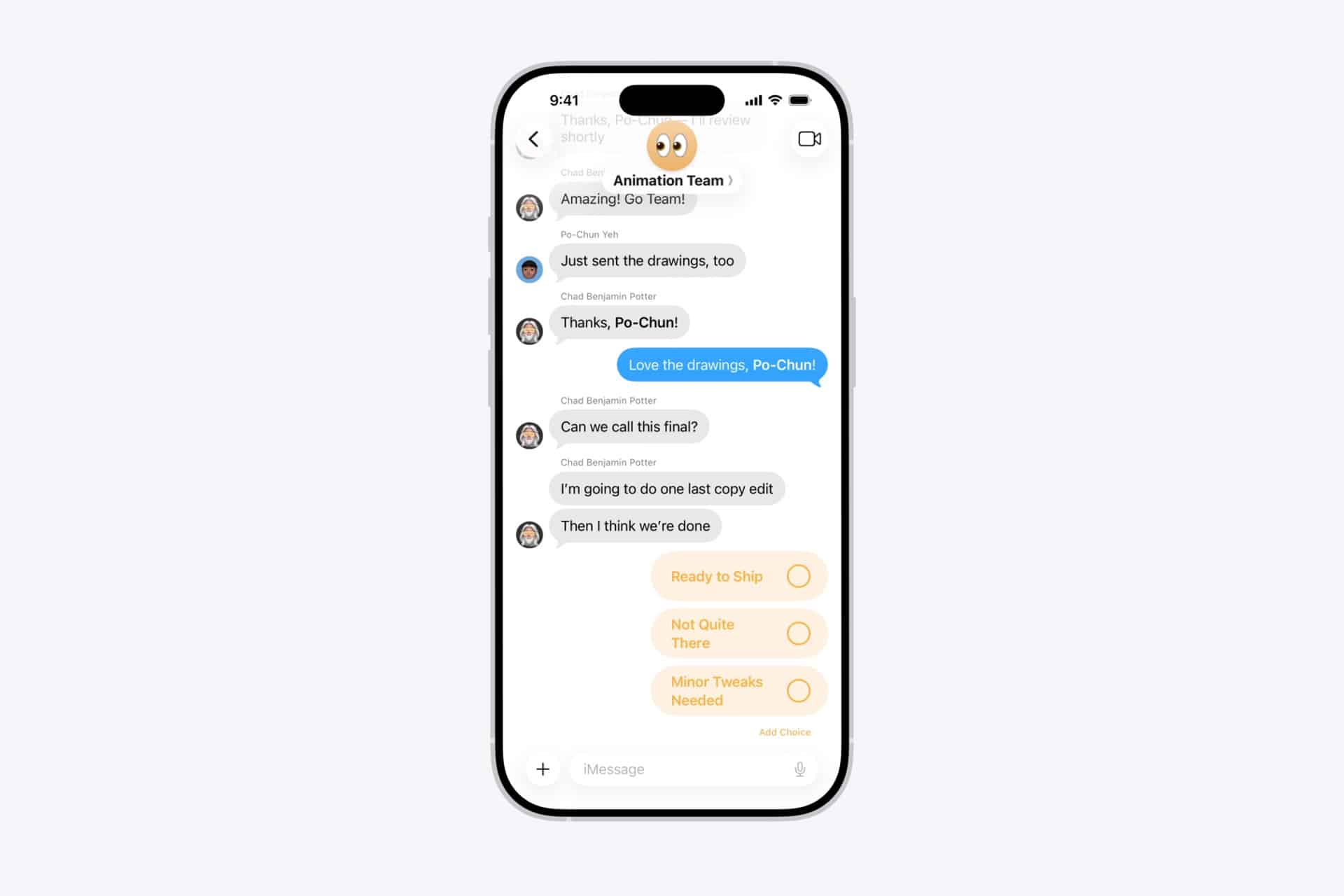
Messages polls start from the same app drawer used for other iMessage features. Apple’s iPhone guide says users can open a conversation, tap the Add button, choose Polls, add options, and send it.
A poll can have up to 12 options:
Messages > Open Group Chat > Add Button > Polls
That path keeps the feature simple enough for everyday use. The poll appears inside the chat, and people can vote directly from the conversation. If someone wants to add another option, they can contribute one, which helps when the group starts with only a few ideas and someone remembers a better choice later.
The 12-option limit is generous enough for most casual decisions. A dinner poll can include several restaurants. A trip poll can include possible weekends. A family poll can include gift ideas. A movie poll can include several titles.
Apple Intelligence can also make the feature feel more natural. Apple says users may see a “Create a Poll” suggestion when Messages detects different options in a conversation. That means the iPhone can notice when the chat is already debating choices and offer a cleaner way to decide.
This is especially helpful because people may forget the feature exists. Group chats move quickly. A built-in suggestion can catch the moment when the chat starts becoming messy and turn it into something easier.
The feature requires iMessage, which means blue-bubble conversations. Apple’s support page says iOS 26 or later is required to start, see, or vote in a poll, along with the corresponding newer versions on iPad, Mac, Apple Watch, and Apple Vision Pro. For mixed chats where some people are not using iMessage or are on older software, the poll may not work for everyone.
That limitation matters for family groups where not every person updates quickly. If someone cannot vote, the group may still need a regular reply from that person. For fully updated iMessage groups, though, polls should feel like a natural part of the chat.
Perfect for Friends, Families, and Weekend Plans
Messages polls are made for the little decisions that keep social life moving. They are not only for big plans. In fact, they may be best for the everyday choices that normally create too much back-and-forth.
A close-friends chat can use polls to choose where to eat, which playlist to use, what time to leave, which movie to watch, or whose house becomes the meeting spot. A family chat can use them to pick Sunday lunch, holiday dishes, birthday gift ideas, vacation dates, or who is bringing what. A school or college group can use them to choose study times, project meeting slots, or event ideas.
The tone can stay light. A poll does not have to sound like work. It can be written the way the group actually talks. “Where are we eating?” “Who is free Saturday?” “Which gift feels less boring?” “Movie or bowling?” “Who is coming to grandma’s?” Messages keeps the decision inside the same casual space where the group already jokes, reacts, and shares photos.
Polls also help with people who reply late. In a normal chat, someone may miss the main discussion and answer after the group has already moved on. With a poll, they can still tap an option when they catch up. The vote is clearer than a random reply buried under newer messages.
The feature also works well with other iOS 26 Messages changes. Apple says iOS 26 adds backgrounds, typing indicators in group conversations, polls, and Apple Cash features for group chats where available. That makes Messages feel more complete for social planning, especially for groups that already use iPhone heavily.
For a big family, a custom background and a poll can make the chat feel warmer and more organized. For a close-friends group, polls can become part of the joke. The best version of the feature is not formal. It feels like someone finally added a “please just vote” button to the group chat.
Voting Keeps the Mood Light
Messages polls work best when the question is simple. A poll should not try to solve the whole weekend in one message. It should ask one thing at a time. Dinner place. Date. Time. Movie. Gift. Destination. The clearer the poll, the faster the group can answer.
Short option names help. “Pizza,” “Sushi,” “Burgers,” and “Tacos” work better than long descriptions. If the group needs details, those can stay in the chat below the poll. The poll should be the decision point, not the whole conversation.
It also helps to keep the number of options reasonable. Even though Apple allows up to 12 options, most casual group chats work better with three to six. Too many choices can restart the same chaos the poll was supposed to fix. The person creating the poll can add the best options first and let the group add one or two more if needed.
Polls can also be used in rounds. A family planning a trip might first vote on the weekend, then vote on the place. Friends choosing dinner might first choose the neighborhood, then the restaurant. This keeps each poll easy and avoids making one giant decision feel overwhelming.
The results can be part of the fun. If one option wins by a lot, the group has an easy answer. If two options are close, that can become the next joke or the next poll. The point is not to make every decision perfectly democratic. It is to give the group a faster way to move from “what are we doing?” to “done, see you there.”
For families with different ages, polls are also easier than long threads. Someone who does not want to type much can still vote. Someone who loves adding opinions can still explain in the chat. The format gives each person a simple way to participate.
A Small Feature That Saves Big Back-and-Forth
Messages polls are useful because they solve a very normal problem. Group chats are where plans happen, but they are not always good at making decisions. People answer at different times, change their minds, forget the options, or reply with jokes instead of choices. That is part of the fun, but it can make simple plans take much longer than they should.
The new poll feature gives iPhone users a built-in way to keep that fun without losing the decision. It is casual enough for friends, clear enough for family, and simple enough for everyday plans. Nobody has to download another app, open a form, or send a link. The vote lives where the conversation already is.
For Apple, the feature is also a smart Messages upgrade because it makes iMessage more useful for real group behavior. The app is not only for sending texts. It is where people organize dinners, birthdays, trips, gifts, rides, payments, photos, and daily life. Polls fit naturally into that role.
The best use may be the weekend group chat. A few people are hungry, someone wants plans, someone else is late to reply, and nobody wants to become the official organizer. A quick poll can turn the whole thing into a vote before the chat turns into 80 messages.
Messages polls will not make every group decisive. There will still be the friend who votes for two options, the cousin who adds a joke answer, and the family member who replies after everything is settled. That is part of the charm. The difference is that now the group has a simple way to laugh, vote, and finally pick a plan.