

Verification-code autofill is one of the most useful security features built into iPhone because it handles a repetitive authentication step without removing the protection behind it. When a website or app sends a one-time code through Messages or Mail, iOS can detect the code, suggest it above the keyboard, and fill it into the correct field with a tap.
The feature is designed around a simple security problem. One-time codes are widely used for two-factor authentication, account recovery, payment confirmation, device sign-in, password resets, and sensitive account changes. They help verify that the person signing in has access to a trusted phone number or email address. The downside is friction: the user has to leave the app, open Messages or Mail, read the code, return to the login screen, and type or paste it correctly before it expires.
Autofill reduces that process to a system-level handoff. The code still arrives through the trusted channel. The app or website still asks for confirmation. iOS simply identifies the code and makes it available in the input field at the right moment.
That makes verification-code autofill both a convenience feature and a security feature. It improves the login flow while reducing the chances of mistyped codes, expired sessions, copied text errors, and phishing attempts that depend on users manually moving codes between apps.
How Verification-Code Autofill Works
When a one-time code arrives by SMS, iOS scans the message for a recognizable verification-code pattern. If the user is on a login, payment, reset, or confirmation screen with a compatible code field, the system can suggest the code in the QuickType bar above the keyboard.
The user taps the suggestion, and the code is entered into the field. The app or website receives only the code that the user chooses to fill. The feature does not give the app access to the Messages inbox.
The same approach applies to verification codes received through Mail. When a service sends a one-time code by email, iOS can detect the code and offer it in the relevant field, again without requiring the user to copy it manually.
This system depends on several layers working together. Messages and Mail receive the code. The keyboard presents the suggestion. Safari or the app provides the input field. Autofill connects the code with the current task. The user remains in control because the code is filled only after the user selects it.
The technical strength is that autofill happens at the system level. Instead of each app building its own method for reading codes, iOS provides a controlled path that limits unnecessary access. Apps do not need permission to read text messages. They only need to present a proper one-time-code field that the system can recognize.


Domain-Bound Codes Add Phishing Protection
The safest version of verification-code autofill uses domain-bound SMS codes. Apple introduced support for domain-bound codes so developers can associate a one-time code with the website or app where it should be used.
In practice, a service can format an SMS message so it includes the code and the associated domain. When the user visits that website or uses an app connected to that domain, iOS can offer the code. If the user is on a different domain, the code is not suggested in the same way.
That helps reduce phishing risk. A common scam sends users to a fake website that looks like a bank, delivery company, streaming service, or social network. The fake page asks for the one-time code. If the user manually copies the code from Messages, the phishing site may capture it. Domain-bound autofill makes that attack harder because the system can limit code suggestions to the legitimate domain.
This does not make SMS codes perfect. Attackers can still pressure users by phone, text, email, or fake support chats. A scammer can still ask someone to read a code out loud. But domain binding gives iOS more context about where the code belongs, which is safer than treating every six-digit number as interchangeable.
For developers, the formatting matters. A one-time code message should be clear, standard, and tied to the correct domain. Poorly formatted codes may still work manually, but they lose the extra protection and smoother user experience that Apple’s system can provide.
Autofill Limits App Access to Messages
One of the strongest privacy advantages is that apps do not need to read SMS messages to support code autofill. On some platforms and in older authentication flows, apps have requested deeper message access or used workarounds to detect incoming codes. That can create privacy concerns because text messages often contain personal conversations, financial alerts, delivery updates, medical reminders, and other sensitive information.
Apple’s approach avoids that model. iOS detects the verification code and presents it to the user. The app receives the code only when the user fills it into the field.
That separation is important. A banking app does not need access to the user’s inbox to confirm a login. A shopping app does not need to scan private messages to verify a purchase. A social app does not need message-reading privileges to complete account recovery.
The system keeps the sensitive inbox separate from the app requesting the code. That is the right technical boundary for a feature used across thousands of services.
Delete After Use Reduces Code Clutter
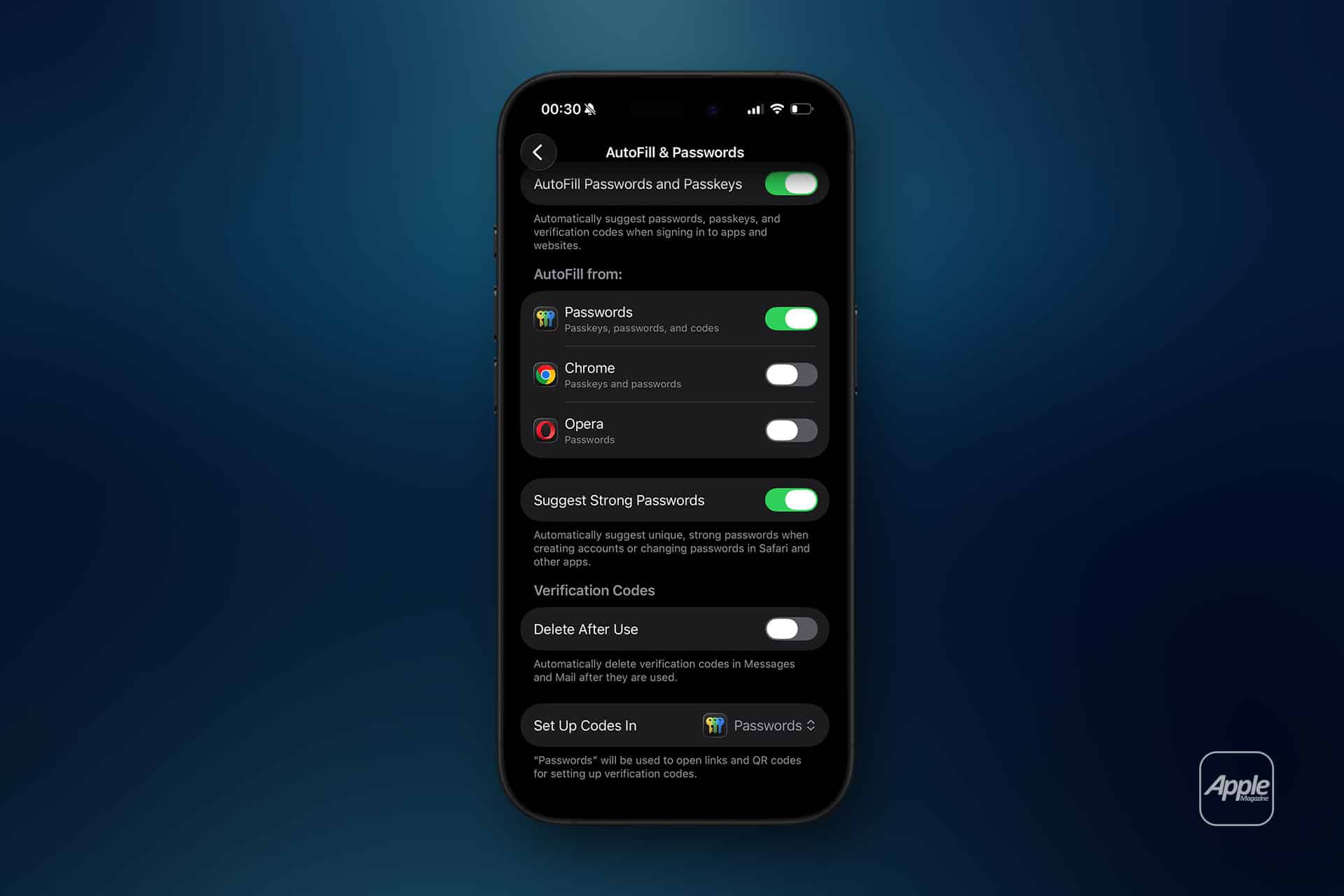
Verification codes are temporary by design. Once used, they usually expire quickly and have little long-term value. iOS includes a Delete After Use option that can automatically remove verification-code messages from Messages and Mail after they are filled with autofill.
The setting can be managed here:
Settings > General > Autofill & Passwords > Delete After Use
This feature improves security hygiene and reduces clutter. Old codes are not usually dangerous after expiration, but keeping hundreds of one-time codes in Messages and Mail makes account activity harder to review. Removing used codes keeps inboxes cleaner and separates real conversations from temporary authentication messages.
There is also a practical benefit. Some users receive codes from banks, social networks, delivery apps, work tools, and cloud services several times a week. Automatic cleanup prevents those messages from becoming a permanent record of routine sign-ins.
Users who prefer to keep verification messages can leave the setting off. That may be useful for people who want to monitor sign-in attempts or keep a short record of account access. For most users, automatic deletion is the cleaner option.
Why Autofill Is Safer Than Manual Copying
Manual code entry creates several weak points. The user may copy the wrong code. They may paste it into the wrong website. They may leave the app and lose the login session. They may expose the code in the clipboard. They may type it incorrectly. They may be tricked into entering it on a fake page.
Autofill reduces those weak points by keeping the code close to the original login flow. The user stays in the app or website. The system suggests the code in context. Domain-bound formatting can help confirm that the code belongs to the current domain. The clipboard is not needed.
The clipboard point is easy to overlook. Copying a code places it somewhere that other apps may be able to detect depending on system rules and user actions. Tapping an autofill suggestion avoids that copy-and-paste step entirely.
Autofill also reduces the time window for user error. One-time codes often expire within minutes. The longer the user spends switching apps, searching messages, copying numbers, and returning to the form, the more likely the session breaks or the wrong code is used. Autofill keeps the process short.
This is not only a convenience gain. It is better authentication design.
Where the Feature Fits With Passkeys
Verification-code autofill should not be confused with passkeys. Passkeys are a newer authentication method designed to replace passwords with cryptographic credentials stored securely on the user’s devices. They are resistant to phishing because the passkey is tied to the legitimate website or app and cannot be typed into a fake page.
Passkeys are stronger than SMS codes for many sign-in flows. Apple supports passkeys across iPhone, iPad, Mac, and iCloud Keychain, and the Passwords app gives users a central place to manage credentials.
Still, one-time codes remain common. Banks, government services, work accounts, delivery apps, streaming services, travel apps, and older platforms often use SMS or email codes for sign-in, recovery, device enrollment, or transaction approval. Even services that adopt passkeys may keep codes as backup methods.
That is why verification-code autofill remains valuable. It improves a security system that users still encounter every day while the industry moves toward passkeys and stronger authentication.
The best account setup uses the strongest available method. Passkeys should be preferred when supported. Authentication apps or hardware security keys may be better for high-risk accounts. Verification-code autofill improves SMS and email codes when those are still part of the flow.
What Developers Need to Do
The feature works best when developers follow Apple’s implementation guidance. Apps and websites should mark verification-code fields properly so iOS can recognize them. Websites should use correct associated domains. SMS messages should use domain-bound formatting when possible. Email templates should make the code easy for the system to detect.
Poor implementation weakens the experience. If a code field is not identified correctly, iOS may not suggest the code. If the message format is unusual, the system may not detect it reliably. If a service sends several codes at once without clear context, users may still have to choose manually.
Developers should also avoid asking for unnecessary access. A service should not request message-reading permissions or build invasive workarounds when iOS already provides a safer autofill path.
For financial apps, password managers, cloud services, shopping platforms, and enterprise tools, proper one-time-code support should be treated as part of login security, not a minor interface detail. A smooth verification flow can reduce abandonment, support requests, and account-recovery errors.


Where Verification-Code Autofill Still Has Limits
Autofill does not make SMS a perfect security method. SIM-swap attacks, number recycling, social engineering, phishing, compromised email accounts, and fake support calls can still put users at risk. A one-time code is only as safe as the channel used to deliver it and the user’s ability to recognize where it should be entered.
The feature also depends on app and website support. Some services use unusual formats or custom input fields that prevent autofill from working smoothly. Codes sent through third-party messaging apps may not be handled the same way as Messages or Mail. Some enterprise systems use older login pages that do not support modern autofill behavior.
Users should also be careful with any request to share a verification code with another person. A legitimate company should not ask for a one-time login code over the phone, in a chat, or by email. Autofill is safest when the code stays inside the sign-in flow and is entered only into the legitimate app or website.
The strongest warning is simple: never read a verification code to someone who contacted you.
A Small System Feature With Large Security Value
Verification-code autofill works because it improves the weakest part of many security flows: the human handoff. The user still has to authenticate, but iOS removes the risky and annoying steps around copying, switching apps, and typing short-lived codes.
The feature also shows Apple’s preferred security design. Keep private messages away from apps. Use system intelligence to detect codes. Tie codes to domains when developers support it. Let the user approve the fill. Clean up used codes when requested. Move the industry toward passkeys while making today’s authentication less error-prone.
The next time a code appears above the keyboard, the useful detail is not only that the iPhone saved a few seconds. It is that the code moved through a controlled system path instead of a manual copy-and-paste chain that could be mistyped, misplaced, or exploited.