Skip to content
AppleMagazine
 
Everything Apple, All in One Place.
  • Mobile & Wearable
  • Computers
  • Productivity
  • Entertainment
  • Innovation
  • Tech Industry
  • Business Partnership Program
  • More
    • Search
    • Menu
    AppleMagazine
     
    Everything Apple, All in One Place.
    • Search
    Mobile & Wearableby Tom Richardson

    iOS Reduce White Point: Make Your iPhone Screen Easier on the Eyes

    Girl mobile phone
    iOS Reduce White Point: Make Your iPhone Screen Easier on the Eyes
    Mobile & Wearableby Mickey

    iPhone 17 Battery Life: What to Expect From 17, 17 Pro, and 17 Pro Max

    Three modern smartphones are shown upright: one orange with three rear cameras, one black with a glossy finish, and one light purple displaying a pastel flower. All have the Apple logo, highlighting the impressive iPhone 17 battery life.
    iPhone 17 Battery Life: What to Expect From 17, 17 Pro, and 17 Pro Max
    A smart home display with a wide screen shows the time “10:47” and date “Tuesday, April 23.” The black device rests on a flat surface, featuring a small Apple logo in the bottom right corner.

    Apple’s Smart Home Hub Hits Snag, But 2025 Launch Still on Track

    by MickeyMobile & WearableMay 27, 2025May 27, 2025

    The smart home hub, often described as a smaller, more affordable iPad-like device, is designed to be a central “command center” for HomeKit and Matter-compatible devices. MacRumors reports it will…

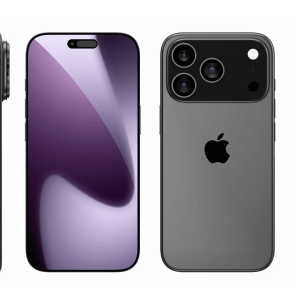
    Multiple views of the sleek iPhone 17 Pro, including front, back, sides, top, and bottom. The black phone features three rear cameras with an Apple logo on the back. Its display is on, showcasing a purple gradient wallpaper.

    iPhone 17 Pro Unveils Bold Design Shift and Performance Boost for 2025

    by Tom RichardsonMobile & WearableMay 27, 2025May 27, 2025

    For the first time since the iPhone 11 Pro, Apple is reimagining the rear camera system. 9to5Mac reports the iPhone 17 Pro will feature a rectangular camera bar stretching across…

    Apple Vision Pro user navigating with intuitive Apple Vision Pro gestures, pinching to scroll, tapping to select, and dragging windows in visionOS for seamless mixed reality control.

    Master visionOS: Navigating Apple Vision Pro with Hand Gestures

    by MarcusMobile & WearableMay 27, 2025May 27, 2025

    Navigating visionOS relies on a handful of precise gestures, designed for comfort and ease. Apple Support outlines the primary actions: to select an item, look at it and tap your…

    iPhone with Find My enabled, showcasing protections against the stolen iPhone trade.

    Stolen iPhone Trade Thrives in Shenzhen’s Electronics Markets

    by MickeyMobile & WearableMay 25, 2025May 23, 2025

    The stolen iPhone trade often begins with brazen thefts—thieves on electric bikes or scooters snatching phones from pedestrians in busy urban centers. One victim, London entrepreneur Sam Amrani, used Apple’s…

    A close-up of a light brown and white dog wearing a dark green collar with an Apple AirTag pet tracking device attached, outdoors with a blurred background.

    Apple AirTag Pet Tracking Reunites Lost Dog, Highlights Battery Maintenance

    by HannahMobile & WearableMay 24, 2025May 23, 2025

    The dog, a friendly but disoriented wanderer, appeared on Purdy’s porch with an AirTag on its collar. The tracker was nonfunctional due to a dead battery, unable to ping its…

    Apple booth at CVPR 2025 in Nashville, displaying a live demo of FastVLM technology on an iPhone, showcasing advanced computer vision for AR and photo processing.

    Apple’s Vision Pro Trains Humanoid Robots with Human Precision

    by HannahMobile & WearableMay 23, 2025May 23, 2025

    Imagine a robot in your home that can fold laundry or prepare coffee as deftly as you do. Apple’s PH2D method aims to make this possible by training robots to…

    Side view of a black Apple Watch 10. The image highlights the digital crown and side button, focusing on the sleek, glossy finish of the smartwatch. The Apple logo is in the bottom right corner. The watch band is also visible, curving around the edges.

    Apple’s Canceled Apple Watch Camera: What It Means for Your Wrist

    by MarcusMobile & WearableMay 23, 2025May 23, 2025

    The camera wasn’t about snapping selfies or video calls, unlike earlier smartwatch experiments by competitors. Instead, it aimed to make the Apple Watch a standalone tool for real-time insights. Imagine…

    Futuristic Apple Glass smart glasses with digital holographic displays showing data and interface icons, set against a dark, high-tech background with glowing lights and abstract shapes.

    Apple’s Smart Glasses Set to Redefine Wearables by 2027

    by MarcusMobile & WearableMay 22, 2025May 22, 2025

    Apple’s smart glasses promise to transform how users interact with technology. Picture walking through a city, with directions overlaid on your lenses, or holding a conversation in a foreign language…

    iPhone Focus Modes productivity settings displayed on an iPhone 16 screen, showcasing a Work Focus mode with a minimalist home screen and silenced notifications for enhanced concentration.

    iPhone Focus Modes: Your Key to Staying Productive in a Distracted World

    by HannahMobile & WearableMay 22, 2025May 22, 2025

    Notifications are productivity killers. Studies cited by The Verge show it takes 23 minutes to refocus after an interruption, and with phones buzzing constantly, that adds up. Focus Modes let…

    A close-up of a black Beats Cable with a "6" logo plugged into the port of a dark-colored electronic device, possibly a laptop, resting on a textured surface.

    Beats Cable Bridges the Gap for CarPlay with USB-C iPhones

    by Tom RichardsonMobile & WearableMay 22, 2025May 22, 2025

    CarPlay transforms your car’s infotainment system into an iPhone extension, letting you navigate, play music, or handle calls safely via apps like Maps and Apple Music. The Verge notes that…

    iPhone displaying AI-powered app interface enabled by iOS 19 AI integration, showcasing developer tools for Apple Intelligence at WWDC 2025.

    Apple’s iOS 19 AI Integration Empowers Developers to Redefine Apps

    by MickeyMobile & WearableMay 21, 2025May 21, 2025

    The iOS 19 AI integration introduces a software development kit (SDK) that lets developers access Apple’s large language models (LLMs), the foundation of Apple Intelligence. With iOS 19 AI integration,…

    Apple Vision Pro displaying a movie with visionOS spatial audio, delivering immersive 3D sound through AirPods Pro, enhancing entertainment in 2025.

    Mastering visionOS Spatial Audio for Immersive Sound Experiences

    by Tom RichardsonMobile & WearableMay 21, 2025May 21, 2025

    visionOS spatial audio is Apple’s immersive sound technology for the Vision Pro, using advanced algorithms and head-tracking to place audio in a 360-degree space, per Apple Developer. Unlike traditional stereo,…

    Apple-MLS-partnership

    Apple Sports App Levels Up with Newsletter and Streamlined Features for Fans

    by MickeyMobile & WearableMay 20, 2025May 20, 2025

    The standout addition is a personalized daily newsletter, accessible through Apple News, which delivers weekday updates on general sports news and user-selected teams, iDownloadBlog noted. Fans can subscribe via the…

    iPad screen recording 2025 in action, capturing a tutorial on an iPad Pro with Control Center open.

    Master iPad Screen Recording 2025 with Built-In Tools

    by MarcusMobile & WearableMay 20, 2025May 20, 2025

    To use iPad screen recording 2025, first ensure the feature is in Control Center. Go to Settings > Control Center, find Screen Recording under “More Controls,” and tap the green…

    iOS 18 screenshot process on iPhone 16, showing how to capture, edit, and save screens in three easy steps for seamless sharing.

    iOS 18 Screenshot: Master Your iPhone Screen Capture in 3 Easy Steps

    by HannahMobile & WearableMay 19, 2025May 19, 2025

    To take an iOS 18 screenshot, press the Side button (on the right) and the Volume Up button (on the left) at the same time, then release quickly. Apple Support…

    Post navigation

    Prev 1 … 10 11 12 13 14 … 108 Next
    Page 12 of 108

    Cover of Apple Magazine, Special Edition, issue #739 dated Dec 26, 2025. Large number "25" with colorful light streaks in the background. Text: "The year that shaped the foundations of the AI revolution.
    AppleMagazine App - Subscribe and Save | Image promoting AppleMagazine subscription. Text reads: "Subscribe and save. For a limited time only." Below, overlapping blue and multicolored app icons bearing the "AppleMagazine" logo are displayed. "AppleMagazine" is shown above an "App Store" download button. White background.

    A white sports car is displayed on a glossy stage under bright diagonal spotlights, with digital graphics behind it, highlighting Western EV competitiveness. A silhouetted person stands in the foreground, watching the presentation.

    Western Carmakers Look for Strategic Openings in the Global EV Race

    A person holding a credit card and a mug sits at a table with a wrapped gift, an open laptop, festive decorations, and warm lights in the background, ready for some seamless AI holiday shopping.

    Artificial Intelligence Shapes New Holiday Shopping Habits

    A pair of sleek, futuristic smart goggles display icons for Apple devices and services—including Mac, iPad, iPhone, Vision Pro with hyper specific Vision Pro use cases—on a black background.

    Hyper-Specific Apple Vision Pro Use Cases Emerging Among Early Adopters

    Apple Store

    Apple Retail Behind the Scenes: How Stores Prepare for Launches, Repairs, and Daily Operations

    A man with glasses and a headset microphone is speaking passionately about AI, gesturing with his hands during a presentation or panel discussion. The background shows a blurred logo and text, hinting at an Apple event and possibly John Giannandrea’s involvement.

    John Giannandrea Retire From Apple Marks a Major Transition in the Company’s AI Direction

    Three iPhones are displayed: the left shows the back with a white MagSafe battery, the center shows the front home screen, and the right displays a blue MagSafe charger—highlighting why iPhone 17 outsells iPhone 16 in innovative accessories.

    Apple Devices and Power Grid Issues: 7 Critical Hidden Risks Users Should Know

    Black and white logo featuring a pixelated arrow pointing upwards to the right, with the word "MINECRAFT" in bold capital letters beneath it. The design is simple with a retro, blocky aesthetic.

    AppleMagazine logo

    AppleMagazine is an independent publication and has not been authorized, sponsored, or otherwise approved by Apple Inc.

    We cover everything Apple, every day of the week. The latest on iOS, macOS, Apple Watch, AirPods, and the wider technology industry. Check back soon for more.
    X Icon Instagram Icon Newsstand Icon Facebook Icon
    • Business Partnership Program
    • Contact
    • Terms & Conditions
    • Privacy Policy
    © Copyright 2025 by AppleMagazine. All Rights Reserved.

    We are using cookies to give you the best experience on our website.

    You can find out more about which cookies we are using or switch them off in .


    Loading Comments...
     

      Apple Magazine
      Powered by  GDPR Cookie Compliance
      Privacy Overview

      This website uses cookies so that we can provide you with the best user experience possible. Cookie information is stored in your browser and performs functions such as recognising you when you return to our website and helping our team to understand which sections of the website you find most interesting and useful.

      Strictly Necessary Cookies

      Strictly Necessary Cookie should be enabled at all times so that we can save your preferences for cookie settings.

      Analytics

      This website uses Google Analytics to collect anonymous information such as the number of visitors to the site, and the most popular pages.

      Keeping this cookie enabled helps us to improve our website.