Skip to content
AppleMagazine
 
Everything Apple, All in One Place.
  • Mobile & Wearable
  • Computers
  • Productivity
  • Entertainment
  • Innovation
  • Tech Industry
  • More
    • Search
    • Menu
    AppleMagazine
     
    Everything Apple, All in One Place.
    • Search
    Mobile & Wearableby Ivan Castilho

    iOS 27 Downgrade Guide Before Returning to iOS 26

    A digital icon with the number 26 in translucent font over abstract blue and teal shapes, set against a soft gradient background. The Apple logo appears in the bottom right corner.
    iOS 27 Downgrade Guide Before Returning to iOS 26
    Mobile & Wearableby Ivan Castilho

    iOS 27 Public Beta Is Here

    A metallic, reflective icon with the number 27 in white sits centered on a blurred, gradient background. The Apple logo and word “Apple” appear in a small white box at the bottom right, hinting at iOS 27 Messages and Apple Intelligence announced at WWDC26.
    iOS 27 Public Beta Is Here
    A person with blond hair in a low ponytail is wearing a black Beats Studio Buds wireless earbud and a gold hoop earring, looking content with eyes closed.

    Beats Studio Buds Security Fix Blocks Eavesdropping Risk

    June 19, 2026 / 1:59 PMJune 19, 2026

    Beats Studio Buds owners should check for Apple’s 1B211 firmware update, which patches a Bluetooth flaw that could expose microphone audio.

    A thin, blue iPhone Air 2 is viewed from the side with the device’s name displayed above it on a light gray background.

    iPhone Air 2 May Fix Its Two Biggest Weak Spots

    June 18, 2026 / 1:21 PMJune 18, 2026

    iPhone Air 2 is reportedly planned for spring 2027 with an ultrawide camera, stronger battery life, and Apple’s A20 Pro chip.

    A smartphone screen displays a photo album titled "Aegean Adventure" in the Photos app, with 47 items. A grid of colorful thumbnails—enhanced by iOS 27 AI photo editing—shows people smiling, sunsets, food, pottery, and scenic outdoor views.

    Photos Features in iOS 27 Bring Cleaner Edits and Smarter Memories

    June 18, 2026 / 8:38 AMJune 18, 2026

    Photos features in iOS 27 add AI reframing, image extension, better Clean Up, video frame capture, custom slideshows, and RAW upgrades.

    A blue Walt Disney World card featuring Mickey Mouse ears with a sorcerer’s hat, surrounded by fireworks and sparkles on a blue gradient background—perfect for adding to your Apple Wallet on iOS 27.

    Disney MagicMobile Gets Apple Wallet Upgrade in iOS 27

    June 17, 2026 / 6:28 PMJune 17, 2026

    Disney MagicMobile will use Apple Wallet’s enhanced key experience to show park plans, reservations, and trip updates on iPhone and Apple Watch.

    A car dashboard screen with CarPlay features displays navigation directions on I-280 North, estimated arrival in 42 minutes, music playback controls, and a calendar reminder for a FaceTime call with Mom from 10:00 to 11:00 AM.

    CarPlay Features in iOS 27 Add Video, Navigation, and Smarter Controls

    June 17, 2026 / 4:49 PMJune 17, 2026

    CarPlay features in iOS 27 include parked video apps, route sharing, navigation panels, MiniPlayer controls, and better voice interfaces.

    People explore Samsung Display exhibits at a tech convention. Bright lights illuminate screens and Samsung XR displays, with visitors interacting and viewing information at various booths. The atmosphere is modern and high-tech.

    Vision AR: Samsung Display Pushes XR Screens Apple Could Use

    June 17, 2026 / 3:32 PMJune 17, 2026

    Samsung Display’s new RGB OLEDoS panels show where future Vision devices may go: brighter, sharper, and better suited for everyday XR.

    Five smartphones are displayed side by side, each showing different apps and features, including messaging, calendar, photos, and widgets on bright screens. The sleek designs hint at the enhancements seen in iOS 27 unveiled at WWDC26.

    Apple Still Has Three iOS 27 Features Waiting for September

    June 16, 2026 / 12:17 PMJune 16, 2026

    Apple reportedly held back three iOS 27 features from WWDC26, including Siri chatbot support, a customizable Camera app, and a new watch face.

    Two hands hold iPhones facing each other against a black background—one displays a $35 peer-to-peer payment screen, while the other shows a blue-green lock screen at 1:41.

    Apple Cash Makes Personal Payments Easier and More Secure

    June 15, 2026 / 3:17 PMJune 15, 2026

    Apple Cash turns iPhone into a simple peer-to-peer payment tool for sending, receiving, spending, and managing money through Wallet.

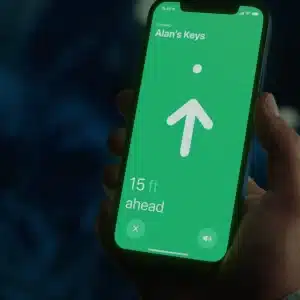
    A hand holds a smartphone displaying a green screen with an arrow pointing up, text reading "Alan's Keys," and "15 ft ahead," showing distance to the keys using Apple Find My accessories.

    Find My Support Turns Third-Party Accessories Into Trackable Essentials

    June 15, 2026 / 8:34 AMJune 15, 2026

    Apple’s Find My network lets compatible third-party accessories appear inside the Find My app, extending item tracking beyond AirTag.

    A smartphone featuring Apple Intelligence powers a text search, centered before four overlapping app cards showing topics like underwater leaves, mushrooms, a woman’s portrait, and a pizza—perfect for wwdc26 innovations.

    iOS 27 Beta Backups Need an Archived Copy First

    June 15, 2026 / 6:28 AMJune 15, 2026

    iOS 27 beta – Before installing the iOS 27 developer beta, users should create an archived iPhone backup that can survive a downgrade or restore.

    Three iPhones are shown from different angles: two dark-colored models with triple rear cameras on the left and center, and a light purple model with dual cameras on the right, highlighting the iPhone Air lineup position against a white background.

    Mastering iPhone Protection Features for Better Privacy

    June 13, 2026 / 6:02 PMJune 12, 2026

    iPhone includes layers of protection for privacy, theft, hacking, lost devices, app tracking, account access, photos, passwords, and emergency safety.

    A dark blue Apple iPhone with three camera lenses and a textured case is shown upright against a dark background, spotlight illuminating the upper part. The Apple logo is visible, highlighting its LED flash alerts for iPhone calls.

    iPhone Flash Alerts for Calls: The Feature Many Users Forget Exists

    June 13, 2026 / 12:34 PMJune 12, 2026

    iPhone flash alerts for calls make the LED flash blink when calls, messages, and notifications arrive, helping users notice alerts without sound.

    A close-up of a smartwatch screen displaying colorful app icons, including activity rings and music, with a blurred scenic background. The watch features a blue strap and highlights watchOS 27 compatibility.

    watchOS 27 Makes Apple Watch More Personal and Faster

    June 13, 2026 / 6:21 AMJune 12, 2026

    watchOS 27 brings Siri AI, Workout Buddy, a dynamic app grid, new gestures, Cycle Tracking improvements, and a sharper Apple Watch focus.

    A smartwatch with a yellow band displays the Walkie-Talkie app’s "Hold to Talk" button in the center of the screen, showing a message conversation with "Olivia" at 10:09.

    Apple Removes Walkie-Talkie From watchOS 27 Beta

    June 10, 2026 / 1:03 PM

    Apple has removed Walkie-Talkie from the watchOS 27 beta, raising questions about whether the Apple Watch feature is gone for good.

    AirPods Pro 3 2025 earbuds and case on a white background, showcasing sleek design

    iOS 27 Gives AirPods Their Biggest Audio Upgrade

    June 10, 2026 / 7:26 AM

    iOS 27 brings AirPods a redesigned settings experience, custom EQ controls, GymKit support, and deeper integration with iPhone.

    Post navigation

    Prev 1 2 3 4 5 … 125 Next
    Page 3 of 125

    Apple Magazine cover featuring a smartphone displaying 9:41, with headlines about SpaceX business expansion, AirPods Pro 3 news, and Apple’s Siri AI public beta. Issue dated July 10, 2026.
    AppleMagazine App - Subscribe and Save | Image promoting AppleMagazine subscription. Text reads: "Subscribe and save. For a limited time only." Below, overlapping blue and multicolored app icons bearing the "AppleMagazine" logo are displayed. "AppleMagazine" is shown above an "App Store" download button. White background.

    A white rounded square icon with an orange and yellow house symbol appears on a blurred background, representing Apple Home. The Apple logo is visible in the bottom right corner.

    Apple Intelligence Brings Smarter Video Analysis to Home Cameras

    White envelope and shield icons appear in the center of a blue gradient background, with the Apple logo in the bottom right corner. The image suggests iOS mail privacy, emphasizing secure or protected email related to Apple services.

    Apple Unifies Hide My Email and Sign in With Apple Domains

    A sleek, modern white Tesla electric SUV drives on an empty highway at dusk, with tall glass skyscrapers and a hazy sky in the background. CarPlay route sharing enhances the connected driving experience.

    Tesla CarPlay Support May Depend on Apple Maps

    Cristiano Amon stands on stage in a blue suit, white shirt, and black polka dot tie, gesturing as he discusses the future of agentic AI and Qualcomm AI agents against a striking blue background. Glasses and a beard complete his confident look.

    Qualcomm CEO Says AI Agents Will Replace Apps

    A close-up of a silicon wafer with a grid pattern reflecting a gradient of colors from orange to green to blue, highlighting the intricate design found in Apple chips and advanced M-series chips.

    Intel 18A-P Production Raises Apple Deal Question

    People explore Samsung Display exhibits at a tech convention. Bright lights illuminate screens and Samsung XR displays, with visitors interacting and viewing information at various booths. The atmosphere is modern and high-tech.

    Vision AR: Samsung Display Pushes XR Screens Apple Could Use

    AppleMagazine logo

    AppleMagazine is an independent publication and has not been authorized, sponsored, or otherwise approved by Apple Inc.

    We cover everything Apple, every day of the week. The latest on iOS, macOS, Apple Watch, AirPods, and the wider technology industry. Check back soon for more.
    X Icon Instagram Icon Newsstand Icon Facebook Icon
    • Business Partnership Program
    • Contact
    • Terms & Conditions
    • Privacy Policy
    © Copyright 2026 by AppleMagazine. All Rights Reserved.

    We are using cookies to give you the best experience on our website.

    You can find out more about which cookies we are using or switch them off in .

    AppleMagazine
    Powered by  GDPR Cookie Compliance
    Privacy Overview

    This website uses cookies so that we can provide you with the best user experience possible. Cookie information is stored in your browser and performs functions such as recognising you when you return to our website and helping our team to understand which sections of the website you find most interesting and useful.

    Strictly Necessary Cookies

    Strictly Necessary Cookie should be enabled at all times so that we can save your preferences for cookie settings.