


X Money has officially started rolling out in the United States, giving eligible X Premium subscribers access to peer-to-peer payments, an interest-bearing deposit account and a Visa debit card that can be added to Apple Wallet.
The public launch follows an invite-only beta that offered an early view of Elon Musk’s attempt to turn X into a financial platform as well as a social network. X Money is now reaching Premium and Premium+ subscribers, although the rollout remains gradual and access may not appear immediately for every eligible account.
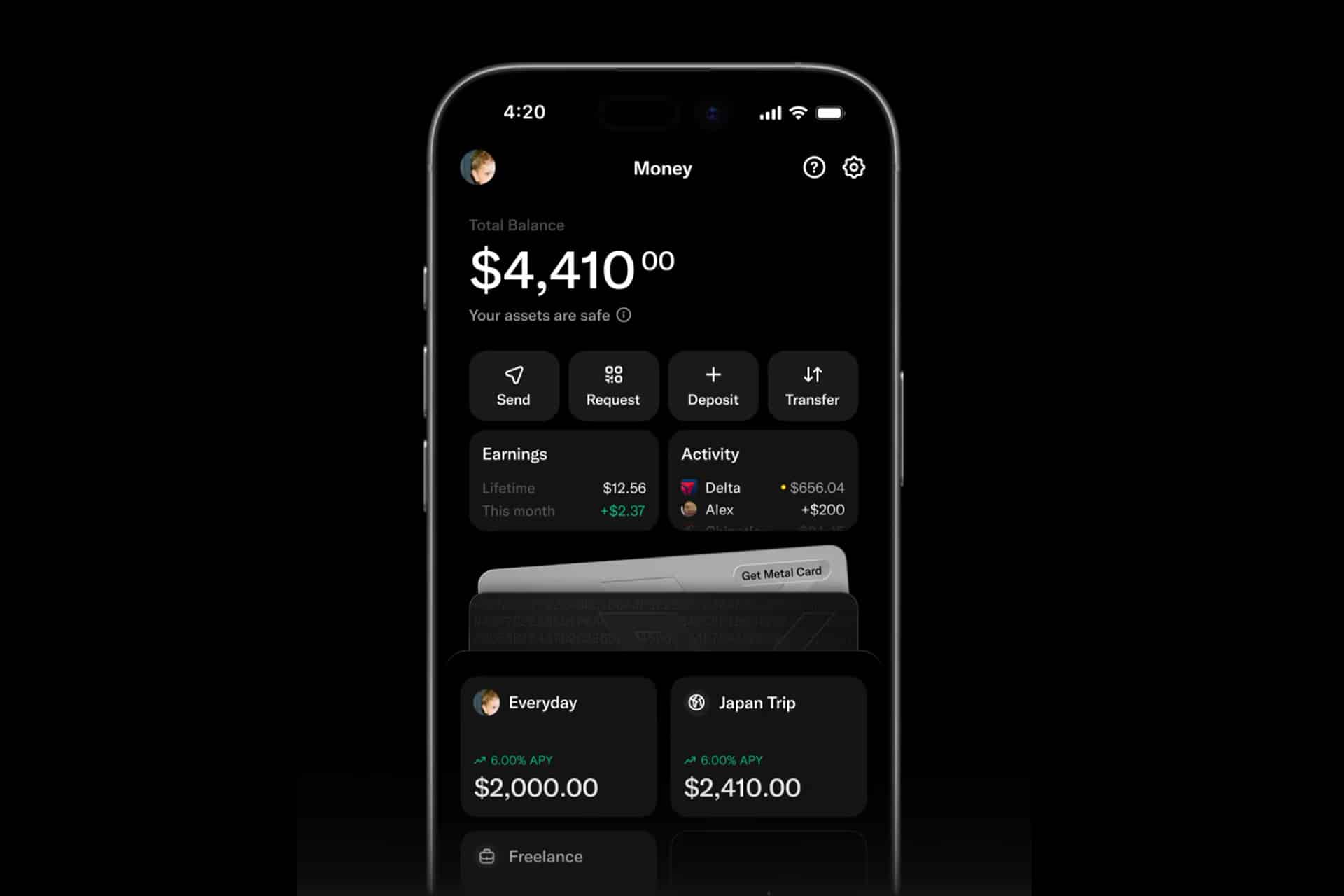
Once activated, the service places financial tools directly inside X. Users can send, receive or request money from other people on the platform, deposit funds, receive eligible paychecks early and spend through a virtual or physical X Card.
Apple Wallet support extends the service beyond the X app. Adding the virtual Visa card to Wallet allows an iPhone or Apple Watch to make Apple Pay purchases anywhere the card and contactless payments are accepted.

X Money Combines Payments, Savings and a Debit Card
X Money is not only a person-to-person transfer feature. It is structured more like a fintech account combining several services that would ordinarily require separate banking and payment apps.
X advertises free and instant transfers between users on its network. The company also supports direct deposits, bill payments, wire transfers and mailed checks, making the account capable of handling more routine financial activity than a basic social payment service.
Eligible users receive an X Card operating on the Visa network. The virtual version can be used immediately after it is issued and added to Apple Wallet, while customers can request a physical metal card.
The physical card can be personalized with the cardholder name, and users can decide whether their X username should also appear on it. Despite the social identity attached to the design, the card remains a conventional debit product drawing money from the X Money balance rather than a line of credit.
Eligible purchases made with the X Card earn 3% cash back. Certain transaction categories are excluded, so the reward should not be treated as an automatic return on every payment.
X also advertises free ATM withdrawals globally. Fees charged by an ATM operator are reimbursed within three calendar days, according to the current product terms. The card carries no foreign transaction fee, which could make it useful for international travel when merchants accept Visa.
Direct deposit can make eligible payroll funds available as much as two days before the employer’s standard payday. Early availability depends on when the payer sends the deposit information rather than a guaranteed advance for every paycheck.
The largest promotional figure is an annual percentage yield of up to 6%. Premium+ subscribers are eligible for the 6% rate, while standard Premium users may qualify after meeting the required direct-deposit conditions.
The APY was accurate when X Money launched on July 27, 2026, but it is variable and can change. Fees or failure to maintain eligibility may also reduce the effective return.
How X Money Works With Apple Wallet
Apple Wallet does not hold the X Money deposit account itself. It stores a digital representation of the X Card so the debit card can be used through Apple Pay.
That distinction separates X Money from Apple Cash, Apple Card and Apple Savings. X Payments operates the service, its banking partners hold the deposits and Visa processes card transactions. Apple provides the secure Wallet and Apple Pay layer used at checkout.
For accounts that have received X Money access, the card can be added through the financial section of the X app.
To add the virtual X Card to Apple Wallet:
X > Money > X Card > Add to Apple Wallet > Continue
Follow the verification instructions and accept the card terms. The X Card should then appear beside existing credit, debit, transit and identification cards in Wallet.
The exact controls may differ slightly as X adjusts the interface during the rollout. Users who do not see Money in the X navigation or an Add to Apple Wallet button probably have not received access yet.
The card can also be selected as the default Apple Pay card.
To make X Card the default payment card:
Settings > Wallet & Apple Pay > Default Card > X Card
Changing the default card does not remove any existing cards. Another payment method can still be selected manually before confirming a purchase.
Apple Watch users may need to add the card separately even when it already appears on the paired iPhone.
To add X Card to Apple Watch:
Watch app on iPhone > Wallet & Apple Pay > Add Card > Select X Card
Apple Pay does not send the physical card number to a merchant during a contactless purchase. Wallet uses a device-specific number and a unique transaction security code, while Face ID, Touch ID or the device passcode authorizes the payment.

X Money Is Not an Apple Bank Account
The Apple Wallet presence could make X Money appear more closely connected to Apple than it is.
Apple does not issue the X Card, set the interest rate, hold the deposits or operate the peer-payment network. Questions involving declined transactions, missing transfers, cash back, direct deposits or account access must be handled through X Money support rather than Apple Support.
X Payments LLC is also not a bank. Deposit accounts are held initially at Cross River Bank, an FDIC member institution.
An ordinary eligible deposit at one insured bank receives federal insurance up to $250,000 per depositor, per ownership category. X Money automatically places deposits into a cash sweep program that can distribute funds among participating banks.
The sweep arrangement advertises aggregate pass-through FDIC insurance of as much as $10 million when all conditions are satisfied. That larger figure does not mean the federal government directly insures X Payments or protects users from every possible failure involving the platform.
Customers should review which banks already hold their deposits. FDIC limits are calculated across all eligible accounts owned by the same depositor at the same institution, including money placed there outside X Money.
The account requires users to be at least 18 and located in the United States. A Premium or Premium+ subscription is also required for the current rollout; the less expensive Basic tier is not included.
A Social Account Now Requires Banking-Level Security
Connecting money to an X profile makes account protection more consequential. A compromised social account is no longer limited to unauthorized posts or messages when it also provides access to transfers and a debit card.
X Money supports passkeys, transaction limits and additional authentication controls. Users should enable the strongest available protections before depositing significant funds.
To create or review an X passkey on iPhone:
X > Settings and privacy > Security and account access > Security > Passkey
The iPhone itself should use a secure passcode with Face ID or Touch ID enabled. Transaction notifications should remain active so unfamiliar payments are noticed quickly.
Before sending money, users should confirm the recipient username carefully. Display names can be similar, usernames can change and social platforms regularly attract impersonation attempts. A post or direct message claiming an emergency should not replace independent verification.
The opening of X Money creates an unusual bridge between a public conversation network and Apple’s private payment interface. Its most immediate test will not be whether people add the black Visa card to Wallet, but whether they trust X enough to move their paycheck, savings and everyday spending behind the same account used for their timeline.