


Apple is turning Xcode 27 into a more open AI coding environment, adding Gemini support as part of a wider agentic coding upgrade for developers building apps across iPhone, iPad, Mac, Apple Watch, Apple TV, and Vision Pro.
The change expands on Apple’s earlier agentic coding work in Xcode 26.3, which brought support for tools such as Claude Agent and OpenAI’s Codex. With Xcode 27, Apple is bringing models and agents from Anthropic, Google, and OpenAI more directly into the developer workflow, giving teams more choice over how AI helps plan, write, test, and refine code.
Gemini’s addition is especially notable because it connects Apple’s development tools with Google’s AI platform in two ways. Developers can use Gemini inside Xcode for multi-step coding tasks, and they can also access Gemini models through Apple’s Foundation Models framework using the new LanguageModel protocol. That gives Apple developers a more flexible path for adding AI features to apps without leaving Apple’s native development environment.
Xcode 27 Expands Agentic Coding
Apple describes Xcode 27 as a major step for agentic coding. Instead of limiting AI to autocomplete or small code suggestions, the new tools are designed to work through larger tasks with more autonomy.
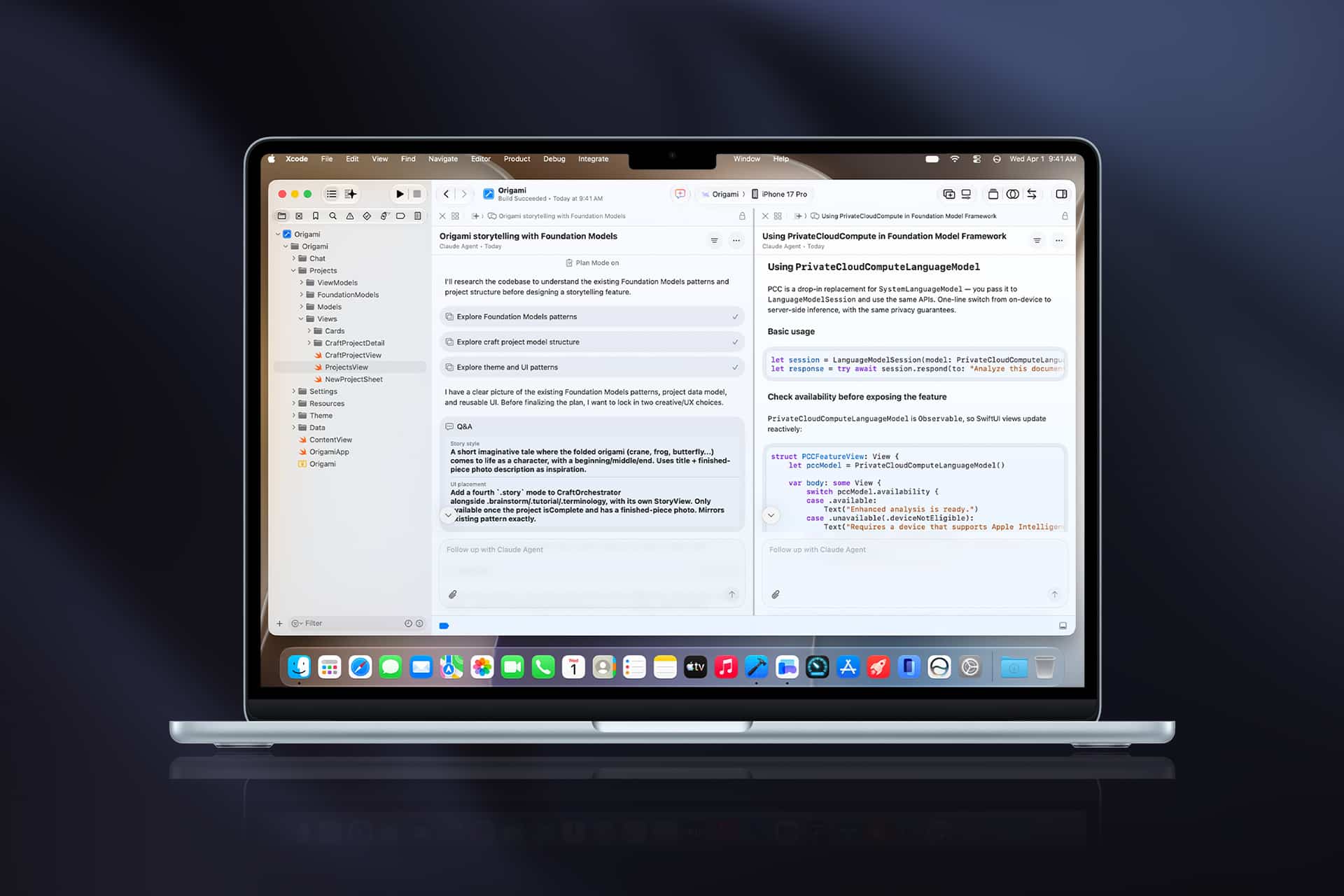
In Xcode 27, coding agents can plan work, answer follow-up questions, show code changes, render Markdown, and display previews next to the project. Apple is also giving agents more ways to validate their own work. They can write and run tests, try ideas in Playgrounds, check visual changes with previews, and interact with the simulator through the new Device Hub.
That changes the role of AI inside Xcode. A developer is not only asking for a function or a fix. They can ask an agent to investigate a bug, sketch a plan, make edits, run tests, inspect UI changes, and return with something closer to a reviewed patch.
This is where agentic coding differs from older AI coding assistants. The goal is not only faster typing. It is helping with the repetitive, multi-step work that usually sits between an idea and a usable build.
Gemini Comes Into Xcode
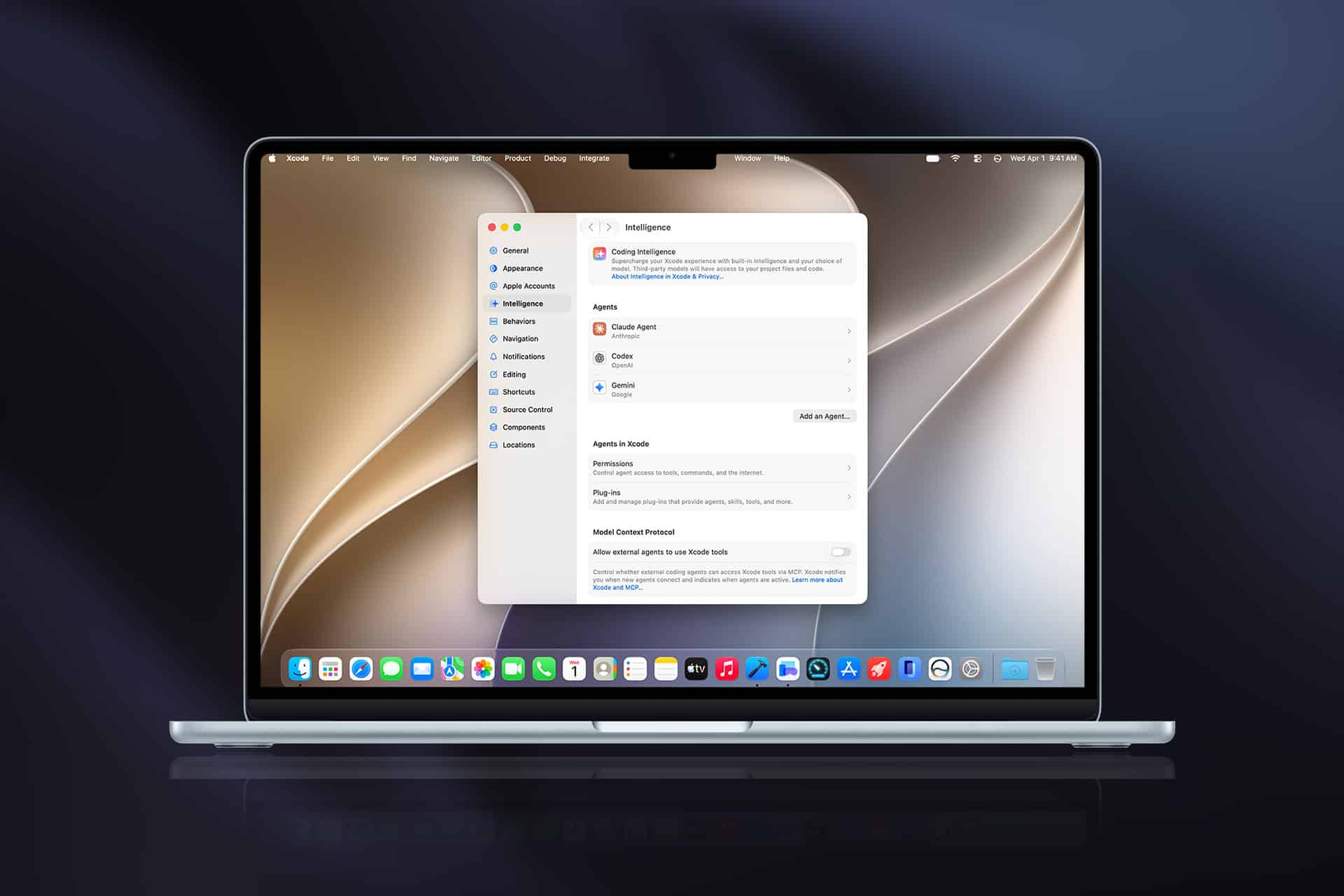
Google says it worked with Apple to integrate Gemini into Xcode so developers can handle complex, multi-step development tasks without switching tools or windows. Gemini can be configured through Xcode’s Intelligence settings panel, then used to review code, fix bugs, and help build features.
That matters because developer workflows are already fragmented. Many teams keep Xcode open alongside documentation, issue trackers, design files, terminals, browsers, AI chat windows, and testing tools. Bringing Gemini into Xcode reduces some of that switching and lets AI work closer to the project context.
Apple’s approach also avoids locking developers to a single model provider. Xcode 27 supports agents and models from multiple companies, including Google, Anthropic, and OpenAI. That is a practical decision. Different teams already have different AI subscriptions, privacy requirements, coding preferences, and enterprise agreements.
For individual developers, Gemini access can use a self-serve API key from Google AI Studio. For enterprise teams, Google points to its Gemini Enterprise Agent Platform, which can support corporate quotas and privacy requirements. That gives Xcode 27 a path for both solo developers and larger companies that need more control over AI use.

Apple Keeps Xcode as the Center
The most strategic part of Xcode 27 is not only Gemini support. It is Apple keeping Xcode as the place where AI coding work happens for Apple platforms.
Developers building for Apple devices often rely on Xcode because it handles project structure, signing, simulators, Swift, SwiftUI previews, debugging, App Store workflows, and device testing. If AI coding tools live outside Xcode, they can help write code, but they may miss the surrounding context that makes Apple development complicated.
Xcode 27 gives agents more direct access to that environment. The new Device Hub can manage physical devices and simulators in a unified workspace. Agents can interact with previews and tests. Plug-ins can add custom skills. The Model Context Protocol lets developers bring in tools they already use, while Agent Client Protocol support allows compatible agents to connect with Xcode.
Apple also says GitHub and Figma are among the first to offer installation between their tools and Xcode. That makes the agentic coding story more than a model picker. It becomes part of a workflow that can include code repositories, design assets, project context, and app testing.
Foundation Models Open the Door to Gemini in Apps
Gemini’s role is not limited to Xcode. Apple is also opening its Foundation Models framework to more providers through a new public LanguageModel protocol. Google says Gemini models are available to Apple developers through the Firebase Apple SDK, allowing cloud-hosted Gemini models to plug into Apple’s native framework.
That gives developers a shared Swift API surface for model access. They can use Apple’s on-device models where local inference makes sense, then use cloud-hosted Gemini models for tasks that need larger models or different capabilities. Google says switching to Gemini through the framework can be as simple as changing the model instance when an app is already using the Foundation Models framework.
This is a meaningful change for app development. Apple is not forcing every AI feature to depend only on its own models. Developers can choose Apple models, Gemini, Claude, or other providers that implement the new protocol. That flexibility may help apps move faster, especially when developers need capabilities that vary by model, cost, latency, or deployment strategy.
Apple is still keeping the experience native. Developers can write Swift code, use Apple frameworks, and fit AI features into iOS, macOS, iPadOS, visionOS, and watchOS without building a separate model integration layer from scratch.
Xcode 27 Is Apple Silicon Only
Xcode 27 also reflects Apple’s wider move away from Intel. Apple says the new version of Xcode is Apple silicon only, 30 percent smaller, faster, and easier to set up. That matches the larger macOS 27 Golden Gate shift, where Apple is leaving Intel Macs behind and narrowing the Mac developer baseline around M-series chips.
For developers, that has two consequences. The first is performance. Apple can optimize Xcode more aggressively for Apple silicon, including faster builds, better simulator behavior, and improved AI workloads. The second is hardware planning. Developers still using Intel Macs will need Apple silicon hardware to use Xcode 27.
That may frustrate some developers, especially those with older MacBook Pro, iMac, or Mac Pro hardware that still feels capable. But Apple is clearly aligning its developer tools, AI frameworks, and macOS roadmap around its own chips. Agentic coding, local models, Core AI, SwiftUI performance improvements, and Xcode Cloud improvements all sit inside that same transition.
The new Xcode also brings a customizable toolbar and a new theme system that spans colors across the editor, giving developers more control over the workspace. Those are smaller changes than Gemini or agentic coding, but they matter for an app many developers keep open all day.
AI Coding Still Needs Human Review
Xcode 27’s agentic tools may save time, but they do not remove the need for developer judgment. AI agents can make mistakes, misunderstand project architecture, introduce bugs, or produce code that works in a narrow test but fails in real use.
That is why Apple’s validation tools are so relevant. If agents can run tests, use Playgrounds, check previews, and interact with simulators, developers get more evidence before accepting a change. The best workflow is not “let the agent write everything.” It is “let the agent prepare work that a developer can inspect, test, and improve.”
Gemini integration raises the same review requirement. A model can help move faster, but Apple platform development still involves privacy permissions, App Store rules, accessibility, localization, performance, energy use, Swift concurrency, device behavior, and UI expectations. Those areas need human review.
For teams, the value will come from setting clear boundaries. Agents can handle repetitive fixes, refactors, test generation, documentation, UI experiments, and bug triage. Developers still decide what ships.
Developers Get More AI Choice
Xcode 27 puts Apple developers in a stronger position than they were a year ago. Instead of relying on one AI provider or using external coding tools disconnected from Xcode, developers can work with multiple agents inside the environment where Apple apps are built.
Gemini support adds another major model family to that mix. Claude, Codex, Gemini, Apple Foundation Models, and other providers connected through Apple’s protocols give developers more flexibility across coding, testing, app intelligence, and cloud-assisted features.
The deeper shift is that Apple is treating AI as part of the developer stack, not only an end-user feature. Xcode, Foundation Models, App Intents, Core AI, Siri AI, SwiftUI, and Xcode Cloud are all being adjusted for a world where apps are built with AI and also expected to include more AI-driven behavior.
For developers, the next step is less about whether AI belongs in the workflow and more about where it belongs. Xcode 27 gives them a more native place to answer that question.